Facebook
 Google
 GitHub
 Linkedin

Hi everyone,
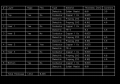
I'm designing a multilayer rigid flex PCB in DipTrace. For the documentation purpose, when I extract the Layer Stackup table from the Layer Setup option, I find it to be as follows:
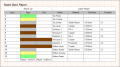
I want it to be customized according to the colour of the layers like in the following example of a similar table made in Altium:
Is there a way to customize it similarly in DipTrace? atleast using the shades of the layers in the following table to indicate the presence of Rigid and Flex portions ? if not then what other methods can I use to achieve the same in the DipTrace .dip file?
Please guide me towards a solution to this problem.
Thanking You,
Warm Regards,
Srinjay Bhattacharya
I'm designing a multilayer rigid flex PCB in DipTrace. For the documentation purpose, when I extract the Layer Stackup table from the Layer Setup option, I find it to be as follows:
I want it to be customized according to the colour of the layers like in the following example of a similar table made in Altium:
Is there a way to customize it similarly in DipTrace? atleast using the shades of the layers in the following table to indicate the presence of Rigid and Flex portions ? if not then what other methods can I use to achieve the same in the DipTrace .dip file?
Please guide me towards a solution to this problem.
Thanking You,
Warm Regards,
Srinjay Bhattacharya