Facebook
 Google
 GitHub
 Linkedin
I’m designing a 100% flexible PCB (no rigid FR-4 regions in the construction). The board is a wearable strap and we want a 4-layer flex stack.
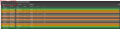
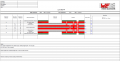
My PCB supplier (Würth “SLIM.flex 4F”) sent me an Altium stackup file (.stackup). When I open it in Altium Layer Stack Manager, it shows two regions:
Rigid region: has 4 copper layers (Top / Inner1 / Inner2 / Bottom)
Flex region: has only 2 copper layers (Inner Layer 1 and Inner Layer 2)
Please see the attached images.
This looks like a typical rigid-flex template (e.g., 1Ri–2F–1Ri), where the flex tail is 2-layer and the rigid parts carry the outer layers.
But my intention is full 4-layer flex across the entire board outline (Top + Inner1 + Inner2 + Bottom all in flex), and I will add local FR-4 stiffeners under connector/component areas (USB-C, THT connector, RF module, etc.)—still a “pure flex + stiffeners” build, not rigid-flex.
This is the first time I am working with flex PCB's
Questions:
Does a .stackup showing Rigid=4L and Flex=2L indicate the supplier actually provided a rigid-flex construction?
For a 100% 4-layer flex PCB, should the Flex region in Altium also show all 4 copper layers?
What is the correct way in Altium to ensure the entire board uses the flex stack, and not accidentally a rigid-flex region mapping?
If you’ve dealt with fab-provided stackups, is it common they send a rigid-flex template even for full-flex builds?
Any advice on what to ask the supplier / how to validate the correct construction would be appreciated.
My PCB supplier (Würth “SLIM.flex 4F”) sent me an Altium stackup file (.stackup). When I open it in Altium Layer Stack Manager, it shows two regions:
Rigid region: has 4 copper layers (Top / Inner1 / Inner2 / Bottom)
Flex region: has only 2 copper layers (Inner Layer 1 and Inner Layer 2)
Please see the attached images.
This looks like a typical rigid-flex template (e.g., 1Ri–2F–1Ri), where the flex tail is 2-layer and the rigid parts carry the outer layers.
But my intention is full 4-layer flex across the entire board outline (Top + Inner1 + Inner2 + Bottom all in flex), and I will add local FR-4 stiffeners under connector/component areas (USB-C, THT connector, RF module, etc.)—still a “pure flex + stiffeners” build, not rigid-flex.
This is the first time I am working with flex PCB's
Questions:
Does a .stackup showing Rigid=4L and Flex=2L indicate the supplier actually provided a rigid-flex construction?
For a 100% 4-layer flex PCB, should the Flex region in Altium also show all 4 copper layers?
What is the correct way in Altium to ensure the entire board uses the flex stack, and not accidentally a rigid-flex region mapping?
If you’ve dealt with fab-provided stackups, is it common they send a rigid-flex template even for full-flex builds?
Any advice on what to ask the supplier / how to validate the correct construction would be appreciated.
Attachments
-
 46.9 KB Views: 1
 -
 36.9 KB Views: 1
 -
 108.3 KB Views: 0