The point is that YCDC is just another seller on Aliexpress and elsewhere. It sells unbranded merchandise, regardless of the pictures that accompany its ads. Example on point: Your post #35 links to YCDC* and shows cells with a Panasonic label (i.e., NCR18650B). However, details in that "reliable" source show:
Yes, Panasonic is generally considered a reliable brand. But, simply showing cells with the Panasonic number does not mean they are Panasonic brand. Everyone shops for price, but it is even more important to know what you are actually buying.
I've seen the video @oz93666. However I don't equipment to run such tests. Anyway, even if I had the equipment, I could only test the cells when I got them. If they were fake I would have to deal with the trouble of asking money back and sending cells back, probably.
I'll go to do some more reading and research.
I have another question. Can these 3400mAh cells deliver the same current as the original ones? My laptop has quite an high current consumption due to its dedicated graphics card.
I sent a message to the seller asking how could he grant that his were really Panasonic (which I find hard to believe they are original) and he told me they are authorized Panasonic merchant. Hope I'm not gonna get busted.
Edited;
Anyone knows about if is there any specific order I should dessolder old cells and solder new ones? I've been said that charger controllers might get blocked if one otherwise!
Ok, apparently cells have a specific way they should be removed and re-added so that the charger controller won't get blocked. If such thing happens, probably only specialized personnel will be able to unblock the charger. Usually these people takes large amount of money to get the job done. So, if this happens, a new battery will be less expensive!
From this quote:
To assure continued operation when changing the cells, supply a secondary voltage of same voltage level through a 100-Ohm resistor to the circuit before disconnection. Remove the outside supply only after the circuit receives voltage again from the new cells. Furthermore, some fuel gauge chips run wires to each cell. These must be reassembled in the correct sequence beginning with cell one, then two, three and so forth.
I have some questions just to make sure:
1 - When they say to "supply a secondary voltage of the same level" to the circuit, they mean to connect the same voltages only to + and - or also to each of the balancing wires (3 wires)?
2 - If I connect a voltage using resistors, won't I be connecting these resistors in parallel with each pair of cells making the voltage to drop and therefore not matching the voltage level they say?
Ok, apparently cells have a specific way they should be removed and re-added so that the charger controller won't get blocked. If such thing happens, probably only specialized personnel will be able to unblock the charger. Usually these people takes large amount of money to get the job done. So, if this happens, a new battery will be less expensive!
I don't understand the sarcasm, but I'll just pass it!
If I just read that I should match the voltages in the circuit with a secondary voltage, you're asking me to just turn them off and replace them? I can't understand.
As for the "sarcasm," you obviously have been getting input from several sources and ignoring better advice here. What do you expect?
As for the clock, it is a "laptop" or similar device, All of the ones I have seen have a calendar/clock function and often a separate battery to keep that function alive during power down or battery replacement. Ignoring that "keep alive" function usually means that one only needs to reset that clock/calendar after a hard restart.
There is often (almost always) a battery management chip as part of the battery pack. One of the functions of the BMS is to detect if the battery has been discharged to below a certain voltage. If a Li-ion battery has been over-discharged, it is much more likely to fail catastrophically during a following charge. If you just disconnect the existing batteries, the BMS will see this as an excessively low voltage condition and disable charging as a safeguard.
Whether the low voltage detect applies to the battery as a whole, or whether it is determined on a per cell basis I can't say - it might be either depending on the BMS. And the method of resetting is also dependent on the particular BMS.
As for the "sarcasm," you obviously have been getting input from several sources and ignoring better advice here. What do you expect?
As for the clock, it is a "laptop" or similar device, All of the ones I have seen have a calendar/clock function and often a separate battery to keep that function alive during power down or battery replacement. Ignoring that "keep alive" function usually means that one only needs to reset that clock/calendar after a hard restart.
I've been trying to follow advises here and obviously from other sources because I'm not standing here just waiting for you guys to do everything for me. So I keep searching, reading, etc.
Ah, ok. I thought you could be talking about some chip clock or so from battery circuitry!
There is often (almost always) a battery management chip as part of the battery pack. One of the functions of the BMS is to detect if the battery has been discharged to below a certain voltage. If a Li-ion battery has been over-discharged, it is much more likely to fail catastrophically during a following charge. If you just disconnect the existing batteries, the BMS will see this as an excessively low voltage condition and disable charging as a safeguard.
Whether the low voltage detect applies to the battery as a whole, or whether it is determined on a per cell basis I can't say - it might be either depending on the BMS. And the method of resetting is also dependent on the particular BMS.
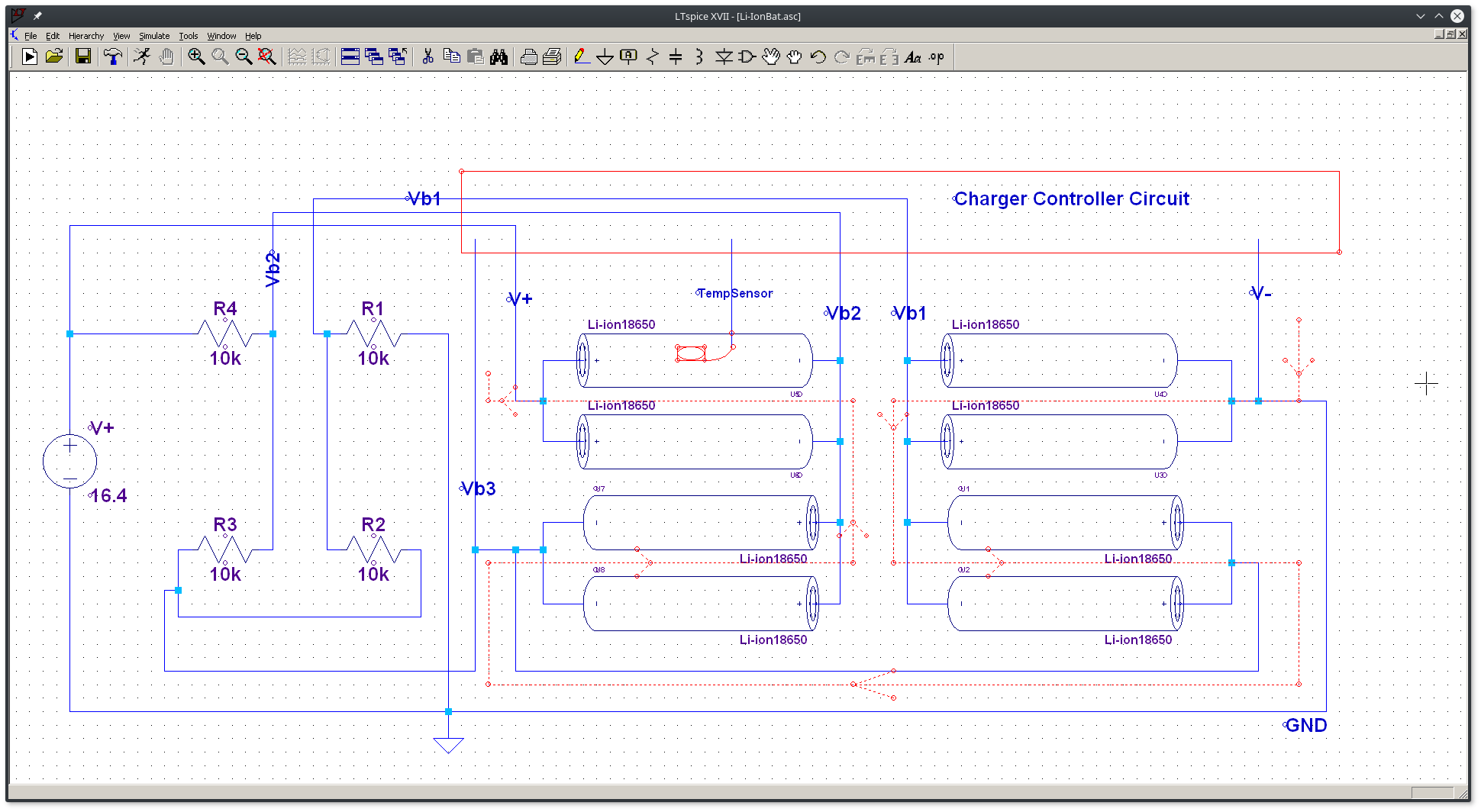
Ok, I'll try to come up with a solution to keep the voltages at all points (+, Balancing spot 1, Balancing spot 2 and baancing spot 3) at the same level as before disconnecting!
I already have the circuit with the resistors of 1kΩ and a current limiter resistor at the input of 100Ω.
I have 2 questions:
Can I o the soldering without the external power supply already connected? I think I can. The external power supply will only be needed when I'm about to remove the old cells. I guess.
The other question is:
I have only soldered the ground and the + of the resistor circuit to the gnd and + of the battery pack (and charger controller). Now I'm measuring the voltage at those 3 points of interest at the resistor circuit and I'm having small differences in the voltage with respect to wha tI'm reading directly at the battery pack same (equivalent) 3 points. The biggest difference is of about 0.3V. Is this due to the fact that I still on't have the external power supply connected? Can it still be done even if after I connect the external power supply, this difference of 0.3V is still there?

 Facebook
 Google
 GitHub
 Linkedin