[KiCad] USB Power switch with TPS2553 design

Thread Starter

neutral

Joined Jan 18, 2021
3
Hi all,

I'm coming from computer science background but I've been in embedded field for last couple of years. I'm total beginner to hardware design. I've tried KiCad years ago, more as a curiosity than an actual need to design something. Now I've got a small project in mind so I've picked it up again to try and design my own idea. I'm seeking for any advice/suggestion/comment on my current design - schematic and PCB layout.

Short project background

My initial motivation comes from the need to power cycle USB devices connected to my Linux PC in home office. I'm often working out of the office and some of the devices need power cycle to function properly (mostly debug probes, FTDI adapters, devkits stuck in bootloader etc.). I've tried software approach (/sys/bus/usb/*, binding/unbinding) but AFAIK this depends a lot on the device and implemented USB protocol specs.
I've also found some expensive industrial grade stuff (https://www.usbgear.com/usb-hub/managed-hubs.html) which is overkill for my application.

Initially I thought about designing my own USB hub, creating a nice GUI/CLI interface to control each individual port. But this was just initial wave of enthusiasm - I'm complete amateur in this stuff, I know how to read schematic but I'm nowhere near close to designing and manufacturing such device. Also I don't need consumer friendly product, maybe in the future if I get enough time and resources I will design one. So I will start from the simplest circuit possible. A TPS2553 with male/female USB 2.0 connectors and an exposed control PIN which I can connect to my rpi Pico. I've ordered the parts and soldered a prototype breakout board following reference design from TPS2553 datasheet. I've loaded Pico with some zephyr shell firmware so I can control it from my PC. This works perfectly and it's exactly what I need. Next step is designing a PCB and 3D printing simple enclosure so I can just plug it into the USB Hub.
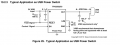

1766267346621.png
IMG_0869.JPEG


Schematics
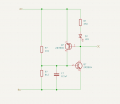
First thing was copying the reference design to KiCad which was fairly straightforward. I needed to create my own symbol for TPS2553 as it did not exist. I also downloaded footprints/3D models from snapeda.com for my male/female connectors I've already purchased. Schematic only contains one pair for single USB port. My plan is to replicate this so I have 4 total on single PCB. I've already asked on KiCad forum the best way to do this: https://forum.kicad.info/t/best-way-to-arrange-multiple-instances-of-same-circuitry/66032
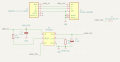
1766267444881.png

PCB Layout
This is where problems started for me. I wrote about it on KiCad forum as well -> https://forum.kicad.info/t/multiple-errors-on-simple-tps2553-design/65983/8. It seems USB footprints I've downloaded from snapeda.com had generated a ton of warnings which prompted me to replace them with footprints from KiCad official library. Keep in mind I'm total amateur in hardware design and this is now more of a manufacturing area where I'm even less experienced. If you're interested you can download the project which generates a lot of DRC errors in the link above. KiCad guys stick mostly to KiCad topics only and this is more of a footprint problem than KiCad problem so they pointed me here for general discussion.

I've attached the project which passes both ERC and DRC checks (kicad_usb_pcb.zip).

Questions
  1. Should USB connectors shield be grounded? Now I've searched this topic a bit, and consensus seems to be that host should have shield grounded and device NOT.
  2. What width of the traces to use for data lines and what for power? I've used 0.5mm for power nets and default 0.2mm for rest
  3. What capacitor to use for output? Reference circuit uses polarized 120u cap on output. Is form factor important here? I've used SMD 0603 footprint for PCB, is that ok? Should I use THT? Ceramic,electrolytic?
  4. I'd really appreciate you taking a look at initial project (it can be downloaded from kicad forum link above). How can I fix those footprints? I'd like to reuse the components I've ordered for breakout board prototypes. I've compared them with the ones from KiCad library but there are slight differences (e.g. plastic pins that go on NPTH positioning holes are 4.5mm apart in one footprint while 4.6mm in the other. Distance between pads and shield holes are identical).

I'm aware this is a really dead simple circuit to be nitpicking about. My goal of this post is to get constructive review and develop good practices from the start.

P.S. If someone uses or knows a similar project, commercial or DIY, please let me know. Might serve as a good reference.

Thank you for reading.
 

Attachments

Last edited by a moderator:

NewbDa

Joined Jan 21, 2020
13
Screenshot 2025-12-23 202725.png

This is a dimensional calculation for a USB differential pair. As shown in the screenshot, the D+ and D– traces should each be 1 mm wide (W) and spaced 0.2 mm apart (S) to meet the requirements of the USB 2.x protocol. This configuration yields a differential impedance close to 90 Ω (97.507 Ω in your case). Given that you select a 1oz copper plating. Therefore, it’s important to design and route the differential pairs accordingly. Since you’re working with a 2‑layer PCB where the ground plane is located 1.51 mm below (H), these values are appropriate to achieve the target impedance. However, for shorter trace lengths, the exact dimensions are less critical, as many practitioners suggest—and as one YouTube source also showed in their videos.
 

panic mode

Joined Oct 10, 2011
4,929
the errors and warnings depend largely on setting you use. without knowing what messages you got, there is no way to answer them. i would suggest to make J2 a 2-pin connector and connect other pin the GND. circuits require closed path and one pin cannot be both signal and return. you may also want to place some mounting holes near corners.

when you say "replicating", i am guessing you are talking about palletizing. that is arranging several copies of the design onto a single board. it also depends what you plan on to separate them later on. conventionally boards are either
a) single (you let PCB manufacturer do panelization as they see fit), then they would separate and send you separated boards.
b) panelized by you, using V-cut
c) panelized by you, using routing

V-cut only works on boards where V-cuts can be straight lines (such as rectangular shape). the boards can be snapped along V-grove. if not done carefully bending of board during this operation can damage board and or parts on it, and edges are rough.

when using routing, any board shape is possible and edges are clean.

to create panel, i would recommend to create copy of the PCB file with new name (board_name_panelized.kicad_pcb). this will also create project file for it. next step is to create mouse bites footprints if you don't already have some. that is a component that has bunch of holes close enough to easily break. you can create bunch of different ones to meet your needs.

note all of this can be done using plugins or manually. i usually do it manually.

so measure your board and add mouse bite dimensions to it. i my case i use 3mm. so the spacing would be
X=88.9+3=91.9
Y=35.56+3=38.56

1766518618653.png

use large grid to snap mouse bite to your edge cuts. rework edge cuts to be single line (replace your single rectangle by several line segments)
1766519199317.png

next select everything, right click and choose "Create From Selection" > "Create Array". specify number of copies and arrangement so that they are closely matching mouse bite size. then modify the board edge.

1766519314440.png

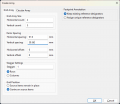
enter number of bords in grid size, enter spacing and keep current reference designators.
not sure why the last one is not default, how often one wants to get 20 boards and each needs to have a different designators?
so R1 would be on first board, R86 on second board, etc. and - they are the same part in same place.

1766518742044.png

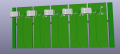
complete edge cuts, optionally add frame or runners and you should get something like this :
1766519941322.png

as you an see USB connectors are overlapping so this would be something to take into consideration if doing PCBA.
 

panic mode

Joined Oct 10, 2011
4,929
if you are asking about making multiple instances of some circuit, you need to use sheets. also:
open one of the schematics instances and select everything. that selection will be visible in PCB editor too.
now you can quickly move selected components to size and arrange and route them.
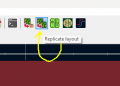
then with a plugin "replicate layout" you select instance you just arranged and plugin will do the same for all other instances.
1766520551912.png
 

Jon Chandler

Joined Jun 12, 2008
1,570
b) panelized by you, using V-cut
c) panelized by you, using routing
EasyEDA facilitates panelizing easy. Lay out the single board, then click "create panel" (something like that), specify the grid of boards (3×4 as example), and the result is one board plus the grid of v-score lines which pcb fabs understand to duplicate the base board into. JLCPCB and Elecrow both understand this and I assume other Chinese fabs do as well.

Elecrow has an advantage if panelizing bare boards (i.e., they're not being assembled) – if the board is a panel of one design, they don't charge extra per number of boards in the panel.

Also note – v-scores must be straight lines all the way across a panel but you can still have rounded corners. Specify rounded corners in the board outline, and the corners will be routed prior to scoring. You can extend this idea to make almost round boards by leaving a few mm of straight edges on each side with large rounding of the corners.
 

Thread Starter

neutral

Joined Jan 18, 2021
3
Thank you for your replies guys. I'm sorry you spent so much time on panelizing as that's not my intention. I was thinking on how to replicate design of same circuit on the same PCB to have multiple instances of same circuit. I've got suggestion to use hierarchical sheets but I'm facing some problems with that. Please take a look at this post: https://forum.kicad.info/t/best-way...instances-of-same-circuitry/66032/5?u=neutral

i would suggest to make J2 a 2-pin connector and connect other pin the GND. circuits require closed path and one pin cannot be both signal and return. you may also want to place some mounting holes near corners.
Is this needed if devkit to which I will connect TPS2553 CTRL lines will be driven from the same USB hub? I guess it doesn't hurt to add it just in case.


I've attached in this post the original project with 3rd party footprints I downloaded from snapeda. I would appreciate taking a look at it as I was not able to pinpoint the footprint issues of imported parts. I would like to keep those footprints (fix them if possible) as they match components I have stocked with me. If not possible, I can edit the ones used in latest version (from KiCad library) but I have to adjust mounting NPTH distance and see if PTH are at same distance.

Here's DRC.rpt (it is also in the zipped project).
DRC.rpt:
** Drc report for Smart_USB.kicad_pcb **
** Created on 2025-12-16T21:14:47+0100 **

** Found 39 DRC violations **
[solder_mask_bridge]: Front solder mask aperture bridges items with different nets
    Rule: board setup solder mask min width; error
    @(97.5600 mm, 89.5700 mm): Polygon of J1 on F.Mask
    @(98.2600 mm, 88.6700 mm): NPTH pad of J1
[solder_mask_bridge]: Front solder mask aperture bridges items with different nets
    Rule: board setup solder mask min width; error
    @(109.2600 mm, 89.5700 mm): Polygon of J1 on F.Mask
    @(109.9600 mm, 88.6700 mm): NPTH pad of J1
[starved_thermal]: Thermal relief connection to zone incomplete (layer F.Cu; zone min spoke count 2; actual 1)
    Local override; error
    @(84.0600 mm, 53.2600 mm): Zone [GND] on F.Cu, priority 1
    @(108.4500 mm, 77.2300 mm): Pad 2 [GND] of U1 on F.Cu
[silk_edge_clearance]: Silkscreen clipped by board edge
    Rule: board setup constraints silk; warning
    @(88.9000 mm, 55.8800 mm): Rectangle on Edge.Cuts
    @(110.5602 mm, 61.5000 mm): Segment of J4 on F.Silkscreen
[silk_edge_clearance]: Silkscreen clipped by board edge
    Rule: board setup constraints silk; warning
    @(88.9000 mm, 55.8800 mm): Rectangle on Edge.Cuts
    @(97.4603 mm, 61.5000 mm): Segment of J4 on F.Silkscreen
[copper_edge_clearance]: Board edge clearance violation (board setup constraints edge clearance 0.5000 mm; actual 0.4717 mm)
    Rule: board setup constraints edge; error
    @(97.9100 mm, 89.5700 mm): Segment of J1 on Edge.Cuts
    @(98.2600 mm, 87.2700 mm): Pad 5 [unconnected-(J1-SHIELD-Pad5)] of J1 on F.Cu
[copper_edge_clearance]: Board edge clearance violation (board setup constraints edge clearance 0.5000 mm; actual 0.4717 mm)
    Rule: board setup constraints edge; error
    @(109.6100 mm, 89.5700 mm): Segment of J1 on Edge.Cuts
    @(109.9600 mm, 87.2700 mm): Pad 6 [unconnected-(J1-SHIELD__1-Pad6)] of J1 on F.Cu
[copper_edge_clearance]: Board edge clearance violation (board setup constraints edge clearance 0.5000 mm; actual 0.0000 mm)
    Rule: board setup constraints edge; error
    @(97.9100 mm, 89.5700 mm): Segment of J1 on Edge.Cuts
    @(97.7600 mm, 89.5700 mm): Segment [<no net>] of J1 on F.Cu
[copper_edge_clearance]: Board edge clearance violation (board setup constraints edge clearance 0.5000 mm; actual 0.0000 mm)
    Rule: board setup constraints edge; error
    @(98.6100 mm, 87.7700 mm): Segment of J1 on Edge.Cuts
    @(98.7600 mm, 87.7700 mm): Segment [<no net>] of J1 on F.Cu
[copper_edge_clearance]: Board edge clearance violation (board setup constraints edge clearance 0.5000 mm; actual 0.0000 mm)
    Rule: board setup constraints edge; error
    @(109.6100 mm, 89.5700 mm): Segment of J1 on Edge.Cuts
    @(109.4600 mm, 89.5700 mm): Segment [<no net>] of J1 on F.Cu
[copper_edge_clearance]: Board edge clearance violation (board setup constraints edge clearance 0.5000 mm; actual 0.0000 mm)
    Rule: board setup constraints edge; error
    @(110.3100 mm, 87.7700 mm): Segment of J1 on Edge.Cuts
    @(110.4600 mm, 87.7700 mm): Segment [<no net>] of J1 on F.Cu
[copper_edge_clearance]: Board edge clearance violation (board setup constraints edge clearance 0.5000 mm; actual 0.0000 mm)
    Rule: board setup constraints edge; error
    @(97.9100 mm, 89.5700 mm): Segment of J1 on Edge.Cuts
    @(98.2600 mm, 87.7700 mm): Arc [<no net>] of J1 on F.Cu
[copper_edge_clearance]: Board edge clearance violation (board setup constraints edge clearance 0.5000 mm; actual 0.4603 mm)
    Rule: board setup constraints edge; error
    @(97.9100 mm, 89.5700 mm): Segment of J1 on Edge.Cuts
    @(98.2600 mm, 87.7700 mm): Arc [<no net>] of J1 on F.Cu
[copper_edge_clearance]: Board edge clearance violation (board setup constraints edge clearance 0.5000 mm; actual 0.0000 mm)
    Rule: board setup constraints edge; error
    @(97.9100 mm, 89.5700 mm): Segment of J1 on Edge.Cuts
    @(98.2600 mm, 89.5700 mm): Arc [<no net>] of J1 on F.Cu
[copper_edge_clearance]: Board edge clearance violation (board setup constraints edge clearance 0.5000 mm; actual 0.4603 mm)
    Rule: board setup constraints edge; error
    @(97.9100 mm, 89.5700 mm): Segment of J1 on Edge.Cuts
    @(98.2600 mm, 89.5700 mm): Arc [<no net>] of J1 on F.Cu
[copper_edge_clearance]: Board edge clearance violation (board setup constraints edge clearance 0.5000 mm; actual 0.0000 mm)
    Rule: board setup constraints edge; error
    @(109.6100 mm, 89.5700 mm): Segment of J1 on Edge.Cuts
    @(109.9600 mm, 87.7700 mm): Arc [<no net>] of J1 on F.Cu
[copper_edge_clearance]: Board edge clearance violation (board setup constraints edge clearance 0.5000 mm; actual 0.4603 mm)
    Rule: board setup constraints edge; error
    @(109.6100 mm, 89.5700 mm): Segment of J1 on Edge.Cuts
    @(109.9600 mm, 87.7700 mm): Arc [<no net>] of J1 on F.Cu
[copper_edge_clearance]: Board edge clearance violation (board setup constraints edge clearance 0.5000 mm; actual 0.0000 mm)
    Rule: board setup constraints edge; error
    @(109.6100 mm, 89.5700 mm): Segment of J1 on Edge.Cuts
    @(109.9600 mm, 89.5700 mm): Arc [<no net>] of J1 on F.Cu
[copper_edge_clearance]: Board edge clearance violation (board setup constraints edge clearance 0.5000 mm; actual 0.4603 mm)
    Rule: board setup constraints edge; error
    @(109.6100 mm, 89.5700 mm): Segment of J1 on Edge.Cuts
    @(109.9600 mm, 89.5700 mm): Arc [<no net>] of J1 on F.Cu
[copper_edge_clearance]: Board edge clearance violation (board setup constraints edge clearance 0.5000 mm; actual 0.0000 mm)
    Rule: board setup constraints edge; error
    @(97.9100 mm, 89.5700 mm): Segment of J1 on Edge.Cuts
    @(97.7600 mm, 89.5700 mm): Segment [<no net>] of J1 on B.Cu
[copper_edge_clearance]: Board edge clearance violation (board setup constraints edge clearance 0.5000 mm; actual 0.0000 mm)
    Rule: board setup constraints edge; error
    @(98.6100 mm, 87.7700 mm): Segment of J1 on Edge.Cuts
    @(98.7600 mm, 87.7700 mm): Segment [<no net>] of J1 on B.Cu
[copper_edge_clearance]: Board edge clearance violation (board setup constraints edge clearance 0.5000 mm; actual 0.0000 mm)
    Rule: board setup constraints edge; error
    @(109.6100 mm, 89.5700 mm): Segment of J1 on Edge.Cuts
    @(109.4600 mm, 89.5700 mm): Segment [<no net>] of J1 on B.Cu
[copper_edge_clearance]: Board edge clearance violation (board setup constraints edge clearance 0.5000 mm; actual 0.0000 mm)
    Rule: board setup constraints edge; error
    @(110.3100 mm, 87.7700 mm): Segment of J1 on Edge.Cuts
    @(110.4600 mm, 87.7700 mm): Segment [<no net>] of J1 on B.Cu
[copper_edge_clearance]: Board edge clearance violation (board setup constraints edge clearance 0.5000 mm; actual 0.0000 mm)
    Rule: board setup constraints edge; error
    @(97.9100 mm, 89.5700 mm): Segment of J1 on Edge.Cuts
    @(98.2600 mm, 87.7700 mm): Arc [<no net>] of J1 on B.Cu
[copper_edge_clearance]: Board edge clearance violation (board setup constraints edge clearance 0.5000 mm; actual 0.4603 mm)
    Rule: board setup constraints edge; error
    @(97.9100 mm, 89.5700 mm): Segment of J1 on Edge.Cuts
    @(98.2600 mm, 87.7700 mm): Arc [<no net>] of J1 on B.Cu
[copper_edge_clearance]: Board edge clearance violation (board setup constraints edge clearance 0.5000 mm; actual 0.0000 mm)
    Rule: board setup constraints edge; error
    @(97.9100 mm, 89.5700 mm): Segment of J1 on Edge.Cuts
    @(98.2600 mm, 89.5700 mm): Arc [<no net>] of J1 on B.Cu
[copper_edge_clearance]: Board edge clearance violation (board setup constraints edge clearance 0.5000 mm; actual 0.4603 mm)
    Rule: board setup constraints edge; error
    @(97.9100 mm, 89.5700 mm): Segment of J1 on Edge.Cuts
    @(98.2600 mm, 89.5700 mm): Arc [<no net>] of J1 on B.Cu
[copper_edge_clearance]: Board edge clearance violation (board setup constraints edge clearance 0.5000 mm; actual 0.0000 mm)
    Rule: board setup constraints edge; error
    @(109.6100 mm, 89.5700 mm): Segment of J1 on Edge.Cuts
    @(109.9600 mm, 87.7700 mm): Arc [<no net>] of J1 on B.Cu
[copper_edge_clearance]: Board edge clearance violation (board setup constraints edge clearance 0.5000 mm; actual 0.4603 mm)
    Rule: board setup constraints edge; error
    @(109.6100 mm, 89.5700 mm): Segment of J1 on Edge.Cuts
    @(109.9600 mm, 87.7700 mm): Arc [<no net>] of J1 on B.Cu
[copper_edge_clearance]: Board edge clearance violation (board setup constraints edge clearance 0.5000 mm; actual 0.0000 mm)
    Rule: board setup constraints edge; error
    @(109.6100 mm, 89.5700 mm): Segment of J1 on Edge.Cuts
    @(109.9600 mm, 89.5700 mm): Arc [<no net>] of J1 on B.Cu
[copper_edge_clearance]: Board edge clearance violation (board setup constraints edge clearance 0.5000 mm; actual 0.4603 mm)
    Rule: board setup constraints edge; error
    @(109.6100 mm, 89.5700 mm): Segment of J1 on Edge.Cuts
    @(109.9600 mm, 89.5700 mm): Arc [<no net>] of J1 on B.Cu
[malformed_courtyard]: Footprint has malformed courtyard (not a closed shape)
    Local override; error
    @(104.1100 mm, 88.6700 mm): Footprint J1
[malformed_courtyard]: Footprint has malformed courtyard (not a closed shape)
    Local override; error
    @(104.1100 mm, 88.6700 mm): Footprint J1
[clearance]: Clearance violation (netclass 'Default' clearance 0.2000 mm; actual 0.0000 mm)
    Rule: netclass 'Default'; error
    @(98.2600 mm, 87.2700 mm): Pad 5 [unconnected-(J1-SHIELD-Pad5)] of J1 on F.Cu
    @(98.2600 mm, 87.7700 mm): Arc [<no net>] of J1 on F.Cu
[clearance]: Clearance violation (netclass 'Default' clearance 0.2000 mm; actual 0.0000 mm)
    Rule: netclass 'Default'; error
    @(98.2600 mm, 87.2700 mm): Pad 5 [unconnected-(J1-SHIELD-Pad5)] of J1 on F.Cu
    @(98.2600 mm, 87.7700 mm): Arc [<no net>] of J1 on F.Cu
[clearance]: Clearance violation (netclass 'Default' clearance 0.2000 mm; actual 0.0000 mm)
    Rule: netclass 'Default'; error
    @(109.9600 mm, 87.2700 mm): Pad 6 [unconnected-(J1-SHIELD__1-Pad6)] of J1 on F.Cu
    @(109.9600 mm, 87.7700 mm): Arc [<no net>] of J1 on F.Cu
[clearance]: Clearance violation (netclass 'Default' clearance 0.2000 mm; actual 0.0000 mm)
    Rule: netclass 'Default'; error
    @(109.9600 mm, 87.2700 mm): Pad 6 [unconnected-(J1-SHIELD__1-Pad6)] of J1 on F.Cu
    @(109.9600 mm, 87.7700 mm): Arc [<no net>] of J1 on F.Cu
[clearance]: Clearance violation (netclass 'Default' clearance 0.2000 mm; actual 0.1800 mm)
    Rule: netclass 'Default'; error
    @(110.0900 mm, 71.3950 mm): Pad 1 [Net-(U1-ILIM)] of R1 on F.Cu
    @(110.0900 mm, 70.5800 mm): Pad 2 [GND] of R1 on F.Cu
[clearance]: Clearance violation (netclass 'Default' clearance 0.2000 mm; actual 0.1800 mm)
    Rule: netclass 'Default'; error
    @(106.1300 mm, 76.9075 mm): Pad 1 [/USB1_IN] of R2 on F.Cu
    @(106.1300 mm, 76.0925 mm): Pad 2 [Net-(U1-~{FAULT})] of R2 on F.Cu
 

Attachments

panic mode

Joined Oct 10, 2011
4,929
so you are trying to create hierarchical sheets and that is the problem?

while in schematics editor:
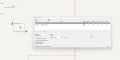
1. position cursor where you want upper left corner to appear.
2. press S on the keyboard (don't move mouse yet)
3. move mouse a little bit down and right from previous position
4. click the mouse.
5, enter sheet name, both as a title in schematics and file name.

1766530748046.png

so you get this:

1766531222175.png

then double click on the new sheet to open it, create some circuit in there. usually one creates local sheet pins. this allows you to see what connects to what. using global labels is also possible but it is easy to lose track...
suppose you put something there, such as:
1766531267546.png

now you can leave that sheet and those sheet pins to the parent block, just right click and place pins. you can put them anywhere on the block border:

1766531347851.png

something like this:
1766531426147.png
you can resize it any time to make room for more connections.

now you can connect things from your main page to that sheet.

but... first lets create more instances of that sheet.

just copy and paste it couple of times to make other "channels".
then connect things any way you like note. don't forget to annotate.

when you edit hierarchical sheet and save changes, they will appear for ALL instances, though annotations will remain individual to each instance.
 

Thread Starter

neutral

Joined Jan 18, 2021
3
I've did some design with hierarchical sheets but I'm getting ERC issues. I've posted my issue here: https://forum.kicad.info/t/best-way...instances-of-same-circuitry/66032/5?u=neutral

Something is wrong with PWR_FLAG. I get errors when keeping it and when removing it. I'm cross posting images below.


I've attached project with updated progress.

P.S. Sorry for slow reply, I'm on holidays. Just noticed you've replied.
 

Attachments

Top