Facebook
 Google
 GitHub
 Linkedin

Hi all !
I am designing the PCB of my home made function generator, but I have a problem making a GND plane on the front side of my 2 layer PCB.
After filling zones especially near bypass capacitors, after tracing the GND plane and filling it, KiCAD doesn't mind about the filled zones, he doesn't care if there are filled areas or not. He directly place the GND plane over the filled areas, making a straight short circuit...
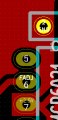
I attach a snapshot of my PCB where we can see a short circuit between GND and +2.5 V.
Do you know how I can fix this problem ? I don't know it this is a known bug but I would like to place filled areas near bypass capacitors..
I also put a GND plane on the back/lower side of the PCB.
Thank you in advance.
I am designing the PCB of my home made function generator, but I have a problem making a GND plane on the front side of my 2 layer PCB.
After filling zones especially near bypass capacitors, after tracing the GND plane and filling it, KiCAD doesn't mind about the filled zones, he doesn't care if there are filled areas or not. He directly place the GND plane over the filled areas, making a straight short circuit...
I attach a snapshot of my PCB where we can see a short circuit between GND and +2.5 V.
Do you know how I can fix this problem ? I don't know it this is a known bug but I would like to place filled areas near bypass capacitors..
I also put a GND plane on the back/lower side of the PCB.
Thank you in advance.