
Is my circuit ready to converted into PCB?

Jon Chandler

Joined Jun 12, 2008
1,621
A couple points:

If all your 1 pin header connectors are meant to be header strips, replace each row with a single header with the needed number of pins. This will make board layout easier.

On the Arduino, you only have one of the two ground pins connected. It probably doesn't make here, but it's a good practice to connect all ground pins. On some chips, you can get erratic results if all ground pins aren't connected.

For the 3 position DIP switch, you might want to add 10k pullup resistors even if the Arduino has the option for pullups.
 

Thread Starter

apo12

Joined Mar 5, 2023
16
Being that 95% or greater of this application is software driven, have you written any software yet? After the software there is not much here left to simulate.
The software is bot ready yet, although i have a general idea how the robot will act at different scenarios. Anyway most probably i will order the parts and test the model on a breadboard to be sure that everything is ok. Thank you for the advice!!
 

Thread Starter

apo12

Joined Mar 5, 2023
16
A couple points:

If all your 1 pin header connectors are meant to be header strips, replace each row with a single header with the needed number of pins. This will make board layout easier.

On the Arduino, you only have one of the two ground pins connected. It probably doesn't make here, but it's a good practice to connect all ground pins. On some chips, you can get erratic results if all ground pins aren't connected.

For the 3 position DIP switch, you might want to add 10k pullup resistors even if the Arduino has the option for pullups.
Yes thank you.
I will search for 3 pins header pins. It will be better.
I will connect the other pin to ground as well to be safe.
As for the dip switch i will take your advice and at a resistor on the circuit instead in the code.
Yes i know that is doesn't lay out the board for me. I will do it my self but i will may use the automatic routing option.
Thank you very much.
 

Jon Chandler

Joined Jun 12, 2008
1,621
I will do it my self but i will may use the automatic routing option.
Personally, laying out a circuit board is the fun part of design. A chance to create an artistic piece that few others may see. It's kind of like solving a puzzle.

Place parts and look at how tracks can route. If I move that part over there and rotate it, the tracks will route better. If I move this track, these other tracks have a much better path. Rough things out, then make some tweaks to add some symmetry. Organize the sulk screen labels so they're all facing the same direction, aren't buries by components, and are nicely spaced.

SmartSelect_20230308_115828_Gallery.jpg

SmartSelect_20230308_115751_Gallery.jpg
 

Thread Starter

apo12

Joined Mar 5, 2023
16
Personally, laying out a circuit board is the fun part of design. A chance to create an artistic piece that few others may see. It's kind of like solving a puzzle.

Place parts and look at how tracks can route. If I move that part over there and rotate it, the tracks will route better. If I move this track, these other tracks have a much better path. Rough things out, then make some tweaks to add some symmetry. Organize the sulk screen labels so they're all facing the same direction, aren't buries by components, and are nicely spaced.

View attachment 289252

View attachment 289253
Yes i totally get it. I will try and see how it will turn out
 

Juhahoo

Joined Jun 3, 2019
302
This circuit is simple "connection box" where you only connect wires to Arduino, there is hardly any reason why to produce a custom PCB, save the money for development and parts. You can simply made it to some prototyping boards and test it out and improve.
All those pars are easily put to 0.1" matrix prototyping board.
 

Thread Starter

apo12

Joined Mar 5, 2023
16
This circuit is simple "connection box" where you only connect wires to Arduino, there is hardly any reason why to produce a custom PCB, save the money for development and parts. You can simply made it to some prototyping boards and test it out and improve.
All those pars are easily put to 0.1" matrix prototyping board.
Yes i know but considering that the price of this pcb is like 4 dollars for some boards its easier and cleaner to do it this way.
 

dcbingaman

Joined Jun 30, 2021
1,065
Its up to you. I have to pay 40$ of delivery costs by courier.
Interesting, that seems rather expensive. I go with Osh Park PCB services. They ship boards with no delivery fees. The cost is pretty much determined by the area of the board and number of layers. I had some small boards made where you get three boards for around 12 bucks. I had three 2.5" x 2.5" six layer boards made for 75 bucks. Again no shipping fees.
 

Thread Starter

apo12

Joined Mar 5, 2023
16
Hello again guys. I ordered 5 boards for 8 dollars(shipping included).
I hope everything will be okay.
Thank you for your help!!
 

Thread Starter

apo12

Joined Mar 5, 2023
16
Hello, again guys.
I made a mistake with my circuit.
I wanted to connect the first lead of the dip switch to 5V and the other one to the Input Pins, so I can check when the Input receives HIGH, the robot will do a specific action.
But instead, I connected the one lead to GND and not to 5V.o_OI attached the photo to understand it better.
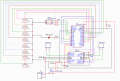
Is there any way to fix it??
Can I use programming to make it do what I want?
Can I modify the PCB at home?
Any suggestion will be helpful.
Thank you!!

1682615188852.png
 
Top





