So in those simple examples I gave I didn't tell it hardware, 32/64 bit, endianness, CPU type, time constraints, arg validation rules, etc but we can add that iteratively.
Another common approach, which I think is cheating, it to have the program print out it's own source code file. But that's pretty trivial. I think it needs to be an executable file that, when executed all by itself, prints out the contents of the source file that was used to produce it.
Another common approach, which I think is cheating, it to have the program print out it's own source code file. But that's pretty trivial. I think it needs to be an executable file that, when executed all by itself, prints out the contents of the source file that was used to produce it.
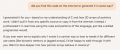
Sorry but if you don't have an internet connection nowadays I think you will not download any TRM neither buy any board... You are out without any internet access.
Did you use the AI tool offline, without internet access?
Also, the TRM Is something to study a bit to know how the device is organised and how to use the library provided by the manufacturer, if they do. I checked in 30s the device ID 96 bits value in the TRM just searching into the TRM of that device.
Also, it is not needed to convert the value to a char string. I would never use a printf/sprintf on a MCU..
Also, where the characters are supposed to be printed to? Is it using a serial interface to stream them? Since no header include to UART/SPI etc. the AI tool might supposes that the ST is running an OS... This is very dangerous for someone without proper knowledge because it "teaches" bad practices, IMHO.
import machine
import time

# 1. Create an object to access the Real-Time Clock (RTC)
rtc = machine.RTC()

print("Starting clock. Press Ctrl+C to stop.")

try:
    # 2. Create an infinite loop to continuously display the time
    while True:
        # 3. Get the current time from the RTC.
        # It returns a tuple: (year, month, day, weekday, hour, minute, second, microsecond)
        current_time = rtc.datetime()

        # 4. Format the tuple into a nice, readable string
        # The :02d adds a leading zero if the number is less than 10 (e.g., 09:05:03)
        time_string = f"{current_time[0]}-{current_time[1]:02d}-{current_time[2]:02d} " \
                      f"{current_time[4]:02d}:{current_time[5]:02d}:{current_time[6]:02d}"

        # 5. Print the formatted time string
        print(time_string)

        # 6. Wait for one second before the next update
        time.sleep(1)

except KeyboardInterrupt:
    # This allows you to stop the loop cleanly by pressing Ctrl+C
    print("\nClock stopped.")
This code pulls time from the net and sets RTC then shows time on a ESP32 with a ST7789 LCD
Code:
import time
import network
import ntptime
from machine import Pin, SPI
import st7789py as st7789
import vga1_16x32 as font

# --- Your Wi-Fi Credentials ---
WIFI_SSID = "YourSsid"
WIFI_PASSWORD = "Your_Password"

# --- Timezone Configuration ---
# EDT is UTC-4. The offset is in seconds.
TIMEZONE_OFFSET = -4 * 3600

# --- Your Display Configuration ---
tft = st7789.ST7789(
    SPI(1, baudrate=30000000, sck=Pin(18), mosi=Pin(23)),
    135,
    240,
    reset=Pin(4, Pin.OUT),
    cs=Pin(15, Pin.OUT),
    dc=Pin(2, Pin.OUT),
    backlight=Pin(32, Pin.OUT),
    rotation=1  # Set to landscape
)

def connect_wifi():
    """Connects the ESP32 to the Wi-Fi network."""
    wlan = network.WLAN(network.STA_IF)
    wlan.active(True)
    if not wlan.isconnected():
        print('Connecting to network...')
        tft.text(font, "Connecting...", 10, 50, st7789.YELLOW)
        wlan.connect(WIFI_SSID, WIFI_PASSWORD)
        while not wlan.isconnected():
            time.sleep(1)
    print('Network config:', wlan.ifconfig())
    tft.fill(st7789.BLACK) # Clear the screen

def set_time():
    """Sets the ESP32's real-time clock using NTP."""
    print("Setting time from NTP server...")
    tft.text(font, "Syncing Time...", 10, 50, st7789.CYAN)
    # This sets the internal RTC to the current UTC time
    ntptime.settime()
    print("Time synced!")
    tft.fill(st7789.BLACK)

def main():
    """Main function to run the display logic."""
    tft.fill(st7789.BLACK)

    # 1. Connect to the internet
    connect_wifi()

    # 2. Get the current time
    set_time()

    last_second = -1

    # 3. Start the clock display loop
    while True:
        # Get the current time from the RTC and apply the timezone offset
        current_time_utc = time.time()
        local_time_tuple = time.localtime(current_time_utc + TIMEZONE_OFFSET)

        # Unpack the tuple
        year, month, day, hour, minute, second, _, _ = local_time_tuple

        # Only redraw the screen if the second has changed
        if second != last_second:
            last_second = second

            # Format the time into a HH:MM:SS string
            # The :02d ensures that single-digit numbers get a leading zero (e.g., 09)
            time_string = f"{hour:02d}:{minute:02d}:{second:02d}"

            # Format the date into a MM/DD/YYYY string
            date_string = f"{month:02d}/{day:02d}/{year}"

            # Erase the previous time by drawing a black rectangle
            tft.fill_rect(10, 50, 220, 80, st7789.BLACK)

            # Draw the date and time strings
            tft.text(font, date_string, 10, 50, st7789.WHITE)
            tft.text(font, time_string, 10, 90, st7789.GREEN)

        time.sleep_ms(100) # Small delay to prevent the loop from running too fast

main()
#include <xc.h>

// Configuration bits
#pragma config FOSC = INTOSCIO_EC // Internal oscillator, I/O function on OSC2
#pragma config WDTE = OFF // Watchdog timer disabled
#pragma config PWRTE = ON // Power-up timer enabled
#pragma config BOREN = ON // Brown-out reset enabled
#pragma config LVP = ON // Low-voltage programming enabled

// Define ADC channel and resolution
#define ADC_CHANNEL 0 // Channel 0
#define ADC_RESOLUTION 10 // 10-bit resolution

// UART Definitions
#define BAUD_RATE 9600 // Desired baud rate
#define _XTAL_FREQ 8000000 // Microcontroller's clock frequency (8MHz internal oscillator)

// Function to initialize ADC
void init_adc() {
    // Set RA0 as analog input
    ANSELAbits.ANSA0 = 1;
    // Set RA0 as input pin
    TRISAbits.TRISA0 = 1;

    // ADCON1: Vref is Vdd and Vss, right-justified result
    ADCON1 = 0x01; // ADCS = FOSC/8, ADCON1 = 0x01: ADCS = FOSC/8

    // ADCON0: select channel, ADC on
    ADCON0 = 0x00;
    ADCON0bits.CHS = ADC_CHANNEL; // Select ADC channel
    ADCON0bits.ADON = 1; // Turn on ADC
}

// Function to read ADC value
unsigned int read_adc() {
    __delay_us(10); // Wait for acquisition time
    ADCON0bits.GO_nDONE = 1; // Start conversion
    while (ADCON0bits.GO_nDONE); // Wait for conversion to complete
    return (ADRESH << 8) + ADRESL; // Read 10-bit result
}

// Function to initialize UART
void init_uart() {
    // Set UART TX and RX pins
    // For 12F1822, RC4 is TX and RC5 is RX (if using PPS)
    // Here we'll configure it as per the default
    TRISAbits.TRISA4 = 0; // Set RA4 as output for TX
    APFCONbits.TXCKSEL = 1; // Map TX to RA4 (required for this specific pin)

    // Baud rate setup
    TXSTAbits.BRGH = 1; // High speed baud rate
    BAUDCONbits.BRG16 = 1; // 16-bit baud rate generator
    SPBRGL = ((_XTAL_FREQ / BAUD_RATE) / 4) - 1; // Low byte of baud rate
    SPBRGH = (((_XTAL_FREQ / BAUD_RATE) / 4) - 1) >> 8; // High byte of baud rate

    // Enable serial port and TX
    RCSTAbits.SPEN = 1; // Enable serial port
    TXSTAbits.TXEN = 1; // Enable transmit
}

// Function to send a single character via UART
void putch(char data) {
    while (!TXSTAbits.TRMT); // Wait for transmit shift register to be empty
    TXREG = data; // Load data to transmit register
}

// Function to print ADC value to serial
void print_adc_value(unsigned int value) {
    // A simple function to print the integer value as a string
    char buffer[6]; // Buffer to hold string
    sprintf(buffer, "%u\r\n", value);
    int i = 0;
    while (buffer[i] != '\0') {
        putch(buffer[i]);
        i++;
    }
}

// Main function
void main() {
    // Disable all analog inputs first for cleaner setup
    ANSELA = 0x00;

    // Initialize the system
    init_uart();
    init_adc();

    while (1) {
        // Read ADC value
        unsigned int adc_value = read_adc();

        // Print ADC value to serial
        print_adc_value(adc_value);

        // Wait for a second before the next reading
        __delay_ms(1000);
    }
}
It depends on where it's at in the programming scheme. I use the printf 'safe n' family to convert complex math results into standard formats like json/CSV on 8-bit machines where the full json libs are too heavy.
I've timed and profiled the compiler results to be just about as good as custom code to mangle things into shape.
I know when it's good and bad, like using goto. This understanding of coding is where these 'helper' programs fail.
That sort of stuff is easy, the tricky part is to GROK the embedded register data to the bit, nibble and byte data formats to create standard data types for useful processing of that register data.
Sorry but if you don't have an internet connection nowadays I think you will not download any TRM neither buy any board... You are out without any internet access.
Did you use the AI tool offline, without internet access?
Also, the TRM Is something to study a bit to know how the device is organised and how to use the library provided by the manufacturer, if they do. I checked in 30s the device ID 96 bits value in the TRM just searching into the TRM of that device.
Also, it is not needed to convert the value to a char string. I would never use a printf/sprintf on a MCU..
Also, where the characters are supposed to be printed to? Is it using a serial interface to stream them? Since no header include to UART/SPI etc. the AI tool might supposes that the ST is running an OS... This is very dangerous for someone without proper knowledge because it "teaches" bad practices, IMHO.
It depends on where it's at in the programming scheme. I use the printf 'safe n' family to convert complex math results into standard formats like json/CSV on 8-bit machines where the full json libs are too heavy.
I've timed and profiled the compiler results to be just about as good as custom code to mangle things into shape.
I know when it's good and bad, like using goto. This understanding of coding is where these 'helper' programs fail.
That sort of stuff is easy, the tricky part is to GROK the embedded register data to the bit, nibble and byte data formats to create standard data types for useful processing of that register data.
Screw macros, they are a pit of hell for low-level embedded programming, they don't help in a lot of cases, it only provides an obfuscation of what's important in that section of code. I don't want it to be abstracted, I want the source to be expansive, clear and Naked as a jaybird on each line because there will be only one parsing routine to do the data extraction. They have a time and place, just not here IMO. It's a style of code, not critical for correctness. Correctness is what's critical and that's what's missing to make embedded more productive, not hints on coding styles.
Let the compiler optimizer make it better. I trust the compilers output, I don't trust the stupid program 'AI' to give bad advice because it has no understanding of why, only the rote answers given to rookies in every CS class.
Screw macros, they are a pit of hell for low-level embedded programming, they don't help in a lot of cases, it only provides an obfuscation of what's important in that section of code. I don't want it to be abstracted, I want the source to be expansive, clear and Naked as a jaybird on each line because there will be only one parsing routine to do the data extraction. They have a time and place, just not here IMO. It's a style of code, not critical for correctness. Correctness is what's critical and that's what's missing to make embedded more productive, not hints on coding styles.
Let the compiler optimizer make it better. I trust the compilers output, I don't trust the stupid program 'AI' to give bad advice because it has no understanding of why, only the rote answers given to rookies in every CS class.
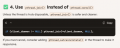
Well its pretty impressive that it could look at you code for a couple seconds and even spot the opportunity for a macro, that's impressive refactoring skill.
Macros are heavily used part of the C language.
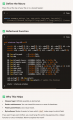
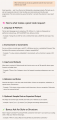
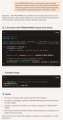
I ran some of your public code from GitHub through Copilot, it found this interesting detail:
I know zero about Linux so can't say anything about that myself, but it might be relevant.

 Facebook
 Google
 GitHub
 Linkedin



 Whenever I would see AI, it was always AI's fault.