ILI9488 3.5" TFT to ESP32

Thread Starter

crescendo93

Joined Nov 21, 2025
27
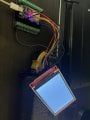
Hey everyone! I am working on a project where I want to get a TFT to display signals from my ESP32. Before I get there, I need to understand why I cannot get even an example code to show on the TFT. So everything has been trial and error thus far. I am hoping someone can review my trials and help me figure out what I am missing. Some things I have learned along the way...

1) Device: 3.5" SPI TFT Module ILI9488 Driver, SPI Bus, 320x480, non touch (SKU: MSP3521)

2) There are predefined pins for the TFT that cannot be changed based on the TFT_eSPI library by Bodmer: DC_2, CS_15, MOSI_23, SCLK_18, BL_-1 (I have been running this to 3.3V for always high), and RST_ -1 (not sure exactly what to do with this but from what I have read I do not need to wire this).

https://forum.arduino.cc/t/power-save-9486-tft-with-esp32/701118

3) When using ESP32 I have read that the J1 channel needs to be soldered together since the ESP32 has the 3.3V output...? I did this but can always reverse it. Shouldn't affect the outcome. But that did not help. I also went through all of the files and defined the correct driver (ILI9488), defined the correct pins, included the correct setup (setup 21 ESP32 and ILI9488 SPI BUS)


3) When I run an example code, I get a blank white screen. Somewhere along the line I am missing something..

If anyone has any experience working with these TFTs and could drop some guidance along the way based on something I have not covered or anything really would be of much help. Thank you!
 

geekoftheweek

Joined Oct 6, 2013
1,429
At minimum the RST pin should be connected to 3.3V. I have always connected it to an IO pin so that the library can do a hard reset of the controller. Typically that pin does need to be at least powered to enable the display.

I have not worked with that particular display or library, but you can actually set the pins by changing the values in certain files. In the "User_Setups" directory open Setup21_ILI9488.h and the pins are defined there and can be changed to suit your needs.
 

Thread Starter

crescendo93

Joined Nov 21, 2025
27
you say you install right driver but which did you install there are lots that don't work

https://github.com/Bodmer/TFT_eSPI
I installed this exact one and went to the files and edited the User_Setup_select and User_setup files to match exactly what I have and I still get a blank white screen for some reason. Ill add to this post the lines I commented out to include in the custom library and the simple code I am trying to run.

Sample Code:

#include <TFT_eSPI.h> // Hardware-specific library

TFT_eSPI tft = TFT_eSPI(); // Create TFT object

void setup() {
// Initialize serial (optional, for debugging)
Serial.begin(115200);
Serial.println("TFT Hello World Test");

// Initialize the display
tft.init();
tft.setRotation(1); // 0–3 (try different values if orientation is wrong)

// Clear screen
tft.fillScreen(TFT_BLACK);

// Set text properties
tft.setTextColor(TFT_WHITE, TFT_BLACK);
tft.setTextSize(3);
tft.setCursor(60, 150); // X, Y position

// Display text
tft.println("Hello World");
}

void loop() {
}
__________________________________________________________________
User_setup.h
For ESP32 Dev board

#define TFT_MISO 19
#define TFT_MOSI 23
#define TFT_SCLK 18
#define TFT_CS 15
#define TFT_DC 2
#define TFT_RST 4

__________________________________________________________________
User_setup_select.h

#include <User_Setups/Setup21_ILI9488.h. //User setup for ESP32 and ILI9488


All of these were manually entered so if there is an error it can be ignored. Is there anything I am missing? I am ready to get this project up and running.
 

Attachments

Last edited:

be80be

Joined Jul 5, 2008
2,394
This what worked for me
ILI9488 Pin ESP32 Pin (VSPI) Notes
VCC 3.3V / 5V Check your module's regulator
GND GND Ground
CS GPIO 15 Chip Select
RESET GPIO 4 Reset (or Connect to ESP32 EN)
DC/RS GPIO 2 Data/Command
SDI (MOSI) GPIO 23 Master Out Slave In
SCK GPIO 18 Serial Clock
LED 3.3V Backlight (use a 100 ohm resistor)
SDO (MISO) GPIO 19 Only needed for touch/reading data

Code:
#define ILI9488_DRIVER     // Define this driver
#define TFT_BL   32        // Optional backlight control pin
#define TFT_MISO 19
#define TFT_MOSI 23
#define TFT_SCLK 18
#define TFT_CS   15
#define TFT_DC    2
#define TFT_RST   4

#define SPI_FREQUENCY  27000000 // Stable for ILI9488
// Some displays can handle 40MHz, but 27MHz is safer for long wires.
White Screen: Usually caused by incorrect wiring of the DC or CS pins, or the library not being set to the correct driver.
 

be80be

Joined Jul 5, 2008
2,394
Try This

Code:
#include <SPI.h>
#include <TFT_eSPI.h> // Hardware-specific library

TFT_eSPI tft = TFT_eSPI(); // Invoke custom library

void setup() {
  // Initialise the screen
  tft.init();
 
  // Set rotation (0-3). 1 and 3 are Landscape
  tft.setRotation(1);

  // Clear the screen to Black
  tft.fillScreen(TFT_BLACK);

  // Set "cursor" at top left (0,0) and select font size
  tft.setCursor(0, 0, 4);

  // Set text color to White with Black background
  tft.setTextColor(TFT_WHITE, TFT_BLACK);
  tft.println("ILI9488 Initialized!");
 
  delay(1000);

  // Draw some shapes to test speed/rendering
  tft.drawRect(50, 50, 100, 100, TFT_RED);
  tft.fillCircle(240, 160, 50, TFT_BLUE);
  tft.drawTriangle(300, 50, 350, 150, 250, 150, TFT_GREEN);
}

void loop() {
  // Flash the text color to prove the loop is running
  tft.setCursor(0, 40, 4);
  tft.setTextColor(TFT_YELLOW, TFT_BLACK);
  tft.println("ESP32 is Running...");
  delay(500);
 
  tft.setCursor(0, 40, 4);
  tft.setTextColor(TFT_MAGENTA, TFT_BLACK);
  tft.println("ESP32 is Running...");
  delay(500);
}
 

Thread Starter

crescendo93

Joined Nov 21, 2025
27
I think your missing the #include <SPI.h>
No luck for me unfortunately. Were you able to get this to work? If so, I must be missing a step somewhere. I've defined everything carefully and double checked my pin locations... It is the strangest thing
 

mikemarcu

Joined Feb 7, 2026
1
Hey everyone! I am working on a project where I want to get a TFT to display signals from my ESP32. Before I get there, I need to understand why I cannot get even an example code to show on the TFT. So everything has been trial and error thus far. I am hoping someone can review my trials and help me figure out what I am missing. Some things I have learned along the way...

1) Device: 3.5" SPI TFT Module ILI9488 Driver, SPI Bus, 320x480, non touch (SKU: MSP3521)

2) There are predefined pins for the TFT that cannot be changed based on the TFT_eSPI library by Bodmer: DC_2, CS_15, MOSI_23, SCLK_18, BL_-1 (I have been running this to 3.3V for always high), and RST_ -1 (not sure exactly what to do with this but from what I have read I do not need to wire this).

https://forum.arduino.cc/t/power-save-9486-tft-with-esp32/701118

3) When using ESP32 I have read that the J1 channel needs to be soldered together since the ESP32 has the 3.3V output...? I did this but can always reverse it. Shouldn't affect the outcome. But that did not help. I also went through all of the files and defined the correct driver (ILI9488), defined the correct pins, included the correct setup (setup 21 ESP32 and ILI9488 SPI BUS)


3) When I run an example code, I get a blank white screen. Somewhere along the line I am missing something..

If anyone has any experience working with these TFTs and could drop some guidance along the way based on something I have not covered or anything really would be of much help. Thank you!

Did you try LED ping to 3.3V?
 
Top