Identifying pin 1 on an LED

WBahn

Joined Mar 31, 2012
32,783
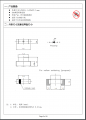
The part (in the datasheet) doesn't have a pin 1 or a pin 2, it has an anode and a cathode and it shows you that there is a mark on the package to identify the cathode.

Your foot print has a pin 1 and pin 2 (since many CAD packages require all pads to be numbered) and the schematic shows you which pin is the cathode.
 

Thread Starter

H treboR

Joined Jun 6, 2024
30
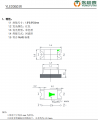
Maybe, but other LED manufacturers clearly identify which is pin 1 in their datasheet. Here is the first one I took from a random list of "LED 0603" on JLCPCB:

LED with pin 1 identified.png

No ambiguity at all about how to place this LED in my Kicad circuit. Pin 1 is anode.

I'm just wondering if there's more to that "polarity" drawing. The arrows are usually in the same direction as the LED triangle icon, but this time they're pointing backwards.
 

Thread Starter

H treboR

Joined Jun 6, 2024
30
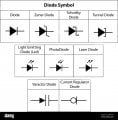
See, this chart identifies a diode symbol with reverse arrows as being a photo-diode, but a forward arrow is a light emitting diode.

diode symbol.jpg


The listing on JLCPCB for the LED I linked to at the top is clearly identified as a light-emitting diode.

I suppose it's always possible they have their arrows on backwards...?
 

WBahn

Joined Mar 31, 2012
32,783
Maybe, but other LED manufacturers clearly identify which is pin 1 in their datasheet. Here is the first one I took from a random list of "LED 0603" on JLCPCB:

View attachment 326848

No ambiguity at all about how to place this LED in my Kicad circuit. Pin 1 is anode.

I'm just wondering if there's more to that "polarity" drawing. The arrows are usually in the same direction as the LED triangle icon, but this time they're pointing backwards.
Each manufacturer is free to include whatever information they want and to represent it however they want. Be careful about making any assumptions or general conclusions -- you are guaranteed to get bit sooner or later if you fall into that trap.

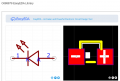
In the EasyCAD drawing you provided in your first post, Pin 1 is the cathode.

It's up to YOU to ensure that your schematic symbols, your simulation models, and your layout footprints are each consistent with the other two.

This is why I took the time to make my own generic resistor, capacitor, and inductor symbols so that there is a slight asymmetry that allows me to identify pin 1 on my schematics. This is important for simulation so that I can ensure the correct interpretation of device currents, and so that my LVS has a lot fewer automorphic nets.
 

WBahn

Joined Mar 31, 2012
32,783
See, this chart identifies a diode symbol with reverse arrows as being a photo-diode, but a forward arrow is a light emitting diode.

View attachment 326849


The listing on JLCPCB for the LED I linked to at the top is clearly identified as a light-emitting diode.

I suppose it's always possible they have their arrows on backwards...?
Exactly what arrows are you referring to?

The main arrow in the symbol is the one that points from the anode to the cathode (another way of visualizing it is that the line is the plate of the cathode and the triangle represents the spray of electrons coming off of it).

The arrows off to the side have nothing to do with anode/cathode polarity. They represent light. If they are pointing away from the symbol, light is leaving the device (i.e., it is emitting it -- an LED of some sort). If they are pointing toward the device, then it represents light entering the device and causing something to happen (i.e., it's a photodiode of some type).
 

Thread Starter

H treboR

Joined Jun 6, 2024
30
...
It's up to YOU to ensure that your schematic symbols, your simulation models, and your layout footprints are each consistent with the other two.
...
That's exactly the approach I used when I started this project.

At the end of the day, I figure JLCPCB just made an arbitrary decision on which pin is #1 after looking how the component was mounted in the reels, and that's how they drew it up in EasyEDA.

I just feel uncomfortable relying on a 3rd party CAD drawing and not the manufacturer datasheet.
 

WBahn

Joined Mar 31, 2012
32,783
Do NOT rely on some footprint in a 3rd party CAD drawing. That's the point! Make YOUR design compatible with the parts YOU are using.
 

Jon Chandler

Joined Jun 12, 2008
1,582
With any polarized parts, don't assume anything. For a diode, put the diode symbol on the silkscreen. For other components, spell it out in a Readme file.

On one board I had assembled, on a SIP resistor pack, with one side of the resistors tied to common, it was obvious to me thar the end of the SIP with the asterisk line up to the marked pin on the PCB. It wasn't obvious to whomever stuffed the boards – every SIP package was installed the wrong way around.
 

geekoftheweek

Joined Oct 6, 2013
1,429
The real issue is getting tripped up over insignificant details. On a diodes the pin numbers mean absolutely nothing. The cathode band is what determines which way it is installed. If you draw your symbol in the right direction then it shouldn't matter which pin is labeled as 1 or 2.
 

WBahn

Joined Mar 31, 2012
32,783
That's the thing. JLCPCB does my assembly, and the CAD model is from their site.
If they are supplying the physical parts, then they should have already dealt with ensuring the polarities are consistent between the schematic symbols, their PCB footprints, the simulation models they provided, and the pick-and-place tooling.

If you are specifying the physical part and supplying it to them, then they are probably taking steps to ensure that everything is consistent, but it would be good to verify that with them if you have any indications that an inconsistency might exist.
 

WBahn

Joined Mar 31, 2012
32,783
The real issue is getting tripped up over insignificant details. On a diodes the pin numbers mean absolutely nothing. The cathode band is what determines which way it is installed. If you draw your symbol in the right direction then it shouldn't matter which pin is labeled as 1 or 2.
It matters if whomever is doing the board assembly relies on inconsistent pin numbering between the board's pick-and-place file and their pick-and-place tool.
 

WBahn

Joined Mar 31, 2012
32,783
Shouldn't pin 1 be the anode?
Why?

The association of pin numbers to two-terminal devices is pretty arbitrary. From the first post, the datasheet doesn't specify pin numbers at all (and no reason it should). The EasyCAD schematic symbol assigns pin 1 to the cathode. The datasheet in Post #3 assigns it to the anode.
 

WBahn

Joined Mar 31, 2012
32,783
It would go along with spice model configuration if the anode was pin 1.
So? There's nothing that requires a manufacturer or any other vendor to follow a generic simulation model that may not have even come into existence prior to them producing their parts (or their predecessors).

Making these kinds of assumptions is a pretty sure way to ensure that you will get bit sooner or later.
 

Ian0

Joined Aug 7, 2020
13,123
Don't identify diodes on the silkscreen layer with a "+" sign. It is ambiguous.
A diode used as a rectifier often has a "+" at the cathode, but an LED has a "+" at the anode.
I use "a" and "k". A diode symbol is good if there is room to draw it.
 
Top