ICON MC1648DLS Custom Console Setup

Thread Starter

toftnt

Joined Apr 18, 2023
2
Hello,
I have a NordicTrack T6.5 that was hit by the firmware update bug that bricked the console. I refuse to pay 500 dollars for parts for something they broke so here we are. I would like to convert the console into a simple up/down rocker for incline and a pwm dc motor controller for the belt. I have been going off the MC2100 diagrams found on this all about circuits forum. It had me questioning my design and wonder if I need to step down the voltage from 12V to 5V. Does anybody have any tips or schematics for the MC1658DLS? My idea was to do something similar to below using the 8 pin connectors from the HD6 on the 1648 board. Also, can the violet incline sensor wire be ignored or does the board require it?

Rocker Switch for incline
DC Motor

1681911869166.png
 

Thread Starter

toftnt

Joined Apr 18, 2023
2
At this point I think I have found most of what I need besides the frequency if any I should be using on the analog out to the controller board for the motor. I am thinking of using an arduino boards PWM pins to send the voltage back to the board. I am stuck trying to figure out if a should be using a special fequency to calculate the duty cycle.

1681944033984.png
 

embain14

Joined Jun 30, 2023
5
At this point I think I have found most of what I need besides the frequency if any I should be using on the analog out to the controller board for the motor. I am thinking of using an arduino boards PWM pins to send the voltage back to the board. I am stuck trying to figure out if a should be using a special fequency to calculate the duty cycle.

View attachment 292470
Did you have success doing this, I'm looking to do the same thing since my console bricked with the latest update.
 

embain14

Joined Jun 30, 2023
5
Did you have success doing this, I'm looking to do the same thing since my console bricked with the latest update.
At this point I think I have found most of what I need besides the frequency if any I should be using on the analog out to the controller board for the motor. I am thinking of using an arduino boards PWM pins to send the voltage back to the board. I am stuck trying to figure out if a should be using a special fequency to calculate the duty cycle.

View attachment 292470
Also, I read in the notes of the document you reference that 60ms pulse spacing is ideal.
 

embain14

Joined Jun 30, 2023
5
Just finished up my retrofit, works perfectly, here is the speed controller I used. I did have to set up a little voltage divider to turn the 12v into 5v max.

MiOYOOW PWM Frequency Generator, 1-Channel 1Hz-150KHz Adjustable Pulse Duty Cycle Function Generator, Square Wave Signal Generator Module with LCD Display and Rotary Switch https://a.co/d/2BCcsTh
 

exeljb

Joined Jul 30, 2023
1
Just finished up my retrofit, works perfectly, here is the speed controller I used. I did have to set up a little voltage divider to turn the 12v into 5v max.

MiOYOOW PWM Frequency Generator, 1-Channel 1Hz-150KHz Adjustable Pulse Duty Cycle Function Generator, Square Wave Signal Generator Module with LCD Display and Rotary Switch https://a.co/d/2BCcsTh
I just joined the bricked treadmill club too! My controller is a MC1648DLS. Did you just hook up to the blue wire/P terminal/pin 4 of the HD6 connector and ground?
 

embain14

Joined Jun 30, 2023
5
I just joined the bricked treadmill club too! My controller is a MC1648DLS. Did you just hook up to the blue wire/P terminal/pin 4 of the HD6 connector and ground?
This video explains the wiring quite well. I did have to set up a pair of resisters in series to get my voltage down to 5v on the pwm signal output pin of the generator.


ghovis

Joined Jan 17, 2024
2
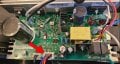
Add me to the bricked treadmill list, Pro 5000 with an MC1648DLS. I'm glad I found this thread because I'd like to continue using the treadmill by installing the PWM suggested @embain14. I've checked out the YT video, which helps a lot, but I wanted to make sure I'm doing this correctly. My board is shown in the attachment. First question, is the arrow pointing to the correct location to attach the PWM? If so, do I simply connect the black, blue, and red PWM wires to the associated pins? Finally, for the voltage step down, how much resistance did you have to add? Thank you!
 

Attachments

ghovis

Joined Jan 17, 2024
2
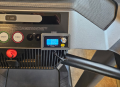
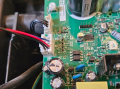
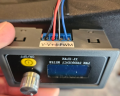
I was able to fix my Pro 5000 treadmill with a MC1648DLS thanks to the info in this thread. I ordered the PWM suggested @embain14 and wired it as shown in the pics (using only the Blue, Red, Black, Black-White wires). My PWM output was low voltage so I didn't use any step down resistors. It works!! These videos helped a lot, especially with wiring and programming the PWM unit. Thanks!


Attachments

runner955

Joined Nov 23, 2024
2
Mine is not bricked. But….i replaced the MC1648 as it got splashed from water on the belt. The motor does respond to speed increases but it hunts up and down and is definitely running far faster than it should. I have another MC1648 and the behavior is the same on both. So I suspect the signal from the console or the motor itself. I know it uses back EMF for speed feedback.
Any thoughts on how to diagnose?

edit, I’ll add that the motor does sound louder than it was….could it be damaged?
 
Add me to the bricked treadmill list, Pro 5000 with an MC1648DLS. I'm glad I found this thread because I'd like to continue using the treadmill by installing the PWM suggested @embain14. I've checked out the YT video, which helps a lot, but I wanted to make sure I'm doing this correctly. My board is shown in the attachment. First question, is the arrow pointing to the correct location to attach the PWM? If so, do I simply connect the black, blue, and red PWM wires to the associated pins? Finally, for the voltage step down, how much resistance did you have to add? Thank you!
I have a similar setup due to the console not putting out the pwm voltage down to the control board on a pro form sport 3.0. Do you know if there is a tach input so I can actually track distance on the console? This treadmill also has the MC1648DLS control board.
 
I got the motor to work to run the belt on the treadmill using the info above. I am curious on if I can do the same thing with the incline?

I tried hooking up the purple wire to were the blue is up above and tried the same PWM of 20hz.. didnt work. Not sure if it works same way…
 

MaxHeadRoom

Joined Jul 18, 2013
30,562
The incline usually uses a different style of motor, AC 50/60hz and not DC also the incline has a couple of SCR's see the reverse engineed schematic.
 
Hello,
I have a NordicTrack T6.5 that was hit by the firmware update bug that bricked the console. I refuse to pay 500 dollars for parts for something they broke so here we are. I would like to convert the console into a simple up/down rocker for incline and a pwm dc motor controller for the belt. I have been going off the MC2100 diagrams found on this all about circuits forum. It had me questioning my design and wonder if I need to step down the voltage from 12V to 5V. Does anybody have any tips or schematics for the MC1658DLS? My idea was to do something similar to below using the 8 pin connectors from the HD6 on the 1648 board. Also, can the violet incline sensor wire be ignored or does the board require it?

Rocker Switch for incline
DC Motor

View attachment 292436
Were you able to resolve this? did this work for you?
 

MaxHeadRoom

Joined Jul 18, 2013
30,562
The PWM pulse for rpm input requires a suitable series resitor due to the low value on board for the input to the opto , due to where the one on board ,for the PC817. is very low value.
 

embain14

Joined Jun 30, 2023
5
Alright guys, its been a minute but I'm back with a solution, total cost was about $100 (already had the Pi 4B). Repository contains a BOM, a schematic, and the code you need to replace your console, I'm working on mounting the touch screen in the place where the old console is, the 3D CAD is done, I just need to print it and check the fit, hope it helps you all as much as you have helped me!

https://github.com/embain14/ProForm-Pro-2000-Console-Replacement
 
Top