How to stop a program HSERIN blocking

sagor

Joined Mar 10, 2019
1,049
You have two STR_DONE=0 in main program, remove the first one:
str_done = 0
valid = 0
rxin = 0
str_done = 0

STR_DONE should only be cleared as the last statement after processing the buffer.

If running in the SIM, watch the variables in the Interrupt routine as you send a string in. You can use a "BREAK" statement to pause before or after every Select. Be sure to remove that when compiling for a real PIC chip
 

Thread Starter

camerart

Joined Feb 25, 2013
3,830
Correct. We add characters to a string that starts with $.

If the 5th character is a “C”, then that is the message we want. So we continue to add characters until you see the end of message.

If the 5th character is NOT a “C”, we clear the $ and reset the count, which ignores everything until a new message (we get another $) is detected.
Hi D,
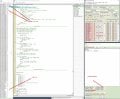
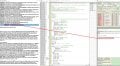
Here is a Screen shot, showing [ RXI = 5 ] at the point of checking for [ RXI =5 ] and CHAR is not "C", but I think it should be.
Is it that the [ $ ] has been put into [ STR1(0)) and STR(1) ] ?
C.
 

Attachments

sagor

Joined Mar 10, 2019
1,049
C, I'm thinking that you should clear the buffer in the main program loop once you are done parsing it. Not doing so makes it hard to debug what you are receiving if there are characters left over in the buffer from the last string. By writing zero into the array when done, it helps see what new characters you are getting, even if only a partial string.
Code:
main:
   
        If str_done = 1 Then  'a valid packet has arrived
            Hserout "Got it", CrLf
            For g = 0 To valid
            Hserout buffer(g)
            Next g
            valid = 0
            rxin = 0
           
            'Zero out the buffer array. Makes it easier to debug next loop
            For g = 0 To 79
            buffer(g) = 0
            Next g
           
            str_done = 0
           
        Endif
WaitMs 1
Goto main
End
 

Thread Starter

camerart

Joined Feb 25, 2013
3,830
C, I'm thinking that you should clear the buffer in the main program loop once you are done parsing it. Not doing so makes it hard to debug what you are receiving if there are characters left over in the buffer from the last string. By writing zero into the array when done, it helps see what new characters you are getting, even if only a partial string.
Code:
main:
  
        If str_done = 1 Then  'a valid packet has arrived
            Hserout "Got it", CrLf
            For g = 0 To valid
            Hserout buffer(g)
            Next g
            valid = 0
            rxin = 0
          
            'Zero out the buffer array. Makes it easier to debug next loop
            For g = 0 To 79
            buffer(g) = 0
            Next g
          
            str_done = 0
          
        Endif
WaitMs 1
Goto main
End
Hi S,
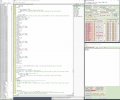
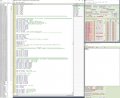
I've been STEPPING through and it looks at [ If temp = "C" Then ] increments [ RXIN ] gets to RESUME then goes to LINE 437.NOTE: [ C ] still in UART
Here's 3x images.
C
 

Attachments

djsfantasi

Joined Apr 11, 2010
9,237
Hi D,
Here is a Screen shot, showing [ RXI = 5 ] at the point of checking for [ RXI =5 ] and CHAR is not "C", but I think it should be.
Is it that the [ $ ] has been put into [ STR1(0)) and STR(1) ] ?
C.
:eek:

Oh! I just noticed a big typo. Look at the if statement where it checks for a “C”! The variable should be “rxi”. I typed the variable name with a “1” (one) instead of an “i”!!!

I agree with sagor. It would make debugging much easier if we cleared out the buffer when we’re done. I may have an indexing error in my code and that would help find it. Try replacing the if block with this for now.

Code:
‘ identify the desired message
        If rxi=5 and char<> “C” then
             str1(0) = “x” ‘ discard “$”
             str1(1) = “x” ‘ clear buffer
             str1(2) = “x” ‘ clear buffer
             str1(3) = “x” ‘ clear buffer
             str1(4) = “x” ‘ clear buffer
             str1(5) = “x” ‘ clear buffer
             rxi=o
             Endif
‘ by overwriting the ‘$’ character,
‘ everything else will be ignored
UPDATE: I don’t think there’s an indexing error in my code (if you let me slide on mistyping the variable name). Let me know what happens when I use the correct variable.

UPDATE TO THE UPDATE: I’ve gotten used to C, where a mistyped variable name likely would have thrown an error.
 

sagor

Joined Mar 10, 2019
1,049
C, your screen shots show there is no PIR1.RCIF flag set, and the "C" character is still in the shift register and NOT in RCREG yet. Once "C" gets moved to RCREG, PIR1.RCIF will get set again.
In screen 1, you are still processing the "M" character in the interrupt, "C" has not fully arrived yet, "RX In Progress" is highlighted in red means it is receiving something, but not completed yet.

Where is HSEROPEN executed? As soon as you do that, it is possible the UART is triggering an interrupt before you finish initializing the rest of your code.
Enable the interrupts near the end, just before start of the main program loop, and then open HSEROPEN after that.

So, the way I see it, you are enabling the interrupts before you have initialized the variables and the Hardware UART may already be opened. You are capturing UART data while still setting up the program.... That messes up your initialization of the variables.

The way I would do it is:
1) initialize all the variables used by the Interrupt routine. This includes zeroing the buffer
2) Do all other initialization
3) Enable the interrupts at the end of all that
4) Open the serial port once you are ready to start the main program.

You may want to disable the receive part of the UART (CREN bit) until you are ready to receive/process data at which point you enable it.

Once you enable interrupts for the UART and it is enabled, it will run continuously, regardless of where you are in your program.

In my example, everything is so close together, and no data is sent to the UART until I enter it in the SIM, hence it seemed to work ok. Since in real life you are already receiving data, you must control when you enable that interrupt...

That all said, if I take my own advice, the code would look like:
Code:
'All your other initialization code
....
Dim buffer(80) As Byte
Dim rxin As Byte
Dim temp As Byte
Dim valid As Byte
Dim str_done As Byte
Dim i As Byte
Dim g As Byte

rxin = 0  'Initialize
valid = 0


'set up interrupts
PIE1.RCIE = 1
INTCON.PEIE = 1
INTCON.GIE = 1

Hseropen 9600


'main loop
'---------
main:
...
...
 

Thread Starter

camerart

Joined Feb 25, 2013
3,830
:eek:

Oh! I just noticed a big typo. Look at the if statement where it checks for a “C”! The variable should be “rxi”. I typed the variable name with a “1” (one) instead of an “i”!!!

I agree with sagor. It would make debugging much easier if we cleared out the buffer when we’re done. I may have an indexing error in my code and that would help find it. Try replacing the if block with this for now.

Code:
‘ identify the desired message
        If rxi=5 and char<> “C” then
             str1(0) = “x” ‘ discard “$”
             str1(1) = “x” ‘ clear buffer
             str1(2) = “x” ‘ clear buffer
             str1(3) = “x” ‘ clear buffer
             str1(4) = “x” ‘ clear buffer
             str1(5) = “x” ‘ clear buffer
             rxi=o
             Endif
‘ by overwriting the ‘$’ character,
‘ everything else will be ignored
UPDATE: I don’t think there’s an indexing error in my code (if you let me slide on mistyping the variable name). Let me know what happens when I use the correct variable.

UPDATE TO THE UPDATE: I’ve gotten used to C, where a mistyped variable name likely would have thrown an error.
Hi D,
That's an improvement.

Your 'TYPO' was 'accidentally' corrected when I had to retype it because of the different syntax. e,g, [ ‘ discard “$” = ‘discard “$” ] just enough difference for it not to work.

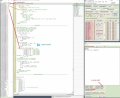
See image '5 NOT C' You can see 'C' is still in the UART while '5 = M'

I don't think [ $ ] should be at [ STR1(1) ] Would it be corrected if you swapped the lines shown in BLUE?

EDIT: Swapping round the lines marked in BLUE doesn't work.

C.
 

Attachments

Last edited:

Thread Starter

camerart

Joined Feb 25, 2013
3,830
C, your screen shots show there is no PIR1.RCIF flag set, and the "C" character is still in the shift register and NOT in RCREG yet. Once "C" gets moved to RCREG, PIR1.RCIF will get set again.
In screen 1, you are still processing the "M" character in the interrupt, "C" has not fully arrived yet, "RX In Progress" is highlighted in red means it is receiving something, but not completed yet.

Where is HSEROPEN executed? As soon as you do that, it is possible the UART is triggering an interrupt before you finish initializing the rest of your code.
Enable the interrupts near the end, just before start of the main program loop, and then open HSEROPEN after that.

So, the way I see it, you are enabling the interrupts before you have initialized the variables and the Hardware UART may already be opened. You are capturing UART data while still setting up the program.... That messes up your initialization of the variables.

The way I would do it is:
1) initialize all the variables used by the Interrupt routine. This includes zeroing the buffer
2) Do all other initialization
3) Enable the interrupts at the end of all that
4) Open the serial port once you are ready to start the main program.

You may want to disable the receive part of the UART (CREN bit) until you are ready to receive/process data at which point you enable it.

Once you enable interrupts for the UART and it is enabled, it will run continuously, regardless of where you are in your program.

In my example, everything is so close together, and no data is sent to the UART until I enter it in the SIM, hence it seemed to work ok. Since in real life you are already receiving data, you must control when you enable that interrupt...

That all said, if I take my own advice, the code would look like:
Code:
'All your other initialization code
....
Dim buffer(80) As Byte
Dim rxin As Byte
Dim temp As Byte
Dim valid As Byte
Dim str_done As Byte
Dim i As Byte
Dim g As Byte

rxin = 0  'Initialize
valid = 0


'set up interrupts
PIE1.RCIE = 1
INTCON.PEIE = 1
INTCON.GIE = 1

Hseropen 9600


'main loop
'---------
main:
...
...
Hi S,
I've made all of the changes, hopefully correctly.

Now it's working, I'm now testing it with corrupt programs etc.

What does clearing/zeroing the buffer mean? Is it make all of the BUFFER() STRING [ 0 ] or is it [ RXIN = 0 ] ?

While looking for error clues earlier, I came across this line, in another program: [ RCON.IPEN = 1 'This MUST be included when using Interrupts ] Should we have it here?

C.
 

sagor

Joined Mar 10, 2019
1,049
IPEN (Interrupt Priority ENable) is only set if you are going to use different priorities for interrupts (high or low). If you leave it clear, all interrupts are treated at the same level (same priority). If things are working as it is now, don't change that. Two levels of interrupts just makes it more confusing, especially if you are using just one interrupt routine in the entire program.
Clear buffer by running a for/next loop for G=0 to 79, and set each buffer(g) to zero.
 

Thread Starter

camerart

Joined Feb 25, 2013
3,830
IPEN (Interrupt Priority ENable) is only set if you are going to use different priorities for interrupts (high or low). If you leave it clear, all interrupts are treated at the same level (same priority). If things are working as it is now, don't change that. Two levels of interrupts just makes it more confusing, especially if you are using just one interrupt routine in the entire program.
Clear buffer by running a for/next loop for G=0 to 79, and set each buffer(g) to zero.
Hi S,
All understood.

I'll now need to connect all of the bits of program together, then test it LIVE.

Many thanks for your valuable help, have a good holiday:)

I've had some thoughts about making the DATA collection more efficient, by 'gleaning' the DATA with better timing.
Each of the BASE and REMOTE both have GPS, that emit an accurate TIMEPULSE, so they can both can be syncronised, as long as there is a GPS signal at each end.
If this TIMEPULSE started an INTERRUPT, just before the $GPRMC sentence, then by TIMING, only the time taken to 'glean' the DATA, plus a bit on each end, would be used.
Something for you to think about on your hols :)
"""""Actually not for now, but sometime in the future""""""""""
Cheers, C.
 

sagor

Joined Mar 10, 2019
1,049
Having a timing pulse does little to help, except maybe let the main program know there will be data "soon". The interrupt driven UART receive does it all in background anyway. You only need to check that STR_DONE flag in the main program to know some valid data string came in. It does not matter when it came in, nor how long ago or how fast, all that matters is you have a valid string that has to be processed by the main program. If the main program takes too long to process it, all that happens is you miss the next string (it gets dumped). Once you process the string, and reset RXIN, VALID and then STR_DONE, the UART interrupt routine will start looking for a new string for you regardless of current time or position of current data stream. It all resets back to looking for a valid string.
There is little reason to do more filtering in the interrupt routine, as the UART has to read each character that comes in anyway. You simply figure out if there is a valid string and capture it, else just dump each character as it comes in. The overhead for the Interrupt routine is small and does not affect the main program much at all. Between UART characters your main program can do lots of processing or checking.

If you want to get fancy, and capture more data, simply copy buffer() to another array (say something called SBUF(80) for "Save Buffer") in the main program. Then reset the flags and STR_DONE right after the copy, and your program can process the SBUF at its leisure while the interrupt routine starts to look for a second valid string in background while the main program does its "thing". This method would likely prevent any loss of serial data due to main program delay or overhead. You would be "double buffering" your data. Since a valid string comes about once a second (rest of the data is dumped), your main program has lots of time to process the saved buffer and even output data via Hserout commands. The delays and overhead of Hserout do not affect the receive UART interrupt at all. In fact, I would recommend this approach to improve data recovery of the RX UART data stream.

You could get fancier and send hardware serial data OUT via an interrupt routine as well, but lets get the basics working first before we make it more complicated. That said, the same interrupt routine I wrote could check the TCIF flag as well as RCIF, and put characters into the TX buffers from some "buffer" you designate, with a pointer/counter..
 

Thread Starter

camerart

Joined Feb 25, 2013
3,830
Having a timing pulse does little to help, except maybe let the main program know there will be data "soon". The interrupt driven UART receive does it all in background anyway. You only need to check that STR_DONE flag in the main program to know some valid data string came in. It does not matter when it came in, nor how long ago or how fast, all that matters is you have a valid string that has to be processed by the main program. If the main program takes too long to process it, all that happens is you miss the next string (it gets dumped). Once you process the string, and reset RXIN, VALID and then STR_DONE, the UART interrupt routine will start looking for a new string for you regardless of current time or position of current data stream. It all resets back to looking for a valid string.
There is little reason to do more filtering in the interrupt routine, as the UART has to read each character that comes in anyway. You simply figure out if there is a valid string and capture it, else just dump each character as it comes in. The overhead for the Interrupt routine is small and does not affect the main program much at all. Between UART characters your main program can do lots of processing or checking.

If you want to get fancy, and capture more data, simply copy buffer() to another array (say something called SBUF(80) for "Save Buffer") in the main program. Then reset the flags and STR_DONE right after the copy, and your program can process the SBUF at its leisure while the interrupt routine starts to look for a second valid string in background while the main program does its "thing". This method would likely prevent any loss of serial data due to main program delay or overhead. You would be "double buffering" your data. Since a valid string comes about once a second (rest of the data is dumped), your main program has lots of time to process the saved buffer and even output data via Hserout commands. The delays and overhead of Hserout do not affect the receive UART interrupt at all. In fact, I would recommend this approach to improve data recovery of the RX UART data stream.

You could get fancier and send hardware serial data OUT via an interrupt routine as well, but lets get the basics working first before we make it more complicated. That said, the same interrupt routine I wrote could check the TCIF flag as well as RCIF, and put characters into the TX buffers from some "buffer" you designate, with a pointer/counter..
Hi S,
I was recalling your comment: "That is over 550 characters/sec, and at 9600baud (I'm assuming this is at 9600???), that would take well over 550mS just to receive that data every second. A huge overhead."

This got me thinking, and I have a few ideas: The sentence we want is the first (I'm pretty sure it's true) $XXRMC, and up to the comma after the first [ W ], contains all of the information, and was thinking of ways to stop receiving once that is 'in'

I will get the 'blocking' problem out of the way before, trying this or anything else.
C
 

sagor

Joined Mar 10, 2019
1,049
With an interrupt routine, it does not matter!
The interrupt may trigger 550 times in one second (once every 1mS), but processing the byte in RCREG takes only a few uS, and data that does not match your pattern is simply dumped by the interrupt routine. Using an interrupt routine leaves 99% of the processing time left over for the main program. In fact, once your BUFFER is full and flagged with STR_DONE, the UART interrupt processing is probably less than 1uS, insignificant.
You have to think outside "the box". The main program runs with your main code. Then, if data comes in the UART, the interrupt is triggered, and the RCREG is read and then if it matches what you want, it saves it. Processing returns to the main program. This all takes a very short time. Your main program does not even know it was interrupted (unless you check in code). Main program still gets most of the CPU time. Main program gets interrupted once every 1mS, and processes the data in RCREG within several dozen uS (1/1000 of a mS). The UART does most of the work.
Only once the string is determined to be complete, the interrupt routine sets that flag STR_DONE and does noting else with the rest of the UART data until that flag is cleared. Your main program can check that STR_DONE flag whenever it wants, and process the returned string, looking for your "W" or whatever, at its own leisure.
My comments about that 550mS was if you sat in the main program trying to read all those characters, would take that long, because Hserin blocks until a character is read.
With an interrupt routine reading the received data, all that blocking and wasted time is gone, your main program runs 99% of the time doing what it wants.
Think of the interrupt routine as a separate, secondary CPU (which the UART actually is...). The interrupt routine is separate code just written for that second "CPU", running independent of the primary CPU. Secondary CPU is doing the data receive, and when it thinks if has a valid string, it notifies the main CPU (main program) that there is some valid data for the main program to process. They are two independent processors. The UART processor simply "borrows" some clock cycles only when it has something to do. Interrupt routines are just that, separate processing of events that simply interrupt the main program for a few clock cycles to service that interrupt.
Character "processing" should only be done in the main program, you must minimize the code in an interrupt routine (as a general rule of thumb for interrupts).

Forget what sentence coming in is first. It does not matter. There is guarantee when you switch devices that any given sentence is coming in, it could be the second or last, depending on when you start looking for it. The interrupt routine reads all characters from all sentences, but only keeps the one you want. Again, based on what I said above, the interrupt to process all the extra garbage characters takes very little time, and there is no blocking, and you only save what you want. The UART may take 550ms to read 550 characters, but the interrupt total time for all 550 characters will likely be less than 1mS. Interrupt is very efficient.
 

Thread Starter

camerart

Joined Feb 25, 2013
3,830
With an interrupt routine, it does not matter!
The interrupt may trigger 550 times in one second (once every 1mS), but processing the byte in RCREG takes only a few uS, and data that does not match your pattern is simply dumped by the interrupt routine. Using an interrupt routine leaves 99% of the processing time left over for the main program. In fact, once your BUFFER is full and flagged with STR_DONE, the UART interrupt processing is probably less than 1uS, insignificant.
You have to think outside "the box". The main program runs with your main code. Then, if data comes in the UART, the interrupt is triggered, and the RCREG is read and then if it matches what you want, it saves it. Processing returns to the main program. This all takes a very short time. Your main program does not even know it was interrupted (unless you check in code). Main program still gets most of the CPU time. Main program gets interrupted once every 1mS, and processes the data in RCREG within several dozen uS (1/1000 of a mS). The UART does most of the work.
Only once the string is determined to be complete, the interrupt routine sets that flag STR_DONE and does noting else with the rest of the UART data until that flag is cleared. Your main program can check that STR_DONE flag whenever it wants, and process the returned string, looking for your "W" or whatever, at its own leisure.
My comments about that 550mS was if you sat in the main program trying to read all those characters, would take that long, because Hserin blocks until a character is read.
With an interrupt routine reading the received data, all that blocking and wasted time is gone, your main program runs 99% of the time doing what it wants.
Think of the interrupt routine as a separate, secondary CPU (which the UART actually is...). The interrupt routine is separate code just written for that second "CPU", running independent of the primary CPU. Secondary CPU is doing the data receive, and when it thinks if has a valid string, it notifies the main CPU (main program) that there is some valid data for the main program to process. They are two independent processors. The UART processor simply "borrows" some clock cycles only when it has something to do. Interrupt routines are just that, separate processing of events that simply interrupt the main program for a few clock cycles to service that interrupt.
Character "processing" should only be done in the main program, you must minimize the code in an interrupt routine (as a general rule of thumb for interrupts).

Forget what sentence coming in is first. It does not matter. There is guarantee when you switch devices that any given sentence is coming in, it could be the second or last, depending on when you start looking for it. The interrupt routine reads all characters from all sentences, but only keeps the one you want. Again, based on what I said above, the interrupt to process all the extra garbage characters takes very little time, and there is no blocking, and you only save what you want. The UART may take 550ms to read 550 characters, but the interrupt total time for all 550 characters will likely be less than 1mS. Interrupt is very efficient.
Hi S,
A good explanation but difficult to visualise. I've had problems previously, visualising peripherals. I'll get there eventually.

Bear with me! Am I correct that it could be an advantage to switch the DATASWITCH at a particular time ( to receive GPS), i,e, just before the $sentence wanted? then switch (to receive REMOTE) after the $sentence is in.
C
 
Last edited:

sagor

Joined Mar 10, 2019
1,049
If you can figure out the timing, yes you could switch the DATASWITCH once STR_DONE is set, meaning you have one of the strings you want. If you double buffer the data (copy buffer to SBUF in main program right away then reset STR_DONE), you could then switch DATASWITCH and capture the next, other string.
The timing of all this is up to you. The interrupt routine will capture the first valid string that you set up in the code, and everything else is skipped until you process the string and reset flags in the main program.
There is not a real advantage trying to figure out "exact" timing if you capture what you want a bit later, although it may be one or two messages later than you expect (1 or 2 seconds later...).

If your main program is quick in processing STR_DONE and buffer (or SBUF), you can switch DATASWITCH while still receiving data from the GPS, as it is being dumped by the interrupt routine anyway. You may get a framing error however, if you switch in the middle of a received character, so add that check in the interrupt routine as well.

To avoid a framing error, you are best to switch DATASWITCH between Ascii characters by checking BAUDCON.RCIDL=1. If it is =1, then the UART is idle and not receiving any serial data stream.
 

Thread Starter

camerart

Joined Feb 25, 2013
3,830
If you can figure out the timing, yes you could switch the DATASWITCH once STR_DONE is set, meaning you have one of the strings you want. If you double buffer the data (copy buffer to SBUF in main program right away then reset STR_DONE), you could then switch DATASWITCH and capture the next, other string.
The timing of all this is up to you. The interrupt routine will capture the first valid string that you set up in the code, and everything else is skipped until you process the string and reset flags in the main program.
There is not a real advantage trying to figure out "exact" timing if you capture what you want a bit later, although it may be one or two messages later than you expect (1 or 2 seconds later...).

If your main program is quick in processing STR_DONE and buffer (or SBUF), you can switch DATASWITCH while still receiving data from the GPS, as it is being dumped by the interrupt routine anyway. You may get a framing error however, if you switch in the middle of a received character, so add that check in the interrupt routine as well.

To avoid a framing error, you are best to switch DATASWITCH between Ascii characters by checking BAUDCON.RCIDL=1. If it is =1, then the UART is idle and not receiving any serial data stream.
Hi S,
Ok, thanks. I've added a NOTE: in the program.
I'll give it more thought after getting 'blocking' working.
C.
 

Thread Starter

camerart

Joined Feb 25, 2013
3,830
Hi,
A giant step forward :) :)

Each of the modules (Altimeter, screen, compass, radio and GPS have lots of data sheet pages. The GPS has about 4 or 500. I decided to spend a little time looking through the GPS D/S and discovered that there are setting that switch 'things' ON/OFF, to make them suit the purpose.

I found the section showing how to switch OFF all but the $GXRMC sentences so it only transmits that one.

I used 'X' in the name because different, satellite groups use different 'titles' e,g $GP $GN.

Anyway, I think we are now only RECEIVING RMC sentences only, so no need for the filters. If this is true, then sorry for all the effort I've put you through, regarding filtering out the RMC sentence in the program.
C.
 

djsfantasi

Joined Apr 11, 2010
9,237
Hi,
A giant step forward :) :)

Each of the modules (Altimeter, screen, compass, radio and GPS have lots of data sheet pages. The GPS has about 4 or 500. I decided to spend a little time looking through the GPS D/S and discovered that there are setting that switch 'things' ON/OFF, to make them suit the purpose.
I found the section allowing all but the $GXRMC sentences OFF, so it only transmits that one. I used 'X' in the name because different, satellite groups use different 'titles' e,g $GP $GN.

Anyway, I think we are now only RECEIVING RMC sentences, so no need for the filters. If this is true, then sorry for all the effort I've put you through, regarding filtering out the RMC sentence in the program.
C.
No worries! It was a good exercise. I’m just glad that you’ve got this much working.
 
Top