How to stop a program HSERIN blocking

Thread Starter

camerart

Joined Feb 25, 2013
3,830
Code:
If PIR1.RCIF = 1 Then
    nxt_rxin:
    WaitMs 10  '???????????????????????????????????????????????
    If PIR1.RCIF = 0 Then Goto nxt_rxin
Makes no sense at all. If RCIF=1, then it can never be cleared until something reads RCREG, so it will never be =0.
Also, waiting 10mS means you will miss 10 characters at 9600 baud, and get an overflow error right away. Never use a "wait" in a UART receive loop, just check the RCIF flag. You do not have time to waste with "WaitMS" commands, characters will be coming in every 1mS at 9600 baud.

I would write it something like:
Code:
If PIR1.RCIF = 1 Then 'Means there is a character ready to be read
    nxt_rxin:
        Hserin char
        If char = "?" Or char = 0x0a Then Goto msg_eol
        If char = "$" Then
            str1(0) = "$"  'CHAR = $
            rxi = 0
        Endif
        If str1(0) = "$" Then
            str1(rxi) = char
            rxi = rxi + 1
            'Goto nxt_rxin   'No, not correct, you should not go back unless RCIF=1. Remove this line
                If rxi > 79 Then
                    Hserout " OVER STR1 LIMIT", CrLf  'Over STR1() limit
                    rxi = 0
                Endif
        Endif
    If PIR1.RCIF = 1 Then Goto nxt_rxin  'Change to =1 !!! to see if there is any more characters
'If not, you fall through and exit IF loop, as there are no more characters to read
Endif
This will read one (possibly two) characters and then exit the loop. It will not read the entire string in one shot, because RCIF =0 for most of the time when the program is running. You may have to loop back to the first IF forever, and only exit this loop when you get the EOL. However, this may "block" if you get an OERR, since you do not check it within this read loop. Hence, you may have to loop back to the OERR if statement at the top and loop forever until you get your EOL.

What happens when you get a "?", and branch to msg_eol, you may need to still check RCIF flag to make sure the receive buffer (RCREG) is emptied, though this may not be too critical at this point if yoiu assume you have an entire message. Any further characters will trigger an overflow most likely, and you will pick that up at the start where you check OERR
Hi S,
When you say "makes no sense" note, that the CODE #118 is showing results, in the SIM.

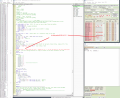
Here is a Screen shot at the point of RCIF = 0, where your CODE is checking for a [1 ] and goes round the full MAIN program LOOP.. At this point my CODE waits at HSERIN CHAR until the RCIF changes to [ 1 ] for a fraction of a second, in the mini LOOP around HSERIN CHAR. All this is inside an [ If PIR1.RCIF = 1 ] LOOP.

EDIT: The WAIT in my CODE has ????????????? following it. I add odd marks, when I try temporary tests, to remind me to remove them.

C
 

Attachments

Last edited:

Thread Starter

camerart

Joined Feb 25, 2013
3,830
Not sure what language this in, but the “goto nxt_rxin” enters an if block. What happens when the endif statement is reached and there is no if active?

I’d code it differently if a while statement is available. This isn’t real code; it’s just to illustrate a better method.

Code:
WHILE (PIR1.RCIF = 1) 'Means there is a character ready to be read
    ‘ nxt_rxin: ‘not needed
        Hserin char
        If char = "?" Or char = 0x0a Then Goto msg_eol
        If char = "$" Then
            str1(0) = "$"  'CHAR = $
            rxi = 0
        Endif
        If str1(0) = "$" Then
            str1(rxi) = char
            rxi = rxi + 1
            '...
                If rxi > 79 Then
                    Hserout " OVER STR1 LIMIT", CrLf  'Over STR1() limit
                    rxi = 0
                Endif
        Endif
‘ end WHILE
‘   If PIR1.RCIF = 1 Then ... ‘ not needed
' when the while exits  you fall through
Hi D,
This is in Oshonsoft BASIC. And the Oshonsoft Simulator.

With your permission, can I deal with one person at a time, or I'll go in my own LOOP :)
I'll reply to your message later, thanks.
C.
 

ericgibbs

Joined Jan 29, 2010
21,442
hi,
Clip from Basic Manual:>

SIMULATION_WAITMS_VALUE,
Important Note: When writing programs for real PIC devices you will most likely use delay intervals that are comparable to 1 second or 1000 milliseconds. Many examples in this help file also use such 'real-time' intervals. But, if you want to simulate those programs you have to be very patient to see something to happen, even on very powerful PCs available today. For simulation of 'WaitMs 1000' statement on 4MHz you have to wait the simulator to simulate 1000000 instructions and it will take considerable amount of time even if 'extremely fast' simulation rate is selected. So, just for the purpose of simulation you should recompile your programs with adjusted delay intervals, that should not exceed 1-10ms. But, be sure to recompile your program with original delays before you download it to a real device. There is an easy way to change arguments of all WAITMS statements in a large basic program with a value in the range 0-10 for simulation purposes. With one line of code setting parameter SIMULATION_WAITMS_VALUE with DEFINE directive, the arguments of all WAITMS statements in the program will be ignored and the specified value will be used instead during compiling. Omitting that line (say, with the comment sign) will cancel its effect and the compiled code will be ready again for the real hardware.
 

Thread Starter

camerart

Joined Feb 25, 2013
3,830
hi,
Clip from Basic Manual:>

SIMULATION_WAITMS_VALUE,
Important Note: When writing programs for real PIC devices you will most likely use delay intervals that are comparable to 1 second or 1000 milliseconds. Many examples in this help file also use such 'real-time' intervals. But, if you want to simulate those programs you have to be very patient to see something to happen, even on very powerful PCs available today. For simulation of 'WaitMs 1000' statement on 4MHz you have to wait the simulator to simulate 1000000 instructions and it will take considerable amount of time even if 'extremely fast' simulation rate is selected. So, just for the purpose of simulation you should recompile your programs with adjusted delay intervals, that should not exceed 1-10ms. But, be sure to recompile your program with original delays before you download it to a real device. There is an easy way to change arguments of all WAITMS statements in a large basic program with a value in the range 0-10 for simulation purposes. With one line of code setting parameter SIMULATION_WAITMS_VALUE with DEFINE directive, the arguments of all WAITMS statements in the program will be ignored and the specified value will be used instead during compiling. Omitting that line (say, with the comment sign) will cancel its effect and the compiled code will be ready again for the real hardware.
Hi E,
I think you mean this line: [ Define SIMULATION_WAITMS_VALUE = 1 ] 'Comment in for SIM out for PIC

I'm surprised that the comment out [ ' ] isn't worn out on my computer :)

Actually, with the settings set to 'fast' when chomping through my 'faulty $sentences' TXT, it takes ages, so I water the garden or something.
Cheers, C.
 

ericgibbs

Joined Jan 29, 2010
21,442
Hi,
The point I am trying to make is that a WaitUs command, is over ridden by the Define SIMULATION_WAITMS_VALUE = 1
So the fact a particular part of your Herser Code runs OK in simulation with a WaitUs10, does not mean it will work correctly in your programmed PIC.
 

Thread Starter

camerart

Joined Feb 25, 2013
3,830
Hi,
The point I am trying to make is that a WaitUs command, is over ridden by the Define SIMULATION_WAITMS_VALUE = 1
So the fact a particular part of your Herser Code runs OK in simulation with a WaitUs10, does not mean it will work correctly in your programmed PIC.
Hi E,
Ok, thanks.
Actually, most times when I use a WAIT, it is a guess, and I watch to see if there is an improvement, in SIM and LIVE. Also sometimes, I may add some time temporarily in case a LED switches off too fast to see.
C.
 

Thread Starter

camerart

Joined Feb 25, 2013
3,830
Not sure what language this in, but the “goto nxt_rxin” enters an if block. What happens when the endif statement is reached and there is no if active?

I’d code it differently if a while statement is available. This isn’t real code; it’s just to illustrate a better method.

Code:
WHILE (PIR1.RCIF = 1) 'Means there is a character ready to be read
    ‘ nxt_rxin: ‘not needed
        Hserin char
        If char = "?" Or char = 0x0a Then Goto msg_eol
        If char = "$" Then
            str1(0) = "$"  'CHAR = $
            rxi = 0
        Endif
        If str1(0) = "$" Then
            str1(rxi) = char
            rxi = rxi + 1
            '...
                If rxi > 79 Then
                    Hserout " OVER STR1 LIMIT", CrLf  'Over STR1() limit
                    rxi = 0
                Endif
        Endif
‘ end WHILE
‘   If PIR1.RCIF = 1 Then ... ‘ not needed
' when the while exits  you fall through
Not sure what language this in, but the “goto nxt_rxin” enters an if block. What happens when the endif statement is reached and there is no if active?

I’d code it differently if a while statement is available. This isn’t real code; it’s just to illustrate a better method.

Code:
WHILE (PIR1.RCIF = 1) 'Means there is a character ready to be read
    ‘ nxt_rxin: ‘not needed
        Hserin char
        If char = "?" Or char = 0x0a Then Goto msg_eol
        If char = "$" Then
            str1(0) = "$"  'CHAR = $
            rxi = 0
        Endif
        If str1(0) = "$" Then
            str1(rxi) = char
            rxi = rxi + 1
            '...
                If rxi > 79 Then
                    Hserout " OVER STR1 LIMIT", CrLf  'Over STR1() limit
                    rxi = 0
                Endif
        Endif
‘ end WHILE
‘   If PIR1.RCIF = 1 Then ... ‘ not needed
' when the while exits  you fall through
Hi D,
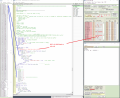
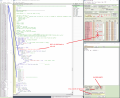
Have a look at this Screen shot, showing, inside an [ If PIR1.RCIF = 1 LOOP ] there are [ IRCIF = 0 ] While the buffer feeds the digits through.
C
 

Attachments

djsfantasi

Joined Apr 11, 2010
9,237
Thanks for your explanation. However the code in your screen shot is different than the code to which I was commenting on. Line 746 (which the screen shot has as ending with a “goti get_data”) used to end with “goto nxt_ rxin”. In that case, you were reentering an if block. Usually not recommended. It’s the problem when you depend on a goto.

The code in your screen shot has a blocking loop. Once you get the ‘$’ character, and read the next character, you have a hard goto (line 739) which then loops until the end of message is detected. Is this your intention? What if the end of message is never received? You will loop forever.

I’ve written quite a few serial communications routines in my day.my professional software engineer career was begun by designing one.

You have the essentials, but IMHO its pretty sloppy. Hopefully one of us can straighten it out for you.
 

Thread Starter

camerart

Joined Feb 25, 2013
3,830
Thanks for your explanation. However the code in your screen shot is different than the code to which I was commenting on. Line 746 (which the screen shot has as ending with a “goti get_data”) used to end with “goto nxt_ rxin”. In that case, you were reentering an if block. Usually not recommended. It’s the problem when you depend on a goto.

The code in your screen shot has a blocking loop. Once you get the ‘$’ character, and read the next character, you have a hard goto (line 739) which then loops until the end of message is detected. Is this your intention? What if the end of message is never received? You will loop forever.

I’ve written quite a few serial communications routines in my day.my professional software engineer career was begun by designing one.

You have the essentials, but IMHO its pretty sloppy. Hopefully one of us can straighten it out for you.
Hi D,
Ok, thanks, I think I see.
The 728 IF ends at 747.

EDIT: I now understand that an [ IF endif ] LOOP shouldn't jump outside. I'll change my program

I'm happy to test your ideas on the simulator. Please refer to Screen shots or CODE with the #number, to help me keep sane :)

EDIT; Does the line at 741 answer your ' LOOP forever' question?

NOTE: PIR1.RCIF = 1 shows there is a digit at the UART, but can change to [ 0 ] WHILE there is a digit in the UART, this is why I use the [ IF 0 ] inside the [ if 1 ] LOOP.

C.
 
Last edited:

Thread Starter

camerart

Joined Feb 25, 2013
3,830
Hi,
Please see EDITS at #129

Here is my latest CODE:
with changes following earlier suggestions.
Again it Simulates, but doesn't run LIVE??
I'm obviously missing something!
C
 

Attachments

sagor

Joined Mar 10, 2019
1,049
....
NOTE: PIR1.RCIF = 1 shows there is a digit at the UART, but can change to [ 0 ] WHILE there is a digit in the UART,
.....

C.
That is NOT true. Where do you see that anywhere in the manual/datasheet???
RCIF can only become =0 when the last character has been read from RCREG, and there are no more in the buffer, and this clearing of RCIF is done automatically by the UART hardware. RCIF is a READ ONLY bit, and no program instruction can clear it. Only by reading the last character in RCREG can RCIF become =0 via UART hardware.

It may be in the SIM, with certain timing issues, you see something like this, but that may be an error in timing in the SIM display, not what happens in real hardware. Remember that in the SIM, you may be running hundreds of other instructions between received UART characters (UART is real slow compared to the CPU). Interpreting results in the SIM can be complicated since it does not run at real speeds, and bits/flags that are set by hardware (UART) may not be exactly the same timing in the SIM
 

djsfantasi

Joined Apr 11, 2010
9,237
In your last posted code, there may be a problem.
Code:
If str1(0) = "$" Then
            str1(rxi) = char
            rxi = rxi + 1
            Goto nxt_rxin
I think you need to increment rxi before storing char in the array. The first character received after the ‘$’ will go into element 0, overwriting the ‘$’. This results in all subsequent characters being ignored.

Oops! Don’t think that’s what you wanted. You had it correct in an earlier listing.
 

sagor

Joined Mar 10, 2019
1,049
Your read loop may still end up in a blocking situation. If you happen to read a last character that is not EOL, and then RCIF=0 is true, you will loop forever at nxt_rxin. Nothing will break out of that loop until some character is received. You are still blocked....

Again, an efficient reading of incoming data would be to have RCIF do an interrupt and either set a flag that data is now coming in, which is then read by the main program, or the interrupt routine saves the entire data string and flags completion when you get an EOL (preferred method)
Trying to read single characters in a tight loop when there may not be any (RCIF=0) will cause blocking of the main program until something is received. As in your main loop, you should be inspecting each character as it comes in, determine if it is valid or not, then process it from there. When you miss a character or nothing arrives in the UART, your software looping will block unless you have some means of interrupting the loop (some flag). One possibility is a timer which sets its flag after 10mS or 50mS (whatever) that is set only once you receive the first start character. Then, check that flag before reading again for a timeout and after the read of each character you reset the timer. If the timer times out, you know the string stopped transmitting. You can break out of your read loop at that point. The timer does not have to be set as an interrupt, just run the timer and check its flag in your read loop (and reset after each successful character)

Reading a data stream without any blocking of the main program or lockup from incomplete data is virtually impossible without some timer flag or interrupt routine. But then, you have to address why "blocking" is bad for you, is it your overall program design or are you limited by the devices you are connecting to? You may have to sit down and look over the entire design of you program, and build it back up with individual sections that don't interact with other sections. The more complicated the program, the more likely you have to use more complex code, including timers and interrupts, to manage the program flow.

Good luck.
 

djsfantasi

Joined Apr 11, 2010
9,237
I noticed something that will also affect program execution, but I am making assumptions in Oshonsoft BASIC.

Your code executes a goto Msg_EOL. And then executes a return. There’s nothing on the stack, so return goes where? I think instead of goto you should use a gosub. The latter saves the address to which execution follows.

I have sone sample code that takes care of blocking issues as well as reliably processes the serial input. My preferred construct is a while loop, because the testing, looping is built in.

Code:
While STUFF_TO_DO
‘ do other stuff here while waiting
‘ for a message. Could be nothing
‘ or something that was being
‘ blocked by your input code

    WHILE PIR1.RCIF = 1

        Hserin char

        ‘ EOM
        If char = “?” or char = 0x0A then
            gosub msg_eol
            Endif

        ‘ Start of message
        If char = “$” then
                str1(0) = “$”
                rxi  = 0
                Endif

        ‘ Build message
        If str1(0) = “$” then
                rxi = rxi + 1
               str1(rxi) = char
               Endif

        ‘ Overflow
        If rxi > 79 then
                ‘ do your overflow stuff
                Endif

    Wend
‘ no characters in buffer
‘ do something else
Wend

‘ the rest of your program, like
‘ processing the message
 

djsfantasi

Joined Apr 11, 2010
9,237
Hi S,
Ok, so when I see this in the Simulator it isn't true, is this correct?
C
The characters in the buffer to which you point is not necessarily the characters in the receive buffer.

There is a finite amount of time where the USART is assembling bits before placing them into the receive buffer. During this time, it could appear that one or both buffers are empty.

Only when the processor sets the PIR1.RCIF flag, can you be assured that a character is ready. And the only way you can be assured that the buffer is empty, is when that flag is cleared.

NOTE: just because that flag is cleared DOES NOT MEAN that there are no more characters. Because as I commented, the USART may be busily constructing the bits into a new character. And, you can’t tell. So you must routinely check the PIR1.RCIF flag.

Also note your code executes more rapidly than serial communications. Hence, between checking for a received character and getting one, your code can do many other things.
 

Thread Starter

camerart

Joined Feb 25, 2013
3,830
Hi All,
I think you imply that the image in #135 is not true. If this is the case, I'll be more wary of the Simulator.

I also think you imply that I should check [ PIR1.RCIF ] in the MAIN program LOOP and not as I have it, inside a [ GET_DATA ] GOSUB that is in the MAIN program LOOP. Is this true?

C.
 
Last edited:

djsfantasi

Joined Apr 11, 2010
9,237
I think you imply that the image in #135 is not true. If this is the case, I'll be more wary of the Simulator.
GO

No, I didn’t mean to imply that. I meant to state that your interpretation is flawed.

T

There is something that happens between the send string and the received flag. The simulator is showing that. Hence, what you see in the send data is not necessarily what’s currently being received, AT ALL POINTS IN TIME.

I also think you imply that I should check [ PIR1.RCIF ] in the MAIN program LOOP and not as I have it, inside a [ GET_DATA ] GOSUB that is in the MAIN program LOOP. Is this true?
IT

No again. I apologize for being confusing. What I’m trying to explain is how serial communications work. I also provided, what I believe, simpler code to take into account unpredictable timing issues.

?

Note the extraneous characters I’ve inserted between paragraphs. Put the together and you get a message. In between the characters, you could read my reply.

If you waited for the whole message, you couldn’t do anything else. And if part of the message was misplaced, it wouldn’t make sense.

My talk about gosub was something else. Let me know when you’re ready to talk about it.
 

sagor

Joined Mar 10, 2019
1,049
C, The SIM is true as well, but the timing of it can be off somewhat when trying to compare hardware emulation (from what I find). Since the UART is a slow serial to parallel (byte) conversion, you see things in the SIM while the UART emulation is still "emulating".
DJ is correct in that while there may be a character somewhere in the UART, until PIR1.RCIF = 1, you should not be attempting any read of the UART. The PIR1.RCIF is the "master flag", and any processing has to be around that flag only. It is UART hardware controlled, and you only process RCREG when that flag is set. The UART then clears that flag once you have fully read all the contents of RCREG (which may be a clock cycle or two later)
There is a flag bit called RCIDL in the register BAUDCON that indicates that the UART is actively getting some serial bits (UART is active), but that does not indicate that all the bits are received just yet. It is a bit that a main program loop can check to say "hey, something is coming into the UART, so I'll get ready to read it soon". But, that may only confuse you even more, so ignore it for now unless you build a more sophisticated program.. Only PIR1.RCIF shows things are "complete" in receiving any character
 

Thread Starter

camerart

Joined Feb 25, 2013
3,830
Hi Both,
Blimey!

To explain what's arriving at the UART!

On the PCB, is a SWITCH that can be switched between the 2x DATA sources, so only one is arriving at any one time. (NOTE a [ ? ] was added to the REMOTE $Sentences as an EOL)

'Say' the DATASWITCH is set to GPS. This is what arrives one/sec.
____________________________________________________________________________
$GPRMC,162254.00,A,3723.02837,N,12159.39853,W,0.820,188.36,110706,,,A*74
$GPVTG,188.36,T,,M,0.820,N,1.519,K,A*3F
$GPGGA,162254.00,3723.02837,N,12159.39853,W,1,03,2.36,525.6,M,-25.6,M,,*65
$GPGSA,A,2,25,01,22,,,,,,,,,,2.56,2.36,1.00*02
$GPGSV,4,1,14,25,15,175,30,14,80,041,,19,38,259,14,01,52,223,18*76
$GPGSV,4,2,14,18,16,079,,11,19,312,,14,80,041,,21,04,135,25*7D
$GPGSV,4,3,14,15,27,134,18,03,25,222,,22,51,057,16,09,07,036,*79
$GPGSV,4,4,14,07,01,181,,15,25,135,*76
$GPGLL,3723.02837,N,12159.39853,W,162254.00,A,A*7C
$GPZDA,162254.00,11,07,2006,00,00*63
_____________________________________________________________________________
I am only interested in the RED sentence and only the dark RED digits.

In simple terms, where would the [ If PIR1.RCIF = 1 ] be? In the MAIN LOOP or as I have it in a [ GET_DATA ] GOSUB?
C
 
Top