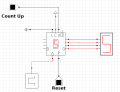
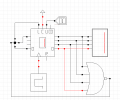
Hello, I've been asked to create a countdown that starts from 9 and counts down to 0.
but, I'm struggling with setting the register value to a specific number. Whenever I need to reset the register, it defaults to 0.
Hi E,
I have no idea, I've just been asked to use Cedar Logic Simulation to create a counter from 9 to 0 and 5 to 0, along with a reset button, using registers and logic gates.
I'm just not sure how I'm supposed to set the register value to another, like jumping from 1 to 9 when pressing the reset button.
Hi H,
I don't use the Cedar simulator.
You can see on the left side of the counter IC drawing there are 4 pin lines, these are used to set the output of the counter from a number from '0' to' 9'.
The other pins along the top are usually a parallel load pin which is used to load the count value on the left pins into the counter.
Just using the Reset pin line will default the count to '0'.
Your generic counter has four inputs. Set these input pins to the BCD value that you want to preset.
I would assume that the L input means LOAD. Try sending a high pulse into L to load the register.
Make sure that the R input (assuming that this is RESET) is set to the inactive state. Don't leave it not connected.