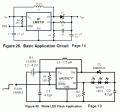
That is a fixed resistor, please see my attached circuit.
Unless you want a precisely resistor then you can using a 100K+VR20K, otherwise you can using a 120 K to replace 117K. (120K-117=3K, Pcnt_R1 = 3K/117K=2.56%)
It means that you can using SHDN pin to control the leds to be flashing as the second circuit, and set SHDN = High(1.5V) then the SHDN is in the flash enable situation, the leds will be flashing, set SHDN = Low(0V or gnd) and then the SHDN is in the flash disable situation, the leds can work in flashing function, if you don't want the SHDN function then you can connect it to Vin pin(5V).
SHDN - shutdown, you can check the datasheet to see more information about SHDN.
I don't have the ic in hand, so I can't try it, if you have this ic then you can try it.
SHDN is a control signal input to the chip. With R3 installed, you can leave it floating and the chip will operate all the time. If you want to shut down the boost circuit electronically, pull the SHDN input to ground. The arrow indicates that that connection goes off to some other switch or circuit that generates the shutdown signal.
The basic problem here is that the schematic in post #1 is very poor. It looks like someone copied a datasheet circuit, but
1. their software did not make some of the connections; that's why some lines step around some component pins.
2. the way they show reference designation and component value is inconsistent. R3 is done the right way, refdes and value on two separate lines, no confusion. The wrong way is the way R1 is done. A dash would be slightly better than a /, but both are confusing.

 Facebook
 Google
 GitHub
 Linkedin

 29.4 KB Views: 61