How to initialise a string to "°C"

Thread Starter

Ian0

Joined Aug 7, 2020
13,131
I found a similar thread from 2012
https://forum.allaboutcircuits.com/threads/displaying-the-degree-symbol-in-code.130002
(and I note that @WBahn and @atferrari are still around)
but I just want to initialise a two character string to "°C", despite the protestations of the compiler (GNU C)
It won't accept \xB0C because it doesn't like a char greater than128.
it won't accept putting the string as individual char {0xb0,0x43,0}
nor does it work if I simply type "°C" because it puts in a 16-bit unicode character.
I'm trying to initialise it so that it goes in ROM with a pointer. When it was just an array of char, it was happy with {0xb0,0x43,0}.
Any ideas?

(It doesn't need to be portable, I really don't care about any other displays, just the one I'm using)
 

nsaspook

Joined Aug 27, 2009
16,321
Show a small code example of what's not working.

Printing the extended ascii char works within the printf family on Linux.
Code:
            char junk[256];
            fprintf(stderr, "%c %c %c  BLOB \r",0xB0,0xB0,0xB0);
            snprintf(junk, 255, "%c %c %c  BLOB \r", 0xB0, 0xB0, 0xB0);
            fprintf(stderr, "%s", junk);
Dropped this in a bit of Linux gcc code for a print test.
 

WBahn

Joined Mar 31, 2012
32,827
I found a similar thread from 2012
https://forum.allaboutcircuits.com/threads/displaying-the-degree-symbol-in-code.130002
(and I note that @WBahn and @atferrari are still around)
but I just want to initialise a two character string to "°C", despite the protestations of the compiler (GNU C)
It won't accept \xB0C because it doesn't like a char greater than128.
it won't accept putting the string as individual char {0xb0,0x43,0}
nor does it work if I simply type "°C" because it puts in a 16-bit unicode character.
I'm trying to initialise it so that it goes in ROM with a pointer. When it was just an array of char, it was happy with {0xb0,0x43,0}.
Any ideas?

(It doesn't need to be portable, I really don't care about any other displays, just the one I'm using)
The char data type on almost all compilers is one byte. 0xBOC requires 12 bits (so two bytes).

Most C compilers support the wide character data type and wide strings for use with Unicode.
 

WBahn

Joined Mar 31, 2012
32,827
Show a small code example of what's not working.

Printing the extended ascii char works within the printf family on Linux.
Code:
            char junk[256];
            fprintf(stderr, "%c %c %c  BLOB \r",0xB0,0xB0,0xB0);
            snprintf(junk, 255, "%c %c %c  BLOB \r", 0xB0, 0xB0, 0xB0);
            fprintf(stderr, "%s", junk);
Dropped this in a bit of Linux gcc code for a print test.
Extended ASCII only is still just one byte per character (and, sadly, there is no standardization on what the higher-order glyphs look like).

He is trying to encode a multi-byte character.
 

Thread Starter

Ian0

Joined Aug 7, 2020
13,131
The char data type on almost all compilers is one byte. 0xBOC requires 12 bits (so two bytes).

Most C compilers support the wide character data type and wide strings for use with Unicode.
should be \xB0 followed by 'C' without a space between them. I wonder if that's what confused it - did it think the whole thing was hex?
I know it should be 0xB0 because it says so in the display for the datasheet, and when I wrote it in assembler, I got the right glyph. Now I've rewritten it in C for easier readability and got stuck with something stupid.
 

atferrari

Joined Jan 6, 2004
5,011
Hola @Ian0
After having changed twice my keyboard, I still can write here ºC by using the topmost/leftmost key (on the left of No. 1).

Other than that I am afraid I cannot add anything that could help you. Buena suerte
 

Thread Starter

Ian0

Joined Aug 7, 2020
13,131
It seems that it is possible to initialise a string as a char array
char suffix1[]="Volts";
char suffix2[]={'V','o','l','t','s'};
char suffix3[]={0xB0,'C'};

suffix3 gives a warning that the 0xB0 has been converted to -80 (decimal)

but for a read-only string
char* suffix1="Volts";
works
but
char* suffix3={0xB0,'C'};
doesn't
neither does
char* suffix3="\xB0C";
 

MrChips

Joined Oct 2, 2009
34,809
Try creating a string with a dummy character in the first byte, e.g.
unsigned char suffix3[] = "AC";

Then try loading the first byte.
suffix3[0] = 176;
 

Thread Starter

Ian0

Joined Aug 7, 2020
13,131
Try creating a string with a dummy character in the first byte, e.g.
unsigned char suffix3[] = "AC";

Then try loading the first byte.
suffix3[0] = 176;
I thought of that, and it would work for a string in RAM, but for a read-only string initialised as char*, perhaps not?
 

Thread Starter

Ian0

Joined Aug 7, 2020
13,131
Then create a dummy string in RAM and then load the characters into the string with program code.
Unfortunately it's part of an array of suffixes (V, W, A, Hz, °C, VA, etc.) so it has to behave like all the others.
 

michael8

Joined Jan 11, 2015
472
How about:
printf("xxx->%s<---xxx\n", "\xb0" "C");
The default in C is adjacent strings are concatenated into one string. You can't use "\b0C" because the C
compiler sees b0c as one hex number...
 

WBahn

Joined Mar 31, 2012
32,827
should be \xB0 followed by 'C' without a space between them. I wonder if that's what confused it - did it think the whole thing was hex?
I know it should be 0xB0 because it says so in the display for the datasheet, and when I wrote it in assembler, I got the right glyph. Now I've rewritten it in C for easier readability and got stuck with something stupid.
Yes -- and for the same reason that I did.

If you have "\xB0C" then the max-munch principle says that the hex code will consist of as many characters following the \x that can be successfully interpreted as hex digits. If this results in a value being too large to fit in the char, the behavior is implementation defined.

You have a few options. First, you can use the \nnn where the escape character is followed by one, two, or three octal digits. But, in this case, the preprocessor stops as soon as the next digit would result in a value that can't be stored in the char.

Since \xB0 = 10110000 = 10 110 000 = 260, you could use "\260C".

You MIGHT be able to use \uhhhh, which was introduced in C99 for entering Unicode code points. I'm just not sure if this works like we want it to if the hex value (which MUST be four hex digits) happens to fit within a char. Assuming it does, you can use "\u00B0C".

My recommendation is to use the required preprocessor behavior that adjacent string literals are concatenated and write it as "\xB0""C".

Code:
#include <stdio.h>
#include <string.h>

#define STR1 "\260C"
#define STR2 "\u00B0C"
#define STR3 "\xB0""C"

int main(void)
{

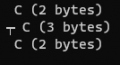
    printf("%s (%i bytes)\n", STR1, strlen(STR1));
    printf("%s (%i bytes)\n", STR2, strlen(STR2));
    printf("%s (%i bytes)\n", STR3, strlen(STR3));
   
    return 0;
}
I THINK (not sure) that the only implementation-defined behavior here is what the glyphs are that are associated with the extended ASCII character set (though I think this is actually determined by the OS, or perhaps the BIOS???).

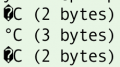
This code produces (on my machine):

1697754475433.png

Notice that the second string is 3 bytes, so that answers the question of whether it will use a 1-byte representation of the character codes that fit in one byte. I don't know if the behavior shown is required, or just allowed.

I'm confused by why it printed the T-like character (tau?) at the beginning of the second string. That first byte should, I think, be zero, which would be the null-terminator, so I would have expected just to see "(3 bytes)".

Clearly I need to read the language spec regarding Unicode strings -- something I have thus far successfully avoided.

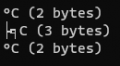
Now, I'm taking your word that 0xB0 is the extended character code for the degree symbol. I'm used to it being decimal 248 (that's what I use here on the forum or when I want to embed it into a Word or Excel file). If I try that, I get this:

Code:
#include <stdio.h>
#include <string.h>

#define STR1 "\370C"
#define STR2 "\u00F8C"
#define STR3 "\xF8""C"

int main(void)
{

    printf("%s (%i bytes)\n", STR1, strlen(STR1));
    printf("%s (%i bytes)\n", STR2, strlen(STR2));
    printf("%s (%i bytes)\n", STR3, strlen(STR3));
    
    return 0;
}
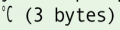
This produces:

1697754928069.png

Which is much more reasonable to me (though there's still the strange second line that I need to learn more about).
 

nsaspook

Joined Aug 27, 2009
16,321
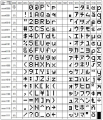
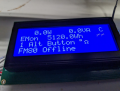
It's been my habit to use octal for extended characters for things like character LCD displays to send the code for X widget.
C:
            snprintf(buffer, MAX_B_BUF, "%d %s", B.alt_display, "Alt Button \337\364       ");
            eaDogM_WriteStringAtPos(2, 0, buffer);
1697757495608.png
1697757326222.png
 

Thread Starter

Ian0

Joined Aug 7, 2020
13,131
How about:
printf("xxx->%s<---xxx\n", "\xb0" "C");
The default in C is adjacent strings are concatenated into one string. You can't use "\b0C" because the C
compiler sees b0c as one hex number...
I didn’t think anyone used octal any more.
That was definitely one for the cognoscenti, as it’s hardly obvious that the compiler likes to make multiple hex bytes but single octal ones.

But the compiler is happy with /260C. Unfortunately, we have to do a bit of rewiring in the product for an unrelated reason, so I’ll know in about an hour what shows up on the display.
 
Top