How to fix copper pad pull off on pcb

Thread Starter

pathos

Joined May 24, 2013
12
Hi Folks,

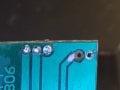
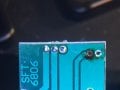
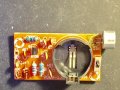
Hope this is an appropriate post for this section. I've been working my way up on learning rf circuits and building them by doing small rf boards- transmitters, receivers, etc. One of the small projects I just put together this am was a small transmitter kit from China. The circuit uses an electret condenser mic with 2 leads and next to it is a flat coin type battery holder. I survey the board quickly to get a general idea of what order to place the components, as the instructions were in Chinese, and I was working from the circuit schematic and diagram. The project went together very well, and after I was done, I just did a last survey of the solder joints and found a cold one, where I had to resolder the mic early on, as you had to bend the mic over the edge of the board to allow the battery holder to set on the board. As I unsoldered and resolder the mic after bending it, I noticed that one of the joints had lifted off the board and no amount of solder would reconnect it. It looks like the copper pad has lifted off the trace. What are my options if any, to get the one lead of the mic reattached to the adjacent trace, without a copper pad- sandpaper or scrape some of the trace covering off?

Thanks very much and any suggestions are appreciated.

Dave
Fort Collins, CO
 

shortbus

Joined Sep 30, 2009
10,050
What are my options if any, to get the one lead of the mic reattached to the adjacent trace, without a copper pad- sandpaper or scrape some of the trace covering off?
You have to scrape off the solder resist to expose new copper on the trace. This is only how I fix this type of situation others may do it differently - Expose a small part of copper on the trace in question, an Exacto type blade works , to keep the exposure small. Then put the wire through the hole but strip the wire insulation enough the the wire will reach the exposed trace. Then solder to the trace, afterward you can apply some nail polish over the joint if you want, to replicate the solder resist. Like said others may do it differently.
 

R!f@@

Joined Apr 2, 2009
10,004
You have to scrape off the solder resist to expose new copper on the trace. This is only how I fix this type of situation others may do it differently - Expose a small part of copper on the trace in question, an Exacto type blade works , to keep the exposure small. Then put the wire through the hole but strip the wire insulation enough the the wire will reach the exposed trace. Then solder to the trace, afterward you can apply some nail polish over the joint if you want, to replicate the solder resist. Like said others may do it differently.
I do the same thing.
 

Raymond Genovese

Joined Mar 5, 2016
1,653
Hi Folks,

Hope this is an appropriate post for this section. I've been working my way up on learning rf circuits and building them by doing small rf boards- transmitters, receivers, etc. One of the small projects I just put together this am was a small transmitter kit from China. The circuit uses an electret condenser mic with 2 leads and next to it is a flat coin type battery holder. I survey the board quickly to get a general idea of what order to place the components, as the instructions were in Chinese, and I was working from the circuit schematic and diagram. The project went together very well, and after I was done, I just did a last survey of the solder joints and found a cold one, where I had to resolder the mic early on, as you had to bend the mic over the edge of the board to allow the battery holder to set on the board. As I unsoldered and resolder the mic after bending it, I noticed that one of the joints had lifted off the board and no amount of solder would reconnect it. It looks like the copper pad has lifted off the trace. What are my options if any, to get the one lead of the mic reattached to the adjacent trace, without a copper pad- sandpaper or scrape some of the trace covering off?

Thanks very much and any suggestions are appreciated.

Dave
Fort Collins, CO
I wanted to add my two cents. Quite a few years ago, I bought a small role of adhesive-backed copper tape - not exactly this but something similar. When I find that I have blown a trace - usually from an iron that was too hot or by holding on the trace for too long - this can fit the bill nicely for repair (including the scraping to get to a good piece as already mentioned). Also, it works well to conveniently add a ground plane for my own home-brew circuits.

Finally, your icon - the stain - is that cresyl violet or thionine or ?
 

dl324

Joined Mar 30, 2015
18,230
It looks like the copper pad has lifted off the trace. What are my options if any, to get the one lead of the mic reattached to the adjacent trace, without a copper pad- sandpaper or scrape some of the trace covering off?
A picture would be helpful.

Paragraphs would make your post more readable.
 

Thread Starter

pathos

Joined May 24, 2013
12
Hi folks,

Thanks for the great info. Ill let you know the results as soon as I have a chance to give the options a try After I posted I did come up with a nice video from norcal on YouTube, using the scraping the trace technique with some additional cleaning with acetone and hot gluing the part to give added stability. Bottom line, there is hope for recovery.

Dl234, sorry, my grammar and sentence structure is abysmal before my second cup of coffee. I agree, a picture is worth more than a couple of poorly constructed run on sentences.

Ray, it is an overstained h and e of a small intestinal adenocarcinoma.

Thanks to all,

Dave, WS0D
 

Thread Starter

pathos

Joined May 24, 2013
12
Hi Folks,

I've made the repair, and amazingly, the transmitter worked the first time I fired it up. The microphone works great with the repaired trace. I used a combination of techniques suggested and found- didn't have the adhesive conductive tape, but I'd like to give that a try, as it might be quicker and easier- not that this was terribly involved.

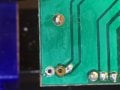
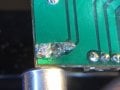
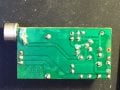
Basically, I desoldered the mic and cleaned the leads off. I then took all/most of the solder off both pads and cleaned the sites with a brush. Since the distance from the pad to the appropriate trace was not too far, I used an exacto knife to scrape the portion of the trace next to the bad hole/pad (about 2 mm separation, but the leads on the mic were long, so no problem). I scraped the trace down to bare copper and roughened the surface to make a better surface for the solder to stick to.

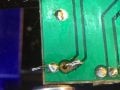
I then cleaned the site and board with acetone and tinned the newly exposed portion of the trace. The mic leads (make sure the polarity is correct) were put back through the holes, this time with enough length left to bend the leads at a 90 degree angle, so the mic is sitting perpendicular to the board upper surface. I tacked down the positive lead to the "new" pad/trace and then soldered the negative lead and went back to finish the positive lead.

I covered the site with hot glue to protect the new site and small area of "old" exposed pad and that was it. As noted, I put the battery in, and it was merrily oscillating and provided a surprisingly good quality voice sound when picked up on the receiver. I've taken step by step photos of the repair and will try to post them with this post or a subsequent one (have never posted to this site, so not sure how it will actually work).

Thanks again for all replys and advice.

Dave WS0D
 

Attachments

#12

Joined Nov 30, 2010
18,224
I covered the site with hot glue
I was just about to go there.:D

There is such a thing as, "air" construction or, "dead bug" style, but it only goes so far before the flexibility of the wires makes it useless. For low frequency work, I see the board as merely a way to make the wires (copper traces) hold still so they can be rather close together and not get distorted. In my opinion, any small defect on a low frequency circuit board can be repaired in air construction style. When you attached exterior wires, you got into flexing danger, and hot glue seems an excellent way to fix that.

Congratulations. You got a little brain exercise and came up with excellent results.:)
 

alyeomans

Joined Sep 13, 2010
39
I have worked on a number of old PCBs where this issue is common - i.e having the pads lift and normally braking off. My problem occurs when the PCB is reworked and the only choice you have is to scrape some coating off a good part of the copper track at a good part and re-solder there.
 

dl324

Joined Mar 30, 2015
18,230
I've made the repair, and amazingly, the transmitter worked the first time I fired it up.
Repair for pad lift like that on a single sided board isn't very complicated. You could use adhesive backed tape if you wanted to restore the pad.

The same method could be used for double sided boards with non-plated through holes, or plated through holes that don't provide connectivity on the other side. For multi-layer boards where the plated through hole provided inner layer connectivity, repair can be significantly more complicated.

The copper is held to the board by an adhesive that melts when too much heat is applied. Plated through holes will help prevent pads from lifting. On single sided boards, or double sided without plated through holes, it's important to avoid using too much heat and to remove as much solder as possible before trying to move the component lead. Remove solder, let any remaining solder cool, break any remaining mechanical connection with an appropriate tool, then remove the lead. When removing solder, apply any mechanical stress in a direction where the trace attached to the pad (edited to replace trace with pad) will provide some mechanical support, e.g. away from the trace, not towards.

On poor quality boards, or those that skimp on pad area, pad lift happens even with good soldering technique.

This looks like insufficient wetting to me:
 
Last edited:

Thread Starter

pathos

Joined May 24, 2013
12
Thanks again. Dennis, I was happy to get the mic tacked down and working again but I agree the site did not look sturdy, as if the solder did not flow well on the newly exposed area of trace. What could be done to " wet" it more? Also, as I went back and thought about it, I had the iron up to full temp (850) from another project and on the one sided and probably not the best quality board, this likely added to the chances of the pad lifting (also was using a broader chisel type tip).

I'll also give the adhesive tape a try as a couple have recommended, this seems very quick and easy- especially if you secure with glue/ silicon on top. Lessons learned. Still have not had my second cup of coffee and getting ready to get to work, so pardon the poor sentence structure again;-).

While "dead bug" is not esthetically pleasing, I can see how it would be easier to deal with some of the issues I ran into. I thought about taking the general circuit design and transferring it to breadboard, dead bug, manhatten, and protoboard constructions, to see what will be easiest to change values of components and try variations of the original circuit- eventually figuring out how to optimize, but also trying changes of my own design.

Thanks again for all the input.

Dave, WS0D
 

shortbus

Joined Sep 30, 2009
10,050
didn't have the adhesive conductive tape, but I'd like to give that a try, as it might be quicker and easier- not that this was terribly involved.
A couple of things about the adhesive copper tape idea. while it sounds good there are problems with it.
1. The adhesive on most of that tape won't stand up to soldering heat, it will stop sticking. The adhesive used to make a PCB blank is heat activated and done in a press to make it bond. No where near the same. That adhesive copper is usually used as a shielding for a circuit installed in an item.
2. The adhesive itself is an insulator, so you need two solder joints. One to the component and one to the broken trace. Which adds more heat into the mix.
 

dl324

Joined Mar 30, 2015
18,230
I agree the site did not look sturdy, as if the solder did not flow well on the newly exposed area of trace. What could be done to " wet" it more?
Use good soldering technique. Heat both the lead and the pad, apply solder anywhere but the iron. I apply solder from the opposite side where I'm placing the iron.
Also, as I went back and thought about it, I had the iron up to full temp (850)
That's too hot, even for no-lead solder. I use 700F for soldering and rework.
 

dl324

Joined Mar 30, 2015
18,230
1. The adhesive on most of that tape won't stand up to soldering heat, it will stop sticking. The adhesive used to make a PCB blank is heat activated and done in a press to make it bond. No where near the same.
I have used adhesive backed copper tape many times. With proper tape attachment and good soldering technique, the adhesive will hold the tape in place.
2. The adhesive itself is an insulator, so you need two solder joints. One to the component and one to the broken trace. Which adds more heat into the mix.
But, you can only solder the joints one at a time. If you're concerned about heat build-up, you can wait until the first joint is sufficiently cool before making the second.

I've been using copper tape for 4 decades now and haven't had any of the problems you mention. When I first used the tape, it was tape that was intended for PCB traces. I started using tape sold for stained glass work 20 years ago; same stuff, much lower price.
 
Top