
 Facebook
 Google
 GitHub
 Linkedin
I want to draw this in "HFSS 3D layout":
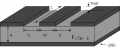
In the top layer I created a rectangle and assigned the net `GND` to it. Then I created a line and assigned the net `signal` to it. I get this:
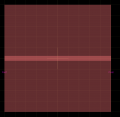
Now I would like to create the gap that separates these two conductors that has distance `S` in the drawing. Do you know if it possible to have this done automatically, in a similar way as it is done for the antipads of a via, and preserve the parameterization?
The only way I found to do this is manually cutting the ground plane, however this is not parametric, i.e. the new shape is a static shape. I also tried drawing a thicker line and setting it as "negative", however in this case all the conductor material is removed, including the line.
In the top layer I created a rectangle and assigned the net `GND` to it. Then I created a line and assigned the net `signal` to it. I get this:
Now I would like to create the gap that separates these two conductors that has distance `S` in the drawing. Do you know if it possible to have this done automatically, in a similar way as it is done for the antipads of a via, and preserve the parameterization?
The only way I found to do this is manually cutting the ground plane, however this is not parametric, i.e. the new shape is a static shape. I also tried drawing a thicker line and setting it as "negative", however in this case all the conductor material is removed, including the line.






