How do I create a simple looping 3-state sequencer

Thread Starter

Cory S

Joined Mar 30, 2026
11
I need create a 3-state sequencer that performs in the following manner: State 1 - Red Lamp on (no power to my circuit), State 2 - Yellow Light on (Button 1 is depressed), State 3 - Green Light on (Button 2 is depressed), Return to State 1 after the main power is shut off. Any ideas for a simple circuit with easily available off the shelf components ???
 

ericgibbs

Joined Jan 29, 2010
21,390
Hi Cory,
Welcome to AAC.
What voltage levels are you switching?
Do you have a sketch of the circuit you are trying to switch?
E
 

BobTPH

Joined Jun 5, 2013
11,463
You mention two buttons and what happens for 3 of the 4 combinations of their states. I see no sequencer there, looping or not.

I thnk this is what you are describing:

You have two buttons (1 and 2) and three LEDs ( red, yellow, and green).

And these states:

(no buttons pressed?): red LED on (others off? you don’t say)

Button 1 pressed: yellow light on (others off? you don’t say)

Button 2 pressed: green LED on (others off? you don’t say)

Both buttons pressed: ? you don’t say

Why do you say it is a looping sequencer? It looks like a simple static logic circuit to me.
 

MrChips

Joined Oct 2, 2009
34,626
You can use a dual flip-flop in one package.
Set flip-flop #1 to turn on yellow light, reset flip-flop #2.
Set flip-flop #2 to turn on green light, reset flip-flop #1.
Master reset to reset both ff #1 and #2.
 

Thread Starter

Cory S

Joined Mar 30, 2026
11
You mention two buttons and what happens for 3 of the 4 combinations of their states. I see no sequencer there, looping or not.

I thnk this is what you are describing:

You have two buttons (1 and 2) and three LEDs ( red, yellow, and green).

And these states:

(no buttons pressed?): red LED on (others off? you don’t say)

Button 1 pressed: yellow light on (others off? you don’t say)

Button 2 pressed: green LED on (others off? you don’t say)

Both buttons pressed: ? you don’t say

Why do you say it is a looping sequencer? It looks like a simple static logic circuit to me.
Hello BobTPH,

Thank you very much for your very rapid reply !!!

I'm just trying to show the device status using lights to visually show that both buttons 1 & 2 are both depressed and in other words, the operational state of the mixing device...

I have a three-button system:
Button 1 - Mixer pan power on
Button 2 - Mixer blades power on
Button 3 - Main power shut-off to device

Rules: Button 1 must be powered prior to button 2 (power up sequence)
Button 3 turns the system off

t(0) - No buttons pressed (Mixer off) Red LED only

t(1) - Button 1 Pressed (Mixer pan rotation) Yellow LED only

t(2) - With Button still 1 energized, Button is 2 Pressed (both Pan & Mixer Blades engaged) [both powered] Green LED only

t(3) = t(0) Main power shut-off Button 3 pressed (power off), Red LED only

Does this help ???
 

Thread Starter

Cory S

Joined Mar 30, 2026
11
Hi Cory,
Welcome to AAC.
What voltage levels are you switching?
Do you have a sketch of the circuit you are trying to switch?
E
Hello ericgibbs, Thanks for your rapid reply !!!

I currently have a 120 VAC system that powers my 24VDC LED's using a relay(s ) to control my LED lights with 24 VDC. and I don't have a schematic handy, sorry... If I need to, I can put one together...
Cory
 

CJSouthern

Joined Mar 30, 2026
4
Hello.

Just to clarify - I'm guessing that you want the repective LEDs to stay on once their respective buttons have been pressed & then released? ie:

Power applied -> Red LED on, yellow & green LEDs remain off

Button 1 pressed and released -> yellow LED comes on and stays on. Red LED goes off, green LED stays off.

Then button 2 pressed and released -> yellow LED goes off, green LED comes on and stays on, Red LED remains off.

Then button 3 pressed and released -> Red LED comes on and stays on, yellow and green LEDs turn off.

Does that sound right?
 

BobTPH

Joined Jun 5, 2013
11,463
Button usually refers to a momentary contact switch, i.e. one that stays on only while it is held down. It sounds like you are talking about what are called radio buttons, a set of buttons where you push any one and it stays on while turning off the others. Is this right? If not, can you charity how the buttons work?
 

panic mode

Joined Oct 10, 2011
4,864
since system is already using relays, add three more and wire them like this.
or even better, forget about individual relays, add smart relay (tiny PLC) and program it using logic below:
1774960807988.png
 
Last edited:

Thread Starter

Cory S

Joined Mar 30, 2026
11
Hello.

Just to clarify - I'm guessing that you want the repective LEDs to stay on once their respective buttons have been pressed & then released? ie:

Power applied -> Red LED on, yellow & green LEDs remain off

Button 1 pressed and released -> yellow LED comes on and stays on. Red LED goes off, green LED stays off.

Then button 2 pressed and released -> yellow LED goes off, green LED comes on and stays on, Red LED remains off.

Then button 3 pressed and released -> Red LED comes on and stays on, yellow and green LEDs turn off.

Does that sound right?
Hello CJSouthern, thank you very much for your rapid reply, it's greatly appreciated !!!Yes, you are correct, with the minor exception that the red state would not be powered. It is just a standby state.

Can this be done with simple off the shelf components ? I'm a materials scientist, with a limited knowledge of programming. I was pretty good at Boolean logic and TTL programming, but that was 35+ years back... (Boy I feel old now....)
 

Thread Starter

Cory S

Joined Mar 30, 2026
11
since system is already using relays, add three more and wire them like this.
or even better, forget about individual relays, add smart relay (tiny PLC) and program it using logic below:
View attachment 365374
Hello panic mode, Thank you for your time and effort, it's greatly appreciated !!! I will very much consider your purposed design.

At the risk of sounding ignorant, do you have more specific names for the types of relays you referred to above ?? A more specific description of the smart relays (tiny PLC) ???

Thanks Cory
 

panic mode

Joined Oct 10, 2011
4,864
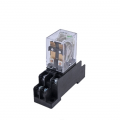
since you have 24VDC at your disposal, any relays with 24VDC coil will do. check for number of contacts needed. DPDT will be plenty. choice is yours.
do you want something that is soldered to PCB or industrial style that has DIN rail mount socket like below. what contact rating?
1774968758134.png

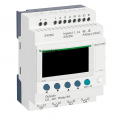
for decades "smart relay" was referring to micro PLCs, like Logo (Siemens), Zelio (Schneider), Alpha (Mitsubishi) etc. but nowadays many IoT products are advertised as "smart relay" too and they are very different animal.
1774969270013.png
 
Last edited:

Thread Starter

Cory S

Joined Mar 30, 2026
11
since you have 24VDC at your disposal, any relays with 24VDC coil will do. check for number of contacts needed. DPDT will be plenty. choice is yours.
do you want something that is soldered to PCB or industrial style that has DIN rail mount socket like below. what contact rating?
View attachment 365379

for decades "smart relay" was referring to micro PLCs, like Zelio, Alpha (from Mitsubishi) etc. but nowadays many IoT products are advertised as "smart relay" too and they are very different animal.
View attachment 365380
Hi Panic Mode, thank you for your support, things are starting to look familiar. My mixer has a DIN rack, so maybe I should explore a more industrial type of configuration...
 

panic mode

Joined Oct 10, 2011
4,864
both will work. the footprint is about the same but with PLC wiring is simpler, and one gets more flexibility due to built in functions (counters, timers etc.). but if you have never used PLCs, learning curve may be a turnoff, specially if you don't have programming cable or software (because that would force you to enter logic using clunky interface - LCD and buttons). in that case stick with relays.
 

panic mode

Joined Oct 10, 2011
4,864
did you determine load specs? if it is only LED indicators or pilot lights, they draw very little (~20mA or so). if they are 24VDC stack lights, depending on type they may draw up to 0.5A. of they are beacons, they may draw up to couple of amps.
 

Thread Starter

Cory S

Joined Mar 30, 2026
11
Button usually refers to a momentary contact switch, i.e. one that stays on only while it is held down. It sounds like you are talking about what are called radio buttons, a set of buttons where you push any one and it stays on while turning off the others. Is this right? If not, can you charity how the buttons work?
Hi BobTPH,
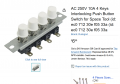
I attached a photo of the button arrangement, please note that the description for buttons 1 & 2 were reversed in a previous post to you. Also, the green light shown in the photo is misleading, since the lights goes on after the first button is depressed. My problem is to set up a visual display that goes to a "Green" light state that guarantees that both the rotor and pan are both fully engaged.
 

Attachments

Top