How do I create a simple looping 3-state sequencer

Thread Starter

Cory S

Joined Mar 30, 2026
11
Hi BobTPH,
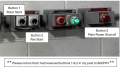
I attached a photo of the button arrangement, please note that the description for buttons 1 & 2 were reversed in a previous post to you. Also, the green light shown in the photo is misleading, since the lights goes on after the first button is depressed. My problem is to set up a visual display that goes to a "Green" light state that guarantees that both the rotor and pan are both fully engaged.
 

panic mode

Joined Oct 10, 2011
4,992
those are Allen Bradley 800H series buttons (30mm heavy duty). first button is "Rotor start" and second is "Pan start". so green light is on after first button is pressed - hence "Rotor running". But objective is to create indication "Rotor running and pan engaged" unless i am missing something.
1774985831011.png
 

Thread Starter

Cory S

Joined Mar 30, 2026
11
those are Allen Bradley 800H series buttons (30mm heavy duty). first button is "Rotor start" and second is "Pan start". so green light is on after first button is pressed - hence "Rotor running". But objective is to create indication "Rotor running and pan engaged" unless i am missing something.
View attachment 365408
Yes, you are correct in your observations regarding the light sequence. Bottom line... I just need to visually be able to determine that both the rotor and pan are engaged, With a Green LED...
"He is no fool who gives what he cannot keep to gain what he cannot lose", Jim Elliot October 28, 1949
 
Hello CJSouthern, thank you very much for your rapid reply, it's greatly appreciated !!!Yes, you are correct, with the minor exception that the red state would not be powered. It is just a standby state.

Can this be done with simple off the shelf components ? I'm a materials scientist, with a limited knowledge of programming. I was pretty good at Boolean logic and TTL programming, but that was 35+ years back... (Boy I feel old now....)
Hi Cory,

I think it's accurate to say that this is one of those times where the old saying "there are many ways to skin a cat" applies (not a saying we hear much these days, but I'm old(er!) too!).

My "weapon of choice" would be to use an Arduino microcontroller (probably an Arduino Nano or an Uno); they're ridiculously cheap & versatile. There are really only "2 parts" to be solved with your puzzle if you were to use one:

1. The electrical interfacing; they typically work using 5V or 3.3V so we'd need a few (also ridiculously cheap) components to get the voltages available in your setup down to what it needs. I'm not clear on what those voltages are yet, but either way it's probably only a few resistors. Definitely easy to buy parts that are dirt cheap.

2. It needs to be programmed. Programming is also easy; the programs (called "sketches") are very intuitive. I could easily write one for you - AI can often get simple sketches pretty close too - or if you wanted to "open a door to many other future projects" then it's a worthy investment of time to learn the basics of programming them yourself. Case-in-point, I've used them in projects to:

- Have a beeper make an urgent sound if either indicator has been switched on on my motorbike for more than 10 seconds but neither brake has been applied in that time (to help prevent cars pulling out in front of me if I accidentally forget to turn it off).

- The grip heaters on my motorbike come with 2 settings (too hot and too cold!) - now that they're controlled by an arduino they come on for 4 minutes at full power when powered up and then give me 16 different levels (defaulting to 6 out of 16 -- just right!) (I also did something similar with my electric blanket controller).

- I have one in my computer that gives me an 8 digit random number at the current cursor position based on random noise when I press a button

- I put another in a small box with a couple of 4 digit LED displays that allows me to chose a variety of specialist timers / counters / stopwatch that I programmed.

Literally millions of potential uses.

I'd be happy to articulate more details, but I'd need to know what electrical signals are available to sense the button presses; are they they 115VAC? 24VDC? Something else? What LEDs need to be powered? How much current will they draw? What are they powered by? 24VDC?

Hope this helps.

Cheers,

Colin
 

panic mode

Joined Oct 10, 2011
4,992
do you have existing schematics? what sensing is used to confirm that action requested by button is actually accomplished? how does machine knows that "pan is engaged"?
 

panic mode

Joined Oct 10, 2011
4,992
TS...

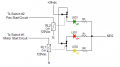
your circuit is fine, it is just a decode function, but depending on actual system architecture it may need to be connected to different part of it.
for example if those buttons are wired to PLC inputs, there is no point connecting the relays to buttons as there is no latching. it would be better if TS would post some actual photos - where the wires from those buttons land, where do they appear on electrical schematics (if present), what is already inside the panel...
 
Last edited:

sghioto

Joined Dec 31, 2017
8,634
I edited the labeling of the switches to indicate the circuitry associated.
My thoughts would be connecting the relays directly to the motors.
 
Last edited:
Top