How can I sudo on a new Ubuntu 22.04 installation?

Thread Starter

WBahn

Joined Mar 31, 2012
33,040
Ok, so now add yourself to the group like this:

Code:
sudo usermod -a -G vboxsf fred
Okay... but is that all that is required to do the shared files thing with the host OS? I would think that there's at least some hoops that I have to jump through with Virtual Box itself, and possibly in the host OS, too. Being a member of the group won't mean much unless all that other stuff is set up, too. So I'll worry about it when (and if) the time comes. But thanks, anyway.
 

xox

Joined Sep 8, 2017
936
Okay... but is that all that is required to do the shared files thing with the host OS? I would think that there's at least some hoops that I have to jump through with Virtual Box itself, and possibly in the host OS, too. Being a member of the group won't mean much unless all that other stuff is set up, too. So I'll worry about it when (and if) the time comes. But thanks, anyway.
I've never actually used Virtual Box myself, but setting up shared folders does seem pretty straightforward (docs). You will still probably need to mount the folder from Linux afterward as described in section "4.3.1. Manual Mounting".
 

joeyd999

Joined Jun 6, 2011
6,390
Okay... but is that all that is required to do the shared files thing with the host OS? I would think that there's at least some hoops that I have to jump through with Virtual Box itself, and possibly in the host OS, too. Being a member of the group won't mean much unless all that other stuff is set up, too. So I'll worry about it when (and if) the time comes. But thanks, anyway.
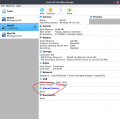
VirtualBox shared folders are defined in the Virtual Machine settings on a per-machine basis:

Oracle VM VirtualBox Manager_001.png
 

Thread Starter

WBahn

Joined Mar 31, 2012
33,040
Thanks. I'll look into this more if and when I need/want it. Right now, it's sufficient to know about the feature, so a big thanks for bringing it to my attention. Any details I learn now about how to do it will be lost by the time I get around to wanting to do it.
 

nsaspook

Joined Aug 27, 2009
16,402
Boy, I can sure see why Linux is preferred over Windows. :rolleyes:
He's loading it in a slightly convoluted way to test on existing systems. When run directly on capable hardware, the possible computing capabilities of Linux is usually preferred by engineering and scientific users.
 
I have exactly the same issue of installing ubuntu 22.04 in VirtualboxVM from ORACLE. Reinstallation didn't help. I do have long experience of working with Linux and just wanted to switch from fedora to ubuntu because a few years ago it showed itself as something absolutely painless. Not anymore, I guess.
 

joeyd999

Joined Jun 6, 2011
6,390
I have exactly the same issue of installing ubuntu 22.04 in VirtualboxVM from ORACLE. Reinstallation didn't help. I do have long experience of working with Linux and just wanted to switch from fedora to ubuntu because a few years ago it showed itself as something absolutely painless. Not anymore, I guess.
It's always possible for there to be a problematic interaction between Ubuntu 22.04 and VirtualBox (whatever version you're using). I wouldn't know, as I run 22.04 on native hardware -- both desktop and server versions -- with no problems.
 

Thread Starter

WBahn

Joined Mar 31, 2012
33,040
I tried to set up shared folders and, as near as I can tell, it is set up correctly. But I can't find the folder anywhere on the Ubuntu machine.

Not very interested in doing a third install.
 

joeyd999

Joined Jun 6, 2011
6,390
I tried to set up shared folders and, as near as I can tell, it is set up correctly. But I can't find the folder anywhere on the Ubuntu machine.

Not very interested in doing a third install.
Shared folders is an -- unnecessary (IMHO) -- feature of Virtualbox. While I've not had problems sharing Linux Host folders with Windows guests, I've not tried it the other way around.

As an alternative, if you set your networking to bridge mode, you'll have access to any Windows, SMB, or NAS shares anywhere on your network. They are addressed in Ubuntu as:

smb://servername-or-ip-address/sharename
 
Top