How can I reference these two systems to the same GND?

Thread Starter

pplg

Joined Nov 19, 2019
14
Hi everyone,

I built a custom module that outputs 0 V or 3.3 V (HIGH or LOW) from one of its microcontroller output pins. I am powering this module from a 3D printer's fan in parallel. It has an onboard regulator so it works fine. So my module is only powered when the printer prints and turns this fan ON (via a MOSFET). The 12 V are always connected to the fan and the MOSFET "connects or disconnects" GND.

I wanted to connect the 0 V / 3.3 V signal of my module to a Raspberry PI's input (GPIO). I assumed that the GND of the printer was the same than the GND of the Raspberry PI since they were already connected with a USB cable... But it seems that the printer has different GNDs on its board and the MOSFET GND is not the same as the USB GND.

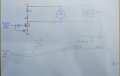
The left (blue) side of the schematic is part of the printer schematic and the grey part is what I am trying to add.

How would you reference these systems to be able to communicate? If I hook up the GND of the Raspberry Pi to the negative of the fan IT DOES WORK but I don't think it's right to do so. I am getting confused at this point... Thank you in advance!
Schematic.jpg
 

Thread Starter

pplg

Joined Nov 19, 2019
14
Just link the the two Grounds together .
Do you mean connecting the GND of the Raspberry Pi to the GND of the MOSFET? The MOSFET GND rail is almost unreachable... It's just the small pad of the board which the MOSFET is soldered to. But when the MOSFET is ON, its Drain (or negative wire of the FAN) is "almost" that same GND, right?

Either way, I assume that by doing what you say I would be indirectly connecting the different types of GND of the printer all together and I am not sure if it's a good idea... There must be a reason they are actually different and not a common one! What do you think?

Thank you again.
 

Thread Starter

pplg

Joined Nov 19, 2019
14
The printer's MCU and mosfet must have the same ground or an optical link. Otherwise, how to you define Vgs?
Yes, that's for sure. But for whatever reason the printer's USB port GND is not the same than the printer's MCU GND! The Raspberry GND is the same than the printer's USB port GND only because I've got them hooked up with a USB cable for other purposes.

But I need to be able to set a Raspberry pin LOW or HIGH (0 V or 3.3 V) with my module (powered in parallel with that FAN) so I need a common reference without bypassing the MOSFET or anything worse of course. Any ideas on how to do it as simple as possible?
 

Thread Starter

pplg

Joined Nov 19, 2019
14
An optoisolator would be a great way to link a circuit powered from the fan voltage to the Pi. No ground connections are needed.
It's a shame that I have to add another device to the equation since I wanted to find a solution with what I had already designed but if there's no other option I'll do it....

Could you elaborate on how would you wire it? The output of my module is 0 V or 3.3 V relative to the GND i use (the negative of the FAN).

Thank you!
 

Analog Ground

Joined Apr 24, 2019
460
It's a shame that I have to add another device to the equation since I wanted to find a solution with what I had already designed but if there's no other option I'll do it....

Could you elaborate on how would you wire it? The output of my module is 0 V or 3.3 V relative to the GND i use (the negative of the FAN).

Thank you!
Hard to say without knowing anything about your custom module. What information are you sending to the Pi? If just on or off of fan, the fan side of the optoisolator is the same as the resistor and LED in your schematic. The LED is the LED in the optoisolator input and then a different resistor value to set the current. Does the Pi have an internal pull up resistor on the GPIO input? I am not an RPi guy.
 

Thread Starter

pplg

Joined Nov 19, 2019
14
Hard to say without knowing anything about your custom module. What information are you sending to the Pi? If just on or off of fan, the fan side of the optoisolator is the same as the resistor and LED in your schematic. The LED is the LED in the optoisolator input and then a different resistor value to set the current. Does the Pi have an internal pull up resistor on the GPIO input? I am not an RPi guy.
Thank you for your reply. My "custom module" is mainly a small Digispark ATtiny85 board (Arduino) which already has an onboard 7805 regulator. Once it's powered up (when the FAN turns ON) it runs its program and determines when to set one of its output pins LOW or HIGH, 0 V or 3.3 V (5 V really but reduced to 3.3 V using a simple voltage divider). It's not mirroring the FAN state. It monitors other things too but only when the FAN is ON. And this is the only signal that I need to connect to an input of the Raspberry PI. It's a shame because the only problem here is that the GND of the MOSFET is not common with the Raspberry's. It's almost working.

In fact when I tried connecting the FAN's negative to the Raspberry PI's GND it worked as expected. But I have a feeling that this practice is not right since, as I said, I am actually connecting the different GND rails of the printer's board which were designed to be different rails. I hope you understand what I mean.

And yes, the Raspberry PI has built-in pull-up and pull-down resistors.

Thank you!
 
Last edited:
Top