How can I prevent screen turn-off in Windows?

Thread Starter

strantor

Joined Oct 3, 2010
6,875
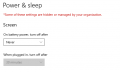
My work laptop has this setting to turn off the screen after 30 minutes and I can't change it:
1715370570980.png

It is so people don't leave their laptop unlocked in an office or conference room and indefinitely open to whoever would tamper with it. But I work from home and this is not a concern.

What IS a concern though, is that all 3 of the USB-C docking stations which I have tried, for some reason can't comprehend the state [laptop on, screen off]. When in this state, my external monitors are constantly cycling ON and OFF, ON and OFF. CLICK CLICK .... CLICK CLICK. It drives me nuts.

I have however noticed on several occasions, the screen never turned off. I strongly suspect it is because of where I left the mouse pointer. But every time I arrive at the laptop and find it in this state (idle several hours, screen still ON), I don't think to check where I left the mouse pointer until 2 seconds after I've already started moving it.

Maybe it's not that; maybe I left some window open, that was waiting on an action? I don't know... It happens so infrequently that I have not been able to realize the pattern.

Anyone know the secret spot to park the mouse, or secret window to open, that prevents the screen turning off?

I have already exhausted all the tips google had to offer, including the ones detailing changes to the registry; those settings are not controlled by the registry on my laptop.
 

djsfantasi

Joined Apr 11, 2010
9,237
It is entirely possible that you cannot change that setting. Your screenshot contains a warning. “…settings…managed by your organization”. Since it is a work laptop, your organization may have installed custom security policies. Which could preclude you making this change.
 

SamR

Joined Mar 19, 2019
5,487
Windows start, settings, Power and Sleep, and change the Screen setting to never or whatever you wish. Anything less than 1 hour is annoying to me but over that I turn it off to prevent screen burn in.
 

Thread Starter

strantor

Joined Oct 3, 2010
6,875
It is entirely possible that you cannot change that setting. Your screenshot contains a warning. “…settings…managed by your organization”. Since it is a work laptop, your organization may have installed custom security policies. Which could preclude you making this change.
Yes I am not able to change the setting. I am looking for a workaround. I have inadvertently stumbled upon a workaround several times already, but can't seem to figure out what it is.
 

cmartinez

Joined Jan 17, 2007
8,759
All the related settings in the registry are as they should be, for the setting to be modifiable. There is some sort of account control policy trickery going on.
That is most likely the case .. you said it was "your work laptop" ... do you actually own that laptop? or was it given to you by a company that you work for?
 

Thread Starter

strantor

Joined Oct 3, 2010
6,875
That is most likely the case .. you said it was "your work laptop" ... do you actually own that laptop? or was it given to you by a company that you work for?
My employer owns it, the IT department has installed their typical "thou shalt nots" in it.
 

Thread Starter

strantor

Joined Oct 3, 2010
6,875
I guess the answer is simple ... you must climb mount Olympus and ask the gods if they'd be willing to accommodate your (in their eyes) petty request ...
Yeah but... I'm just... not willing to do that. I think half the restrictions they impose are "just because they can." They think everyone is in an idiot except them, and they have a divine right of control over others for our own good. Every act of supplication from the likes of me reinforces this belief, and giving them the opportunity to grant or deny my request feels like giving up something that matters. If it were something that interfered with my ability to do my job it would be different, but putting myself in the position of having to convey the rage-inducing magnitude of distraction and irritation caused the simple clicking of a couple of monitors... it would be too easy to write off as a "me" problem instead of a computer problem and I won't give them the chance to do it.
 

Thread Starter

strantor

Joined Oct 3, 2010
6,875
Time to build a gadget which presses one of the keys every 25 mins ! Or train your cat to walk across the keyboard at 25 min intervals :).
You know that's not far off from something I've been considering. An arduino that emulates a mouse and makes a small movement every few minutes. The only reason I haven't is that I know there's a simpler way, that keeps happening accidentally, and if I could just figure it out...
 

eetech00

Joined Jun 8, 2013
4,705
You know that's not far off from something I've been considering. An arduino that emulates a mouse and makes a small movement every few minutes. The only reason I haven't is that I know there's a simpler way, that keeps happening accidentally, and if I could just figure it out...
You can use an automatic keystroke generator to do that.
 

eetech00

Joined Jun 8, 2013
4,705
What IS a concern though, is that all 3 of the USB-C docking stations which I have tried, for some reason can't comprehend the state [laptop on, screen off]. When in this state, my external monitors are constantly cycling ON and OFF, ON and OFF. CLICK CLICK .... CLICK CLICK. It drives me nuts.

I have however noticed on several occasions, the screen never turned off. I strongly suspect it is because of where I left the mouse pointer. But every time I arrive at the laptop and find it in this state (idle several hours, screen still ON), I don't think to check where I left the mouse pointer until 2 seconds after I've already started moving it.
What is the model number of the three docking station(s)? All same?

1. What type of external monitor are you using? Make? Model Number?
2. Using the same external monitor on all three docking stations?
3. Which external video interface is being used? Display port? HDMI?
4. Did you obtain the monitor on yourself? Or did your I.T. dept? If I.T, then you have a legitimate complaint.
5. Same questions, as 1 thru 3 above, regarding the Mouse. Type? Interface? All three stations?
 
Top