Help with digital counter circuit

Thread Starter

Mike Baker

Joined Aug 31, 2017
148
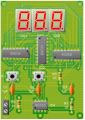
Please can anyone tell me why my circuit does not work, all i get is 888 on the displays and when i press reset they just glow brighter...??

I am new to this.....

Adapted the circuit from here:

http://www.homemade-circuits.com/2015/01/0-to-99-digital-pulse-counter-circuit.html

IC1: 555
IC2 = IC3 = 4026B
DS1 DS2 = = 7 segment display
C1 = C2 = C3: 0.047uF
R1: 10K 1 / 4W
R2: 1M 1 / 4W
R3: 33K 1 / 4W
Switches SW1 = SW2 = normally open push to ON switches
upload_2017-8-31_8-47-54.png
upload_2017-8-31_8-45-12.png
upload_2017-8-31_8-46-51.png
 

AlbertHall

Joined Jun 4, 2014
12,625
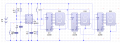
The first thing I notice is that the 'clock inhibit' inputs are left floating. I don't know what effect that would have but, in general, CMOS inputs should not be left floating. Connect these three inputs to 0V and see what happens.
 

MrChips

Joined Oct 2, 2009
34,807
Perhaps your counters are running too fast?
What is the frequency of the 555-timer output?

What is the pin number of CE on the 4026 IC?
All logic inputs must be connected to a valid logic LOW or logic HIGH.
 

AlbertHall

Joined Jun 4, 2014
12,625
Perhaps your counters are running too fast?
What is the frequency of the 555-timer output?

What is the pin number of CE on the 4026 IC?
All logic inputs must be connected to a valid logic LOW or logic HIGH.
The '555 is wired as a monostable triggered by a button.

Despite the labelling on the circuit, the '4026 doesn't have a pin called CE. There is a display enable which is connected to +5 and the clock inhibit, which as noted above is unconnected. The other unconnected pins are outputs not used in this circuit.
 

ArakelTheDragon

Joined Nov 18, 2016
1,366
Thats not possible, if on the pinout in the datasheet there is a "CE" then there is one on the circuit as well.

You might not be using the same circuit. You get inly "1111 1111" on the output because your circuits are not working for some reason. Like mentioned before most likely they are not configured properly.

EDIT: You should drive the LEDs on the 7 segment display with "5V" and a resistor of "330 Ohm" between the wire and the display.
 

Thread Starter

Mike Baker

Joined Aug 31, 2017
148
The 4026 data sheet doesnt seem to have "CE" as stated by Alberthall.


I used pcb wizard to do the circuit drawing and the CE is on their 4026 chips in the program.
 
Last edited:

WBahn

Joined Mar 31, 2012
32,823
Thats not possible, if on the pinout in the datasheet there is a "CE" then there is one on the circuit as well.

You might not be using the same circuit. You get inly "1111 1111" on the output because your circuits are not working for some reason. Like mentioned before most likely they are not configured properly.

EDIT: You should drive the LEDs on the 7 segment display with "5V" and a resistor of "330 Ohm" between the wire and the display.
The pinout on the datasheet does NOT have a "CE" pin, it has a Clock Inhibit pin.

http://www.ti.com/lit/ds/symlink/cd4026b.pdf
 

Thread Starter

Mike Baker

Joined Aug 31, 2017
148
EDIT: You should drive the LEDs on the 7 segment display with "5V" and a resistor of "330 Ohm" between the wire and the display.

Will the circuit run on 5v?
 

WBahn

Joined Mar 31, 2012
32,823
What are the 7-segment displays? Are they common anode or common cathode? They are wired as common cathode, but are they? Do they have internal current limiting resistors? Most don't.
 

ArakelTheDragon

Joined Nov 18, 2016
1,366
What are the 7-segment displays? Are they common anode or common cathode? They are wired as common cathode, but are they? Do they have internal current limiting resistors? Most don't.
And this is why you need the resistors like I said.

EDIT: You should drive the LEDs on the 7 segment display with "5V" and a resistor of "330 Ohm" between the wire and the display.

Will the circuit run on 5v?
Which circuit? Are you referring to the 7 segment display? The display runs on "5V", or should I say "2.2V" and "2.8V" over the current limiting resistor mentioned above.
 

AlbertHall

Joined Jun 4, 2014
12,625
The LED's are lighting. If they were common anode they would be reverse biased in the circuit shown and would not be lighting.
Gotta be common cathode.
 

WBahn

Joined Mar 31, 2012
32,823
The LED's are lighting. If they were common anode they would be reverse biased in the circuit shown and would not be lighting.
Gotta be common cathode.
I agree.

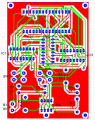
I'm assuming that we are talking about a physical circuit and not a simulation. But one thing seems strange -- it appears that a PCB was laid out and fabbed for a circuit that wasn't tested? Or is the implementation on a solderless breadboard? If the latter, then the TS needs to verify the operation of the circuit piece by piece from left to right.
 

Thread Starter

Mike Baker

Joined Aug 31, 2017
148
It is fabbed on PCB, I assumed the circuit worked....... I have a bread board but can never get anything to work on it lol.....

I am not the greatest with the therory side of things and to be honest the circuit diagram means nothing to me....
 

MrChips

Joined Oct 2, 2009
34,807
Was this a kit? Did you solder the components on to the PCB yourself?
Perhaps there is a short on the board somewhere.
Clear, well focused photos of both sides of the board might help.
 

Thread Starter

Mike Baker

Joined Aug 31, 2017
148
Not a lot, I made it myself. Yes I soldered them and soldering it's something I have done many many times.

I trippe cheked all the connections with a mult meter and there are no shorts and all connections are sound.

Thanks
 
Top