Help with Arduino PWM LED driver

Thread Starter

roof

Joined Jan 8, 2016
18
Cde change, it seems to be some curls in to my brain for this change og code. Now changed pin output, to:
const int ledPin1 = 9; // Set pin's in use:
const int ledPin2 = 12;
const int ledPin3 = 13;
const int ledPin4 = 14;

however, I think the correct are like this:
const int pwm = 9 ; so and on. But it's different any way. What about "ledPin 1"-so and on?
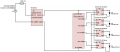
Thanks, Roof. OK, your schematic still doesn't have I- connected to GND, and that's a problem. I don't know where the current is going, but probably through the PWM pin for each driver. Eventually, your nano is going to fry, or maybe the driver module will fry. So please connect I- to GND.
Djsfantasi has already indicated how to use PWM in your Sketch to control on/off and brightness, if that's something you need to do. It can be useful to balance the red and green light pulses.
Arggh, thanks to be supervising! Links: http://schematics.com/project/23-flash-light-arduinoled-driver-10012016-1-25726/
 

sailorjoe

Joined Jun 4, 2013
365
Cde change, it seems to be some curls in to my brain for this change og code. Now changed pin output, to:
const int ledPin1 = 9; // Set pin's in use:
const int ledPin2 = 12;
const int ledPin3 = 13;
const int ledPin4 = 14;

however, I think the correct are like this:
const int pwm = 9 ; so and on. But it's different any way. What about "ledPin 1"-so and on?


Arggh, thanks to be supervising! Links: http://schematics.com/project/23-flash-light-arduinoled-driver-10012016-1-25726/
OK, roof, that's better. Now your design has everything in it, and it's understandable. Now get the software pin selection right so your software matches the hardware, and you're golden. After that, if you want to switch from using a logic pulse to a 2KHz PWM signal, then make changes in your code as recommended by djsfantasi in post #7. In this case, though, I wouldn't use a PWM signal, I'd stick with a short logic pulse like your original code. If the lights are too bright, or if the power draw is too high, then just shorten the logic pulse.
 

Thread Starter

roof

Joined Jan 8, 2016
18
Now I was a little puzzled. PWM signal delivers pulses and my logic circuit, LED driver has such input. Where use only a logical pulse (OFF / ON I suppose), LED driver gives the same voltage as Vcc = 12V. It is the point of PWM, that the shorter the pulses are of high level to low level, the lower the output voltage. This adjusted as familiar with the levels of 255 and down to 0. Half of the excitement out of the LED Power Driver is thus 127 as a value. I have calculated that for the red LED value should be thereabouts 53, and for green LED about 75. With only logical pulse high level of 200ms, I will not then send out Vcc (= 12V) in 200ms two LED's? Or, I'm completely out to run two fact?
 

sailorjoe

Joined Jun 4, 2013
365
Sorry to confuse you, roof. Your understanding of PWM and its effect on LED brightness is correct.
From your original code, I expected that you wanted to blink the lights every few seconds.
As you stated, a typical PWM signal is a string of pulses at a fixed frequency and with varying pulse width. But you don't need all that just to blink the lights. All you need is a single short pulse, exactly like you have in your code.
Your calculations for brightness are based on a light that isn't blinking, right? I think you'll find that when you blink the light the effects are different than your calculations.
But this is where experimentation is a great way to get what you want.
 

Thread Starter

roof

Joined Jan 8, 2016
18
Now connection to all parts of this circuit are completed. Need to change some about PWM output pins to arduino. Ped LED to output pin 6+9, green LED to pin 10-11. Those are all PWM output. The sketch are uploade to Nano. At Nano board it's a little red LED. It's placed near to +Vcc pin 30. When flashing, this indicated the board have bootloader, and also flash when sketch are running. The Nano was connected to my PC USBat first test. The main source are approx. 13 volt. LED flashing correct, as in the code, but very low energy level in brightness.

Measured current consumption only 90 mA! Removing USB connector and circuit continued their blinking pattern. Removed + Vcc and connected again. And then suddenly diodes illuminated with their full effects, but the pattern is terminated, LED constant in illuminated. I do not understand this completely. Suggestion; inserting a delay in the very start of the sketch and prevents it to not start earlier than after 2-3 seconds? Then I think PWM LED driver is up and running, during 2-3 sec. Other solutions to think about?
 

Thread Starter

roof

Joined Jan 8, 2016
18
And this are my latest code:

Code:
const int ledPin1 =  11;      // Set pin's in use :
const int ledPin2 =  10;
const int ledPin3 =  9;
const int ledPin4 =  6;

// Variables will change :
int ledState1 = LOW;             //
int ledState2 = LOW;
int ledState3 = LOW;             // ledState used to set the LED LED STATUS :
int ledState4 = LOW;
long previousMillis = 0;        // will store last time LED was updated :
long count = 0;

long interval = 95;           // interval at which to blink (milliseconds) lower faster blinks :

void setup() {
  // set the digital pin as output :

  pinMode(ledPin1, OUTPUT);
  pinMode(ledPin2, OUTPUT);
  pinMode(ledPin3, OUTPUT);
  pinMode(ledPin4, OUTPUT);
}
void loop()
{

  do
  {
    unsigned long currentMillis = millis();

    if (currentMillis - previousMillis > interval) {
      // save the last time you blinked the LED
      previousMillis = currentMillis;

      // if the LED is off turn it on and vice-versa :
      if (ledState1 == LOW ) {
        ledState1 = HIGH;
        ledState2 = LOW;
      }
      else {
        ledState1 = LOW;
        ledState2 = HIGH;
        count++;
        // set the LED with the ledState of the variable :
      }
      analogWrite(ledPin1, ledState1); 
      analogWrite(ledPin2, ledState2);
    }
  } while (count < 3); //sets how many blinke :
  ledState2 = LOW;
  analogWrite(ledPin2, ledState2);
  count = 0;
  //=========================================================
  delay(1000); // PAUSE and sets the time beteewen set green and read
  //=========================================================
  do
  {
    unsigned long currentMillis = millis();

    if (currentMillis - previousMillis > interval) {
      // save the last time you blinked the LED
      previousMillis = currentMillis;

      // if the LED is off turn it on and vice-versa:
      if (ledState3 == LOW) {
        ledState3 = HIGH;
        ledState4 = LOW;
      }
      else {
        ledState3 = LOW;
        ledState4 = HIGH;
        count++;
        // set the LED with the ledState of the variable:
      }
      analogWrite(ledPin3, ledState3);
      analogWrite(ledPin4, ledState4);
    }
  } while (count < 2);
  ledState4 = LOW;
  analogWrite(ledPin4, ledState4);
  count = 0;
  //=========================================================
  delay(1400);  //sets the time between set green and read
  //=========================================================
}
This code will give 3 flash at green LED, 95Ms pulse, every 3th sec. Every 4 sec. 2 flash for red LED in 95 sec. LED flash one by one.
 

sailorjoe

Joined Jun 4, 2013
365
Nice job, Roof. When you plug in just the power supply, there is probably a lot of voltage spikes or bounce, and the CPU is getting confused, which is why it seems to just lock up. Arduino Nano's version 3.1 have a reset button, and if you press that your program should work normally. If your Nano doesn't have a reset button, you can add one via the external pins.
 

Thread Starter

roof

Joined Jan 8, 2016
18
Thanks a lot, Sailorje. I was testing with reset button and it helps. Unfortunately, I was some worry for condition for LED behavior after full flush of brightness. I remove power cable ("to early"). After power ON, wait for 3-4 sec., and it switch over to the PIC patter, but only approx. 10-20 % brightness. I was thinking about this step up converter, from Vcc 7,6 and gain up to 13 volts, could this unit has some thing with this rare start up, laiter only low luminess level?
 

sailorjoe

Joined Jun 4, 2013
365
Roof, I'm not sure what you're using for a power supply, but your schematic says you have an 11,1 volt LiPO battery source. Your LEDs need as much as 700 ma of current to get full brightness. So there are a couple of things that could be the cause of low brightness.
One, the battery isn't big enough to provide 700 ma of current, so when it tries to, it can't, and the LEDs can't get to full brightness. If you can connect two batteries in parallel, you might eliminate the problem.
Two, if the LED drivers can't respond quickly to the logic pulse from the Arduino, then you won't get full brightness. This is unlikely, but possible. If you increase the pulse length from 95 msec to perhaps 200 msec, you might see an increase in brightness. Then you can reduce the pulse length in 5 msec increments until you get something short but still bright enough.

Perhaps others have ideas of what might be limiting the brightness of the LEDs.
 

sailorjoe

Joined Jun 4, 2013
365

Thread Starter

roof

Joined Jan 8, 2016
18
So I think I see the problem. You start with 7,2 volts at 3200 mAH. Then you up the voltage to 28 volts. That reduces your current to about 800 mAH, barely enough to power everything.
Suggestion: take your 7,2 volt source and feed it directly to the +IN pins on your LED drivers. See if that gets your brightness back.
I think that was some not understanding, because the 7.2 volt are step up to 13 volt, not 28. The drops when using buck step up converter are only lost with 5-6 %, where this DC-DC buck effectively are 95 %. I try first connect my switch mode supply, 12V 30A to this circuit. Current good enough to drive every things. If not helps, i try to adjust from 200mS. There are all ways just one LED lighting, at a time, sometime seldom one red+one green at sametime=1,4 A! I keep in touch.
 

sailorjoe

Joined Jun 4, 2013
365
Ok, then everything points to a problem getting enough current to the LED drivers. So figure out where the current is going and you'll understand the problem with brightness.
 

Thread Starter

roof

Joined Jan 8, 2016
18
Ok, then everything points to a problem getting enough current to the LED drivers. So figure out where the current is going and you'll understand the problem with brightness.
95mS >>200mS, does not give change, only slow blink. 30A current source give 10 % higer level of brightness, of course. Earlier, when using same sketch, with DigitWrite(), using MOSFET as ON/OFF + step down converter, it's play. So, yes agree this has to do with PWM module, with a puzzled starting full brightness. I will post the solution some later.
 
Top