Having trouble wiring PIR sensor

Thread Starter

Anthony Malone 1

Joined Jan 27, 2018
18
hi,
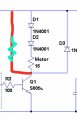
OK, the only downside of using 12V, is that the motor is 3V, which means we have to drop 9V at say 200mA or 300mA, bit wasteful.
With 5V we could use use two 1Amp diodes to drop the 5V down to 3V.

E
Yeah but if we use the 5v won't I need a separate power source for the PIR sensor since that needs at least 5v to operate? We could do it that way too. Doesn't really matter to me
 

ericgibbs

Joined Jan 29, 2010
21,442
hi,
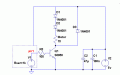
Look at this option using 5V.
BTW: the PIR will work with supply voltage of 5V thru 20V. [ will only output 3V over that range]
The Rser= 1k is already on the PIR PCB.
E
A001.gif
 

Thread Starter

Anthony Malone 1

Joined Jan 27, 2018
18
hi,
Look at this option using 5V.
BTW: the PIR will work with supply voltage of 5V thru 20V. [ will only output 3V over that range]
The Rser= 1k is already on the PIR PCB.
E
View attachment 144742

So you think the diodes and transistor I showed you should work?

The PIR sensor will have enough volts to operate even though you put it after the motor? The reason it will work because of the transistor?

Wait where does the output from the PIR sensor go? PIR sensor has vcc, output, and ground
 

Thread Starter

Anthony Malone 1

Joined Jan 27, 2018
18
Oh wow I totally over looked that. I don't know how I missed that lol. Okay cool now what about the laser. There is also a laser that I need to connect to this circuit also

And c1 and c2 those are capacitors correct?

And must it be a 47uF capacitor?
 
Last edited:

ericgibbs

Joined Jan 29, 2010
21,442
hi,
The 47uF is not a must have value, any say 10uF to 470uF would do the job, what values do you have.?

What is the spec on the lasers, voltage and current.?

E

BTW: the Gnd point in the drawing does not have to be connected to Ground.
Gnd most times means the common 0V line to the power supply or battery.
 

Thread Starter

Anthony Malone 1

Joined Jan 27, 2018
18
hi,
The 47uF is not a must have value, any say 10uF to 470uF would do the job, what values do you have.?

What is the spec on the lasers, voltage and current.?

E

BTW: the Gnd point in the drawing does not have to be connected to Ground.
Gnd most times means the common 0V line to the power supply or battery.

Okay cool. Thanks.

I believe this is the laser or.something close to this considering the toy with the motor and the laser originally ran off of 3 AA batteries. And most of the red dot lasers are these same specs from what I could see. 3-5v 5mw

https://www.amazon.com/gp/aw/d/B01N...=AC_SX236_SY340_QL65&keywords=laser+diode+red

Also I bought this off amazon so I was going to use the transister and capacitors and diodes from this kit

https://www.amazon.com/gp/aw/d/B01I...tDescription_secondary_view_div_1517333893745

npn transistor pn2222
Diode rectifier 1n4007
Electrolytic Capacitor (10UF 50V)
Or Electrolytic Capacitor (100UF 50V)
 

ericgibbs

Joined Jan 29, 2010
21,442
hi A,
I have some of those lasers from Amazon.
The laser light spot is a little distorted, but visible at night upto around 20mtrs.
It is important that you limit the current thru the laser diodes, without a limiting resistor they quickly fail.

E
 

Thread Starter

Anthony Malone 1

Joined Jan 27, 2018
18
hi A,
I have some of those lasers from Amazon.
The laser light spot is a little distorted, but visible at night upto around 20mtrs.
It is important that you limit the current thru the laser diodes, without a limiting resistor they quickly fail.

E
On your wiring diagram you drew for me.. R3 100 going from the PIR output to the transistor... That is a 100 ohm resistor or what is that?
 

lazaABT

Joined Feb 2, 2018
11
Hello, so if I understood correctly, you have a toy that runs on 3 AA batteries and inside this toy there is a laser and a motor. If this is a good interpretation, this circuit should work. First you separate the battery pack and the rest of the electronics in the toy and then you insert this circuit in between. I'm guessing about the inside of the toy's electronics. I just put a led and inductor to simulate the laser and the motor.

http://tinyurl.com/y9mu8fs7

You can click the switch in the PIR box to see what happens when the PIR gives a signal out. The transistor works like a switch to GND(a switch to it's emitter) when current is flowing into the base. The PIR gives out 3.3v, and the current is limited by a 1k resistor to ~3mA, since the typical gain of the transistor is about 100, you can drive up to 300mA with the transistor. You can have a larger resistor but then you won't be able to pull as much current. I assume ~200mA will be enough. I wouldn't put in a lower resistance just so you don't overdrive the sensor's output. It is usually current limited but I wouldn't rely on it.

The extra battery can be just a coin cell, but you can put in an AA as well just in case. It just brings the voltage up for the PIR sensor(This battery will drain slower than the others because it's driving only the sensor).
I didn't add the dropper diodes because of my interpretation of the problem, but they can be added if needed. Also i didn't add the capacitor, which can be added parallel to the original toy's batteries.

Could you please explain where the parts are from. You put in links to parts but it seems like it's just parts that are similar to the ones in the toy that you found to put in for clarification. If there are no new parts, meaning the laser and motor were already in the toy, this will work. If not please put a picture of the toy or draw a schematic of the electronics inside. And a picture of the laser/motor or whatever else you would like to put into the toy.
 

Thread Starter

Anthony Malone 1

Joined Jan 27, 2018
18
Hello, so if I understood correctly, you have a toy that runs on 3 AA batteries and inside this toy there is a laser and a motor. If this is a good interpretation, this circuit should work. First you separate the battery pack and the rest of the electronics in the toy and then you insert this circuit in between. I'm guessing about the inside of the toy's electronics. I just put a led and inductor to simulate the laser and the motor.

http://tinyurl.com/y9mu8fs7

You can click the switch in the PIR box to see what happens when the PIR gives a signal out. The transistor works like a switch to GND(a switch to it's emitter) when current is flowing into the base. The PIR gives out 3.3v, and the current is limited by a 1k resistor to ~3mA, since the typical gain of the transistor is about 100, you can drive up to 300mA with the transistor. You can have a larger resistor but then you won't be able to pull as much current. I assume ~200mA will be enough. I wouldn't put in a lower resistance just so you don't overdrive the sensor's output. It is usually current limited but I wouldn't rely on it.

The extra battery can be just a coin cell, but you can put in an AA as well just in case. It just brings the voltage up for the PIR sensor(This battery will drain slower than the others because it's driving only the sensor).
I didn't add the dropper diodes because of my interpretation of the problem, but they can be added if needed. Also i didn't add the capacitor, which can be added parallel to the original toy's batteries.

Could you please explain where the parts are from. You put in links to parts but it seems like it's just parts that are similar to the ones in the toy that you found to put in for clarification. If there are no new parts, meaning the laser and motor were already in the toy, this will work. If not please put a picture of the toy or draw a schematic of the electronics inside. And a picture of the laser/motor or whatever else you would like to put into the toy.

Thanks is the toy I am using the parts from https://www.google.com/shopping/pro...s1-tw5LhOqNsLO97NCoSfkgVeuIuDTjRoCxMsQAvD_BwE

I disconnected the laser and the motor from the circuit board it was attached to in the toy and removed the battery pack in order to apply my circuit because the way the circuit was set up I couldn't figure out how to just attach the pir sensor to it. So basically I am just using the parts (notor and laser) and casing from this toy .

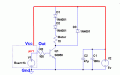
I made a circuit using the diagram @ericgibbs had posted but added the laser into the circuit like this (see attachment). It works but the laser is dim. You can only see it if all the lights are off. I want to make it brighter but I don't want to use batteries because the batteries will have to be replaced every couple days. But like I said this toy used to run off of 3 AA batteries so I don't understand why the laser is dim. I'm assuming it needs more current. I guess I need to put another transistor somewhere ? Because if I use a different voltage plug with more current won't it be too much voltage?
 

Attachments

ericgibbs

Joined Jan 29, 2010
21,442
hi Anthony,
I would buy a 5V or a 6V DC wall wart power supply, rated at least 500mA.
Let me know what you decide and we can recalc the component values.

Its possible that the Laser and 3V motor are pulling the battery voltage right down, have you measured the battery voltage when the laser and motor are running.?
E
 

lazaABT

Joined Feb 2, 2018
11
This configuration(that you made) should work, but i would put a higher resistor, like a 1k ohm resistor, with a 100 ohm you are trying to pull way more current than is specified for the sensor, this may be causing it to cut out and dim the laser(but not very likely).
What kind of source are you using currently, is it the 3 AA batteries still? You should check if the laser still works and if it is bright enough by connecting it to 4.5v (this may kill it, I have no clue if there is a resistor on the module or if it was on the original board, the laser may already be dead, it would be helpful if you took a picture of the laser module). Also, is the motor faster or slower than you want it to be? Try connecting it to 3v(2 aa) and 4.5v to compare the speed. It may be possible to connect both the motor and the laser directly to a 5v phone charger, if not you can just put a series diode to drop it to about 4.4 v for the laser and motor, and use the 5v for the pir.
If the motor spins ok on 4.5 v, you don't need the 2 diodes in series with it(these are there to drop the voltage to about 3v, but this might not be necessary), just the one in paralel. You can also test the motor on 5v as well as the laser.
Could you take a photo of the original board if you still have it, it may be helpful. Also, how long does the pir signal stay active for, in youtube videos i saw that it was only active for a second or so. Is this long enough for what you need?
If you have a multimeter try measuring the battery voltage with the motor and laser attached to it, the voltage on the output of the pir in circuit(if you can catch it) and the current through the laser and motor individually.
 

Thread Starter

Anthony Malone 1

Joined Jan 27, 2018
18
hi Anthony,
I would buy a 5V or a 6V DC wall wart power supply, rated at least 500mA.
Let me know what you decide and we can recalc the component values.

Its possible that the Laser and 3V motor are pulling the battery voltage right down, have you measured the battery voltage when the laser and motor are running.?
E
I am using a 5v power supply. A phone charger. It is not 500mA I know that though. I want to say it is only 150mA but I am not 100 percent sure. I will check and get back to you when I get home
 

Thread Starter

Anthony Malone 1

Joined Jan 27, 2018
18
This configuration(that you made) should work, but i would put a higher resistor, like a 1k ohm resistor, with a 100 ohm you are trying to pull way more current than is specified for the sensor, this may be causing it to cut out and dim the laser(but not very likely).
What kind of source are you using currently, is it the 3 AA batteries still? You should check if the laser still works and if it is bright enough by connecting it to 4.5v (this may kill it, I have no clue if there is a resistor on the module or if it was on the original board, the laser may already be dead, it would be helpful if you took a picture of the laser module). Also, is the motor faster or slower than you want it to be? Try connecting it to 3v(2 aa) and 4.5v to compare the speed. It may be possible to connect both the motor and the laser directly to a 5v phone charger, if not you can just put a series diode to drop it to about 4.4 v for the laser and motor, and use the 5v for the pir.
If the motor spins ok on 4.5 v, you don't need the 2 diodes in series with it(these are there to drop the voltage to about 3v, but this might not be necessary), just the one in paralel. You can also test the motor on 5v as well as the laser.
Could you take a photo of the original board if you still have it, it may be helpful. Also, how long does the pir signal stay active for, in youtube videos i saw that it was only active for a second or so. Is this long enough for what you need?
If you have a multimeter try measuring the battery voltage with the motor and laser attached to it, the voltage on the output of the pir in circuit(if you can catch it) and the current through the laser and motor individually.
I am currently using a 5v phone charger for my power source. I am not sure how many mA it is but I want to say it is 150mA but I will check and post back when I get home. I don't think the laser is dead because if I hook it directly to the 5v power source it gets way brighter. The speed the motor is moving at is fine. It could even go slower and that would also be fine. I will post a picture of the original circuit board when I get home. As for the PIR sensor it has settings on it that can be changed. You can change the sensitivity and the time delay. There was a website I found that explained the way the time delay worked very well. Let me see if I can find it....

http://henrysbench.capnfatz.com/hen...nput/arduino-hc-sr501-motion-sensor-tutorial/

Scroll down to where it says dance floor application and has the examples.


the time delay controls how long until the PIR sensor can be triggered again but also controlled how long the circuit operates for. And I will try and test with a multimeter when I get home and will post back.
 

lazaABT

Joined Feb 2, 2018
11
Ok, if the supply is 5v 150mA, it's almost certainly this that is causing the laser to be low. You can confirm this by just connecting the motor and laser directly to the supply and measuring the voltage. Try using a old phone charger, they are always at least 500mA, that should give you a more stable voltage.
 
Top