GPS NMEA antenna aiming tracker.

Thread Starter

camerart

Joined Feb 25, 2013
3,837
hi,
The UART, PWM sims part of the program will work OK, but the IDE Sig Gen is not able to generate quadrature pulses, so there is now way of driving the QEA and QEB inputs.
I there was a way to drive the quad inputs I am not sure that the internal POSCNT counter and INDX Intr would be simulated.??
So after sending a UART Azimuth value the program would keep waiting for a match between the POSCNT and required Azimuth, which will not happen as there are no QEA/B pulses.?

If you find a way, let me know.
E
Hi,

Ok, Ill have a play.

C.
 

ericgibbs

Joined Jan 29, 2010
21,453
hi C,
Try this,
I have added code that automatically increments or decrements POSCNT, depending upon the relative Azimuth of the data sent by the GPS serial input and the actual Head azimuth.
Use the IDE UART to send a Azimuth values of A000 thru A359 to the program.
The Uart display will echo back the value send, then the poscnt will inc or dec towards the Azimuth sent [ the Poscnt represents the Head azimuth], when they match the counting will stop.
Observe CCP1 and CCP2 on the micro controller view in the IDE, CCP1 will PWM for forward drive and CCP2 will PWM for reverse drive.
When the PWM stops you can send a new Uart azimuth value.

I have remmed out the times 10 on line #154 so that the sim responds faster.

The self counting code is around line # 227.
You should now be able to step thru the program.

Lets me know how it goes
E
 

Attachments

Thread Starter

camerart

Joined Feb 25, 2013
3,837
hi C,
Try this,
I have added code that automatically increments or decrements POSCNT, depending upon the relative Azimuth of the data sent by the GPS serial input and the actual Head azimuth.
Use the IDE UART to send a Azimuth values of A000 thru A359 to the program.
The Uart display will echo back the value send, then the poscnt will inc or dec towards the Azimuth sent [ the Poscnt represents the Head azimuth], when they match the counting will stop.
Observe CCP1 and CCP2 on the micro controller view in the IDE, CCP1 will PWM for forward drive and CCP2 will PWM for reverse drive.
When the PWM stops you can send a new Uart azimuth value.

I have remmed out the times 10 on line #154 so that the sim responds faster.

The self counting code is around line # 227.
You should now be able to step thru the program.

Lets me know how it goes
E
Hi Eric,

Thanks again.

Last night, I was talking to a friend who is also making a tracker. His uses Arduino and is pre-loaded with data for following the predicted path of the ISS. He also uses e,g, A123. I got to thinking that I could use ours in a similar way, if the data was sent via the TX/RX, instead of the remote and GPS.
 

Thread Starter

camerart

Joined Feb 25, 2013
3,837
hi C,
Try this,
I have added code that automatically increments or decrements POSCNT, depending upon the relative Azimuth of the data sent by the GPS serial input and the actual Head azimuth.
Use the IDE UART to send a Azimuth values of A000 thru A359 to the program.
The Uart display will echo back the value send, then the poscnt will inc or dec towards the Azimuth sent [ the Poscnt represents the Head azimuth], when they match the counting will stop.
Observe CCP1 and CCP2 on the micro controller view in the IDE, CCP1 will PWM for forward drive and CCP2 will PWM for reverse drive.
When the PWM stops you can send a new Uart azimuth value.

I have remmed out the times 10 on line #154 so that the sim responds faster.

The self counting code is around line # 227.
You should now be able to step thru the program.

Lets me know how it goes
E
Hi Eric,

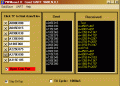
The simulation is working as it should:) Now to try to understand it, better.
C.
 

ericgibbs

Joined Jan 29, 2010
21,453
hi,
The GPS receiving serial data rate is a nominal 1 second at 9600 Baud, there around 70 characters, so very roughly [70/960] =73mS/Sec.
The transmitted A123 and E123 angles would take approx [4/960] =4mS each/Sec so thats approx total of 81mS/Sec, round up to say 100mSec/Sec

This leaves approx 900mSec for the Eastings/Northings/Azimuth maths calculations.
The PIC clock is 20MHz/4 = 5Mhz, so again a very rough approximation 5 *-0.9 = 4.5million code lines/sec. [say 4 mips]

I would say the PIC will have time to spare.
E
 

Thread Starter

camerart

Joined Feb 25, 2013
3,837
hi,
The GPS receiving serial data rate is a nominal 1 second at 9600 Baud, there around 70 characters, so very roughly [70/960] =73mS/Sec.
The transmitted A123 and E123 angles would take approx [4/960] =4mS each/Sec so thats approx total of 81mS/Sec, round up to say 100mSec/Sec

This leaves approx 900mSec for the Eastings/Northings/Azimuth maths calculations.
The PIC clock is 20MHz/4 = 5Mhz, so again a very rough approximation 5 *-0.9 = 4.5million code lines/sec. [say 4 mips]

I would say the PIC will have time to spare.
E
Hi Eric,

Am I correct in thinking that the three signals are synchronised not to 'bump' into each other?

C.
 

ericgibbs

Joined Jan 29, 2010
21,453
hi,
The 18F4520 sequence in the program is:
Serial reception of the Coordinate data from Neo RF receiver to 18F4520, then maths conversion/calculations, then serial transmission of calculated target angle data to the 18F2431.
The 18F2431, quad counting is done in the 'background' , the only program Interrupt occurs at the INDX
The PWM duty rate once set will run in the background until changed for the next Azimuth.

Obviously the Tracker Head may not physical be able to respond in 1 second to any big Azimuth change, so a READY/BUSY bit should be sent back from the 18F2431 to the 18F4520 preventing a further update of the Azimuth/Elevation data.

You should have already produced a flow chart of the timing and control signalling required for the project.:rolleyes:
This would highlight any problem areas.
E
 

Thread Starter

camerart

Joined Feb 25, 2013
3,837
hi,
The 18F4520 sequence in the program is:
Serial reception of the Coordinate data from Neo RF receiver to 18F4520, then maths conversion/calculations, then serial transmission of calculated target angle data to the 18F2431.
The 18F2431, quad counting is done in the 'background' , the only program Interrupt occurs at the INDX
The PWM duty rate once set will run in the background until changed for the next Azimuth.

Obviously the Tracker Head may not physical be able to respond in 1 second to any big Azimuth change, so a READY/BUSY bit should be sent back from the 18F2431 to the 18F4520 preventing a further update of the Azimuth/Elevation data.

You should have already produced a flow chart of the timing and control signalling required for the project.:rolleyes:
This would highlight any problem areas.
E
Hi,

Ok. I can mostly follow your explanation, but as for the finer points and producing a flow chart, this is a bit too advanced for me to be clear about. I think if I keep stepping through your program, I might be able to piece it together better. Thanks.

C.
 

Thread Starter

camerart

Joined Feb 25, 2013
3,837
Hi Eric,

Having 'popped' a couple of receivers in the field tests yesterday, I thought I would try the latest 'circuit not SIM) program on the circuit. If I connect the motor to run in reverse to the QUAD count, can this cause damage?

C.
 

ericgibbs

Joined Jan 29, 2010
21,453
hi C,
Do you mean just change over the PIC PWM outputs to the H Bridge.?
That should be OK, it will only change the drive direction.
I cannot guarantee that the latest program will run the Head OK, it was was written only for you to step thru the program as a learning tool.

Why do you want to do that.?
E
 

Thread Starter

camerart

Joined Feb 25, 2013
3,837
hi C,
Do you mean just change over the PIC PWM outputs to the H Bridge.?
That should be OK, it will only change the drive direction.
I cannot guarantee that the latest program will run the Head OK, it was was written only for you to step thru the program as a learning tool.

Why do you want to do that.?
E
Hi Eric,

I don't want to do it, but accidents happen, and I really don't want to damage the motor/disk circuits!

I have a test motor/disk (Not for Tracker, but wired the same) It's possible to connect them in reverse, until they are marked properly.

I'm about to try the program at #536. I will be able to watch the output to the H bridge, without switching on the Hbridge and motors.

C.
 

Thread Starter

camerart

Joined Feb 25, 2013
3,837
Hi,

Apart from following satellites, and anything with an NMEA data output, the main point of this tracker is to be able to follow a multicopter, that I would like to fly in woods etc taking videos.

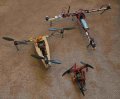
I've been making and learning to fly prototype T-copters for a year or so. I have attached 3x of my still working T-copters. (Not pretty, but quick to make and break) The one top right was the first, so I made it pretty wide, for stability and slower movements, then middle left, so I could see how small I could make one while still being able to pick up a camera. Then the little one, I've just made for indoor winter practice.

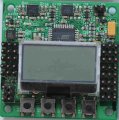
All of these T-copters use KK2 control boards, photo attached: these are great for anyone learning this sort of stuff, as they have their own screen, so you can change settings in the field with out the need for a computer. I also have a, Ardupilot board. I am learning as much as I can before putting it on any machine, as these type of boards need treating with respect, and shouldn't be used lightly.

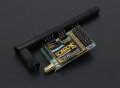
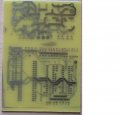
Up till last week I used 2.4GHz TX/RX, but I have been trying to get TX/RX with lower frequency 459MHz working (Uk legal), which is better for foliage flying. I bought OrangeRX TX and RX. A photo is attached: These need programming to change no of channels and frequencies etc. They have the ability to send back telemetry, also beep when the signal is failing. I've been playing with GPS modules (NEO-6M and LEA-6H) and Putty (PC terminal that shows data as it arrives). I've just got all this to work and have just got the large T-copter to fly around, while reading NMEA data on a PC (Note the GPS on the left arm). I couldn't fly far only tens of mtrs, as I got the losing signal beep. (The aerials that come with the modules are notoriously poor) I am now making aerials to suit.

C.
 

Attachments

Last edited:

Thread Starter

camerart

Joined Feb 25, 2013
3,837
hi C,
Try this program in a PIC18F2431 on your test rig.
It checks out OK, it should stop the hunting.
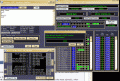
The image shows the 18F2431 test data from/to a PC .

E
Hi Eric,

I tried your program 'as is', it showed '...Test' as it was powered up. When Hbridge is powered nothing. When A111 is entered into RX nothing.

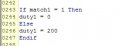
The motor doesn't move till duty1 >155, 128 whistles only (But not in this case). I changed it to 200, (See JPG) still nothing.

I have attached a program that works. This shows Test A090 at the start, then when Hbridge is powered, moves slowly 90D, and the value scrolls down the screen. When A111 is entered using terminal screen one, it shows on the other terminal screen.

C.
 

Attachments

ericgibbs

Joined Jan 29, 2010
21,453
hi,
I did say that the 18F2431 expects AaaaEeee as an input string from the PC.
[its also explained in the program header Comments section]

The Duty is set to 128, approx 50:50 ratio
Retry using the above input string format.
E
 

Thread Starter

camerart

Joined Feb 25, 2013
3,837
Hi,

I've/we've just got the main controller PIC 18F4520 to send AxxxExxx to the HBridge controllers 18F2341 RX pins, which they use for the amount of motor movement. (EricGibbs is designing the programs :))

Camerart.
 

Thread Starter

camerart

Joined Feb 25, 2013
3,837
Hi,

Just got the Azimuth 18F2431 to move the motor with RX simulated AxxxExxx input. Needs testing now.

One problem is that when the RX simulation USB adaptor is connected, the PIC won't reset when switched off, due to voltage coming from the adaptor holding it on, so needs to be disconnected each time. I'm not sure if this will be the case once the correct PCB connections are made.

Camerart.
 
Top