Finding intermittent faults in PIC PCB Peripherals OSHONSOFT

Thread Starter

camerart

Joined Feb 25, 2013
3,842
I don't think the level shifting is needed, because the MISO drops to ~ 2V, when connected to PIC.
Have you checked your program, if the other devices ( BMP280, LCD ) are off.
Could make a test program only for the compass and possibly disconnect the other devices from MISO.

You said in #1 that the radio is one of the SPI devices??
Hi J,
[ I don't think the level shifting is needed, because the MISO drops to ~ 2V, when connected to PIC. ]
The images #117, show lower than ~2V, when connected to PIC.

[
Have you checked your program, if the other devices ( BMP280, LCD ) are off.
Could make a test program only for the compass and possibly disconnect the other devices from MISO. ]
Did you see the EDIT at #117? No difference with Radio disconnected.
C
 

jjw

Joined Dec 24, 2013
823
Hi J,
[ I don't think the level shifting is needed, because the MISO drops to ~ 2V, when connected to PIC. ]
The images #117, show lower than ~2V, when connected to PIC.

[
Have you checked your program, if the other devices ( BMP280, LCD ) are off.
Could make a test program only for the compass and possibly disconnect the other devices from MISO. ]
Did you see the EDIT at #117? No difference with Radio disconnected.
C
I don't understand why the radio would be be a SPI device.
I mean disconnect other SPI devices from MISO, so that only the compass is connected to PIC.
I also wonder do the interrupts mess with software SPI.
Have you tested with all interrupts disabled?
 

sagor

Joined Mar 10, 2019
1,049
I don't understand why the radio would be be a SPI device.
I mean disconnect other SPI devices from MISO, so that only the compass is connected to PIC.
I also wonder do the interrupts mess with software SPI.
Have you tested with all interrupts disabled?
JJW, you have a very valid point. If the rest of the code is using interrupts for other things, and he is using software SPI, improper usage of an interrupt could really mess up the software SPI code. Interrupt code should be as short as possible, and never include any other communication outputs like serial text or other code that takes a long time to process....
 

Thread Starter

camerart

Joined Feb 25, 2013
3,842
I don't understand why the radio would be be a SPI device.
I mean disconnect other SPI devices from MISO, so that only the compass is connected to PIC.
I also wonder do the interrupts mess with software SPI.
Have you tested with all interrupts disabled?
Hi
I don't understand why the radio would be be a SPI device.
I mean disconnect other SPI devices from MISO, so that only the compass is connected to PIC.
I also wonder do the interrupts mess with software SPI.
Have you tested with all interrupts disabled?
Hi J,
Your're correct, the radio isn't SPI, I've corrected #1. I disconnected it anyway, and tried, with similar results. Now re-connected.

Re: My comment regarding my EDIT in #117. As there was no acknowledgment, I'll clarify:
The TEST PCB, only has 1x peripheral 'the COMPASS' also the none SPI RADIO, and has a short test program, For calibrating the COMP. It uses an 18F4520 PIC, with the same PINOUTs as the 18F4620.
I've avoided using it too much as I've changed a lot of things since then, so the programs can't be swapped for later PCBs. I'll reluctantly use it while we find this problem.
C.
 

Thread Starter

camerart

Joined Feb 25, 2013
3,842
JJW, you have a very valid point. If the rest of the code is using interrupts for other things, and he is using software SPI, improper usage of an interrupt could really mess up the software SPI code. Interrupt code should be as short as possible, and never include any other communication outputs like serial text or other code that takes a long time to process....
Hi S,
This project has been running for a few years now, and we've been plowing along testing each peripheral, with their own (as short as poss) programs, with no other peripherals.

For the last year or so, I've been adding each of the peripherals into a MAIN program, making sure each work ok.

The COMPASS problem has only just arisen, so I didn't think it was anything to do with other peripherals.

Each REGISTER READ from each peripheral, is as short as poss, and is still being altered, as results succeed or fail. After the result is in the REGISTER, it is transmitted.
C.
 

Thread Starter

camerart

Joined Feb 25, 2013
3,842
Can you show the whole program, that you use now in tests.
Hi J,
It's not one I now use for tests, it's for calibrating the COMP, I should have called it CALLIbrate not TEST. I'll call it CALLI PCB from now on.
As I'm unfamiliar with it, it needs checking, then I'll post it.
C
 

Thread Starter

camerart

Joined Feb 25, 2013
3,842
Hi,
Switching to the CALLI PCB, today, wasn't good. While checking, I 'popped' 2x radio modules. :( More on order.
C.
 

jjw

Joined Dec 24, 2013
823
Have you taken this from some old version?
This is wrong:

For i = 0 To 18 '5 'READ XYZ Xx2 Yx2 Zx2
compss = 0 'CHIP SELECT COMPASS ON
SPISend addr
SPIReceive data
b(i) = data
compss = 1 'CHIP SELECT COMPASS OFF
addr = addr + 1
If addr = 0x93 Then addr = 0x80 '???CHECK??
?
Next i
The "If" sentence is never true and the loop runs correctly only once.

Change to:
For i = 0 To 18 '5 'READ XYZ Xx2 Yx2 Zx2
compss = 0 'CHIP SELECT COMPASS ON
addr=0x80 + i
SPISend addr
SPIReceive data
b(i) = data
compss = 1 'CHIP SELECT COMPASS OFF
Next i
I am not sure should the chip select 0/1 be used every round in the loop?
The are also other errors. I will look them later.
 

Thread Starter

camerart

Joined Feb 25, 2013
3,842
Have you taken this from some old version?
This is wrong:

For i = 0 To 18 '5 'READ XYZ Xx2 Yx2 Zx2
compss = 0 'CHIP SELECT COMPASS ON
SPISend addr
SPIReceive data
b(i) = data
compss = 1 'CHIP SELECT COMPASS OFF
addr = addr + 1
If addr = 0x93 Then addr = 0x80 '???CHECK??
?
Next i
The "If" sentence is never true and the loop runs correctly only once.

Change to:
For i = 0 To 18 '5 'READ XYZ Xx2 Yx2 Zx2
compss = 0 'CHIP SELECT COMPASS ON
addr=0x80 + i
SPISend addr
SPIReceive data
b(i) = data
compss = 1 'CHIP SELECT COMPASS OFF
Next i
I am not sure should the chip select 0/1 be used every round in the loop?
The are also other errors. I will look them later.
Hi J,
This is from a completely different program, to what we've been working on. It's from the CALLI PCB, which was only for calibrating the COMP modules. I will change it once I know what is causing the WHAT IMAGE problem, then I'll post the program again. I only posted this CALLI one, because it is written with different PINOUTs etc.
C
 

jjw

Joined Dec 24, 2013
823
Hi J,
This is from a completely different program, to what we've been working on. It's from the CALLI PCB, which was only for calibrating the COMP modules. I will change it once I know what is causing the WHAT IMAGE problem, then I'll post the program again. I only posted this CALLI one, because it is written with different PINOUTs etc.
C
I don't understand what the WHAT image should show.
 

Thread Starter

camerart

Joined Feb 25, 2013
3,842
Term View is totally unreadable.
If PCB DATA means compass data, then the change in #130 could help.
Hi J,
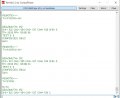
Term view was an image, I've updated it, so you should be able to read it.

I think the odd image in #129 may be something else, it happened before, but I'll change the program and see if it improves.
C
 

Thread Starter

camerart

Joined Feb 25, 2013
3,842
Hi,
I ran the program that shows odd behaviour on the screen through the simulator, and it's not the program.
C
 

jjw

Joined Dec 24, 2013
823
Hi J,
The program in #129 sends HSEROUTS through the radio and is picked up by the computer TERMINAL, as shown in TERM VIEW.
C
But the #129 sends only:

Hserout str_x, ",", str_y, ",", str_z, CrLf
WaitMs 10
Hserout strdeg, CrLf

The TERMVIEW is from another program.
 

Thread Starter

camerart

Joined Feb 25, 2013
3,842
But the #129 sends only:

Hserout str_x, ",", str_y, ",", str_z, CrLf
WaitMs 10
Hserout strdeg, CrLf

The TERMVIEW is from another program.
Hi J,
I'm getting mixed up now!

The first TERM VIEW showed the odd artifacts coming from the CALLI PCB, the example I've just updated shows an example from another program to illustrate what it should look like.

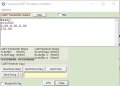
Here is a screen shot of the CALLI program OSH SIMULATOR. It shows the HSEROUT and should look similar. As it's simulated, there's no DATA.
C
 

Attachments

Top