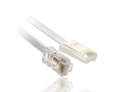
which cable should i be looking at? is there a way to tell which cat mine is? i am going to open it up again after i eat dinner and look properly for what you said (CATxx). thank you so much for your help and advise.
can you tell me where i can buy 100BASE-TX ? I just searched it on amazon but so many different things came up
thank you to all helping me solve this, i am very grateful to you all
Short for Category 5 Enhanced, Cat-5e network cabling is used as a cabling infrastructure for 10BASE-T (Ethernet), full duplex 100BASE-TX (Fast Ethernet) and 1000BASE-T (Gigabit Ethernet, or GbE) networks. The Cat 5e standard provides performance of up to 100 MHz and can be used up to a maximum length of 100 meters.
I am guessing this 100BASE-TX thing really will work for me? can you please confirm for me and tell me where to buy
i cannot bare to use my internet at home because its SO SLOW thats why i am so desperate to get this wired as soon as possible
Later in the text, you can see that any classification above 5 is better than any category before it.
This is wiring and has nothing to do with circuits.
i am not really concerned if its the best or not, i just need a wired connection which is stable and DECENT, i dont even need the quickest, i just need something that will let me surf on my pc in peace
CAT5E cable will work for all ethernet speeds up to gigabit (for runs approaching maximum length, CAT6 may be better, but I've used CAT5E at lengths up to about 100 feet, 30 metres, for gigabit without any problem for many years).
All you need to do is change the jack and plug in some patch cables and you are away. You can probably find a suitable jack at a home improvement store, computer store, etc. The jack you have looks like a snap-in type - you just push down on a little tab on the end just behind the cover for the box and it will pop out. You would need a compatible type, and you can probably find ones that either include a plastic "punch down" tool or just a press-on cover that pushes the wires into the terminals.
.uk puts a lot of us in a disadvantage. The phone system is plain weird compared to the US. I kinda guess uk.
CAT?
Typically we talk about CAT4, CAT5, CAT5E, and CAT6. 5E and 6 are capable of running Gigabit Ethernet. 5e with reduced length.
The primary difference is the tightness of the twists. There is a minimum bend radius that needs to followed for installation. The type of cable is UTP or (unshielded Twisted Pair). Shielded twisted pair is used in some instances. Plenum rated cables are used when the cables pass through an air supply space. These cables have an insulation that isn't toxic when burning.
In the US we use RJ11/RJ12's for telephone and RJ45's for Ethernet.
The telephone one are 6pole with 4 contacts used in the US.
Wiring is usually per TIA568A or TIA568B. The pairs stay in pairs, but the colors are different. I won't get into that right now.
Ethernet has crossover cables and non crossover cables. An interface using auto MDIX doesn;t care. Gigabit crossover cables are not what you expect. 10/100 Ethernet uses 2 pairs. Gigabit 4 pairs.
In the US, I can buy sleaves that convert an RJ45 to a 6pole telco connector.
That said, you can wire everything as an RJ45 (Ethernet) and do some interesting stuff with the patch cables, so you can have telco on a sleaved
RJ45 jack.
single line telco doesn't occupy 10/100 base T pins.
That's just basic info without a lot of details.
I would need to ask how you get Ethernet? DSL requires filters or a splitter. Are you operating in "bridge mode". This adds an important quirk.
"bridge" means, the ISP provided router isn't doing much.
Next, I'd have to ask is the wire connection OK? www.speedtest.net is a first order test. There is another site that gives you a lot more information. That just gives up and download speeds. they should be about 80% of provisioned.
Ping and reverse ping with large packet sizes can give more information.
If your here, wired is OK.
A word about wireless.
In widows, you need the equlivelent of iwconfig in linux.
e.g.
eth0 no wireless extensions.
lo no wireless extensions.
wlan0 IEEE 802.11bgn ESSID:"WLAN"
Mode:Managed Frequency:2.447 GHz Access Point: 00:11:50:**.**:**
Bit Rate=18 Mb/s Tx-Power=20 dBm
Retry long limit:7 RTS thr=2347 B Fragment th: off
Power Management: off
Link Quality=65/70 Signal level=-45 dBm
Rx invalid nwid:0 Rx invalid crypt:0 Rx invalid frag:0
Tx excessive retries:0 Invalid misc:11431 Missed beacon:0
here, there is link quality, signal level and bit rate.
If your within a few meters of the wireless antenna's, you can play around with the channels assigned to the wireless. I have an app on my phone that can scan for SSIDS and show the strength of each of them. The antennas should be in random directions.
Cordless phone and microwave ovens are competing sources of interference.
You need to intuatively look at "line of sight" from your bedroom to the "wireless access point (AP)". Look for thinks like a closet full of clothes, metal cabinets, metal ductwork etc.
Ideally, the access point should be centered in the proposed wifi locations. e.g. center of the house.
So, you need to look at other locations in the house to:
1. relocate the AP or
2. repeat a good WIFI signal with an unobstructed path to your bedroom.
You have some options:
Buy an access point/repeater. Routers can sometimes repeat. An access point has different kind of options.
You can turn off the AP in your router and use a wired AP to a better location in the house. You will need a wire.
from the router/switch.
or
You can repeat the WIFI signal. A repeater does not need a wired connection.
I had a system which broke and I haven't fixed it yet. From like the beginning (1994 with dial-up WIFI), I always had a repeater so i got better reception in the living room and outside. I did put a repeater in the living room which made the living room reception better and outside reception possible. WIFI did not penetrate a cinderblock, dirt and a shed, but would penetrate two windows to get outside.
Your converting to wired should probably be your last resort. My ISP's idea of a DSL wireless router is just plain STUPID. Wireless n is capable of 300 mb/s. DSL is limited to 3 mb/s. Wired connections are limited to 100 mb/s. I have a 5TB RAID server with a gigabit port. Wired connections on my laptop is limited to 100 mb/s.
If I used their DSL modem/wireless AP/switch, connections to my server would be limited to 100 mb/s. When I'm in full swing with wireless ac at 800 mb/s or more. The gigabit switch would be useless.
When I throw a server in the mix, things get really messy. Add wireless ac and a gigabit server and things get messier yet.
Ethernet over power line is not a bad option. I did that when I went from dial-up to DSL initially, but the Ethernet over power line adapters broke easily. I did something unusual. The DSL modem was really close to the demark point like it should be. Then I went Ethernet over power line on the WAN port and had my router/access point in the center of the house in the basement ceiling.
With access points, you can take a single port ethernet connection send it over WIFI to another access point and then convert it back to wired.
CAT5E cable will work for all ethernet speeds up to gigabit (for runs approaching maximum length, CAT6 may be better, but I've used CAT5E at lengths up to about 100 feet, 30 metres, for gigabit without any problem for many years).
All you need to do is change the jack and plug in some patch cables and you are away. You can probably find a suitable jack at a home improvement store, computer store, etc. The jack you have looks like a snap-in type - you just push down on a little tab on the end just behind the cover for the box and it will pop out. You would need a compatible type, and you can probably find ones that either include a plastic "punch down" tool or just a press-on cover that pushes the wires into the terminals.
.uk puts a lot of us in a disadvantage. The phone system is plain weird compared to the US. I kinda guess uk.
CAT?
Typically we talk about CAT4, CAT5, CAT5E, and CAT6. 5E and 6 are capable of running Gigabit Ethernet. 5e with reduced length.
The primary difference is the tightness of the twists. There is a minimum bend radius that needs to followed for installation. The type of cable is UTP or (unshielded Twisted Pair). Shielded twisted pair is used in some instances. Plenum rated cables are used when the cables pass through an air supply space. These cables have an insulation that isn't toxic when burning.
In the US we use RJ11/RJ12's for telephone and RJ45's for Ethernet.
The telephone one are 6pole with 4 contacts used in the US.
Wiring is usually per TIA568A or TIA568B. The pairs stay in pairs, but the colors are different. I won't get into that right now.
Ethernet has crossover cables and non crossover cables. An interface using auto MDIX doesn;t care. Gigabit crossover cables are not what you expect. 10/100 Ethernet uses 2 pairs. Gigabit 4 pairs.
In the US, I can buy sleaves that convert an RJ45 to a 6pole telco connector.
That said, you can wire everything as an RJ45 (Ethernet) and do some interesting stuff with the patch cables, so you can have telco on a sleaved
RJ45 jack.
single line telco doesn't occupy 10/100 base T pins.
That's just basic info without a lot of details.
I would need to ask how you get Ethernet? DSL requires filters or a splitter. Are you operating in "bridge mode". This adds an important quirk.
"bridge" means, the ISP provided router isn't doing much.
Next, I'd have to ask is the wire connection OK? www.speedtest.net is a first order test. There is another site that gives you a lot more information. That just gives up and download speeds. they should be about 80% of provisioned.
Ping and reverse ping with large packet sizes can give more information.
If your here, wired is OK.
A word about wireless.
In widows, you need the equlivelent of iwconfig in linux.
e.g.
eth0 no wireless extensions.
lo no wireless extensions.
wlan0 IEEE 802.11bgn ESSID:"WLAN"
Mode:Managed Frequency:2.447 GHz Access Point: 00:11:50:**.**:**
Bit Rate=18 Mb/s Tx-Power=20 dBm
Retry long limit:7 RTS thr=2347 B Fragment th: off
Power Management: off
Link Quality=65/70 Signal level=-45 dBm
Rx invalid nwid:0 Rx invalid crypt:0 Rx invalid frag:0
Tx excessive retries:0 Invalid misc:11431 Missed beacon:0
here, there is link quality, signal level and bit rate.
If your within a few meters of the wireless antenna's, you can play around with the channels assigned to the wireless. I have an app on my phone that can scan for SSIDS and show the strength of each of them. The antennas should be in random directions.
Cordless phone and microwave ovens are competing sources of interference.
You need to intuatively look at "line of sight" from your bedroom to the "wireless access point (AP)". Look for thinks like a closet full of clothes, metal cabinets, metal ductwork etc.
Ideally, the access point should be centered in the proposed wifi locations. e.g. center of the house.
So, you need to look at other locations in the house to:
1. relocate the AP or
2. repeat a good WIFI signal with an unobstructed path to your bedroom.
You have some options:
Buy an access point/repeater. Routers can sometimes repeat. An access point has different kind of options.
You can turn off the AP in your router and use a wired AP to a better location in the house. You will need a wire.
from the router/switch.
or
You can repeat the WIFI signal. A repeater does not need a wired connection.
I had a system which broke and I haven't fixed it yet. From like the beginning (1994 with dial-up WIFI), I always had a repeater so i got better reception in the living room and outside. I did put a repeater in the living room which made the living room reception better and outside reception possible. WIFI did not penetrate a cinderblock, dirt and a shed, but would penetrate two windows to get outside.
Your converting to wired should probably be your last resort. My ISP's idea of a DSL wireless router is just plain STUPID. Wireless n is capable of 300 mb/s. DSL is limited to 3 mb/s. Wired connections are limited to 100 mb/s. I have a 5TB RAID server with a gigabit port. Wired connections on my laptop is limited to 100 mb/s.
If I used their DSL modem/wireless AP/switch, connections to my server would be limited to 100 mb/s. When I'm in full swing with wireless ac at 800 mb/s or more. The gigabit switch would be useless.
When I throw a server in the mix, things get really messy. Add wireless ac and a gigabit server and things get messier yet.
Ethernet over power line is not a bad option. I did that when I went from dial-up to DSL initially, but the Ethernet over power line adapters broke easily. I did something unusual. The DSL modem was really close to the demark point like it should be. Then I went Ethernet over power line on the WAN port and had my router/access point in the center of the house in the basement ceiling.
With access points, you can take a single port ethernet connection send it over WIFI to another access point and then convert it back to wired.
Thank you for the explanation, but basically you are saying that wired should be the last option? I assumed wired was ALWAYS quicker than Wifi.
In any case, i NEED to wire it because I am not very good with computers to know how to set up everything correct for a strong wifi connection.
i have a laptop and the wireless works fine, but on my PC (which is in my bedroom) the Wifi is TERRIBLE. i believe the pc has a slow wireless card built inside. that is why i NEED wireless on my PC at all costs
what i REALLY want to know is: is there a way I can connect a wire to the phone socket in my room, then connect the other end of the wire to my PC in order to connect directly to my router which is in another room inside the utilities box.
i have received some great advise and links for further reading, but right now i really need a solution. this is what i haven't got because i am far too simple to understand everything everyone is saying to me. i have searched so much on the internet, on youtube etc but NOBODY has given the method of getting it done for a NEWBIE like me
i found a product on amazon called "cdl micro 2m bt male to rj45 cat5e cable"
and i can see that one end of the wire looks like it will fit into my phone socket in my room, and the other end looks like an ethernet cable.
this is something i have been looking for but i don't know if it will work. Can anyone confirm if this will work for me before i buy it? the rj45 end looks exactly like an ethernet cable so maybe rj45 is just another name for ethernet
i have attached a picture of it on here for you to see
I seem to remember that you said that your laptop wi fi connection works wher you laptop is located. Have you tried to see if your laptop works in the location where your other PC is located. This will establish if the problem attenuation of the wi fi signal or a problem with the PC. If you make a table of the wire colours connected to each pin of the RJ45 socket and a table wire colours connected to each pin of the phone socket then we can tell you if it is possible to use the cable. If its is then with this information you can make up an RJ45 to phone plug cable that should work. The only information I can find on structured wiring does not seem to use the 4 pins on the RJ45 connectot that are required for ethernet (Pins 1,2,3 & 6) when it is used for phone signals. We are all assuming that you are probably in the UK but you have nots said if this guess is correct.
I seem to remember that you said that your laptop wi fi connection works wher you laptop is located. Have you tried to see if your laptop works in the location where your other PC is located. This will establish if the problem attenuation of the wi fi signal or a problem with the PC. If you make a table of the wire colours connected to each pin of the RJ45 socket and a table wire colours connected to each pin of the phone socket then we can tell you if it is possible to use the cable. If its is then with this information you can make up an RJ45 to phone plug cable that should work. The only information I can find on structured wiring does not seem to use the 4 pins on the RJ45 connectot that are required for ethernet (Pins 1,2,3 & 6) when it is used for phone signals. We are all assuming that you are probably in the UK but you have nots said if this guess is correct.
hi Les, thanks for your help. Yes i can confirm i am from the UK, England, London.
It is definitely a problem with my PC not my actual Wifi because my laptop Wifi works well. But the PC i bought is custom built, and i think the person who sold it to me wanted to cut costs so it doesnt actually have a built in wifi card thingy. i had to buy a cheap USB to transmit wifi signal. however, i am really not interested in getting wifi signal on my pc because GENERALLY my internet is slow anyway, regardless if connection is good or not. that is why i really badly want to wire it up. i know that these sockets are not in my room for no reason, neither is the utilities box which has labels "bed1", "bed", "bed3", etc.
in relation to the "pins" can i confirm that these are the different colours inside the wire? i will open up the socket again and look at all the different colours and write them down
If it is a slow PC then a fast network connection fill not fix your problem. I suggest to confirm this by moving this PC next to the router and connecting it with an RJ45 cable. This will be quicker than getting it connected via the RJ45 to phone socket method. If it does work better then you can go ahead with your original plan.
The connector in the bedroom should have really been an RJ45 because it's the highest rated speed. This http://www.evonet.com/evonet/index.asp?Page=102 suggests as I just did, you convert the RJ45 jacks tot he BT jacks using LAU (Line Adapter Units).
That's probably why your having a hard time finding the necessary cable.
The cable that you showed, would be fine to connect an RJ45 (wall) to a BT(phone), but not the way you need to go. Why? The wires are not twisted in the silver satin cord. This will create errors in the Ethernet connection.
Again, http://www.molexces.com/webfoo/wp-content/uploads/42-114-Secondary-Line-Adapter-Unit.pdf the wall should have an RJ45 socket, not a BT631A female socket. This shows the pin wiring, but not the pairing. Overlaying ethernet wiring would show the pairing, but not TIA568A or TIA568B standards or something else.
In this application, pairing is not essential, so silver satin cords (non-twisted) can be used.
I don't know if the BT631A plugs will accept a round CAT5 cord. The house/suite was wired wrong. An RJ45 jack should be in the bedroom.
We (in the US) can use these inserts. http://www.l-com.com/ethernet-modular-8x8-insert-adapter-pkg-10
That is actually my plan to do structured wiring at home. One 48 port RJ45 jack panel to the hardwired locations with a 24 port switch and another 12 port panel that's bridged that does telco.
It also looks like what is done in the US is done with the BT connectors, but it's even worse. I read that the pins are n-n numbered, but if you compare connectors, the pins are actually reversed.
The RJ45 side (premise wiring) should either be T568A or T568B. In a given building, you should stuck to one scheme. The difference is two pairs are swapped, but they are still paired.
I agree with KISS that replacing the BT socket with an RJ45 socket is the best solution. This is probably the type of socket that would fit your faceplate in place of the BT socket. You could only do this if you own the property or have permission from the owner.
I agree with KISS that replacing the BT socket with an RJ45 socket is the best solution. This is probably the type of socket that would fit your faceplate in place of the BT socket. You could only do this if you own the property or have permission from the owner.
Hey man, if i buy that socket with the weblink you gave me, and if i pay someone to install it for me, is that all i need to get the wired connection going?
In other words, once that rj45 is installed would it then work if i simply plug my ethernet cable from my router into the utilities box slot 'bed1', then a wire from the rj45 straight to my PC?
Which would would go from the RJ45 into my PC, would the one I found on amazon work then??
thank you for all your help man. i am very grateful and I did read the link. its sad to know that i gotta re-wire stuff because i havent got the slightest clue. at least i know roughly what i need to do now so i can pay somebody to come and do it for me
I suggest that you do what I suggested in post #33 to verify that a wired connection solves your problem before spending money on paying someone to swap over the socket.

 Facebook
 Google
 GitHub
 Linkedin