ERR: Could not mount root RAID d

Thread Starter

Tonyr1084

Joined Sep 24, 2015
9,744
Have an old ReadyNAS NVX "Thing". Has four removable hard drives. Trying to use it to download materials on an iMac Hard Drive (iMHD). Tried reading the iMHD using a Windows based computer with the iMHD installed as an extra drive. No luck.

RNDX4410
NGR•RNDX4000 (B)

What am I missing? Does this need to be connected to the internet? That may be a moot point if I can't mount the root RAID (whatever that is).
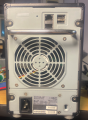
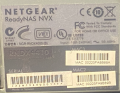
Screenshot 2024-07-26 at 2.38.57 PM.png Screenshot 2024-07-26 at 2.38.13 PM.png
 

Thread Starter

Tonyr1084

Joined Sep 24, 2015
9,744
Looks like it could help. But in short order, reading the manual I came across this:

Congratulations on your purchase of a ReadyNAS Network Attached Storage system from NETGEAR, Inc. If you have not already done so, please read the printed Installation Guide provided with your product and the ReadyNAS Setup Manual on the Installation CD.

The machine was given to me for scrap. I don't have an installation CD. I suppose when I have more time I'll find on line a download that will solve a lot of problems. That is IF this machine is even working. It appears to be working. The title is the exact readout on the front screen, so it's opening with an error message and I can go no further until I have something that is capable of reading it. But then I don't even know where to upload the CD, whether it's supposed to be installed on the machine or on a computer and attached by Ethernet cable. I just don't know. This is almost a foreign language to me.

I wonder if Geek Squad can help.
 

Thread Starter

Tonyr1084

Joined Sep 24, 2015
9,744
Going around and around in circles with Chat. Every time I click "Talk to an agent" I get the option to click "Talk to an agent". But I don't get to TALK to an agent I get the option to "Talk to an agent". I'll try emailing with my question. Nevertheless, thank you for digging up the manual. Much appreciated. When it comes to networking I have no idea what I'm doing.
 

Schluppy

Joined Jun 7, 2024
29
Have an old ReadyNAS NVX "Thing". [...] Trying to use it to download materials on an iMac Hard Drive (iMHD).
What does this mean?

Did you install the Mac drive in the NAS? Or, are you trying to move files from the Mac drive to the NAS? Or something else?

AFAICT, you have two issues:

  1. 1. Reading the Mac drive; and
  2. 2. Getting the NAS running

Is that correct?

The Mac drive is likely formatted in one of three filesystems: HFS, HFS+, or APFS.

What you need is a machine that can read those filesystems. So another Mac, a Windows machine with appropriate 3rd party software, or a Linux machine.

With regard to the NAS, does it have disks already installed in it?
 

KeithWalker

Joined Jul 10, 2017
3,603
Sorry I can't be more help. I'm a mostly a hardware guy. I don't have much experience with networks either. I have had a book on my bookshelf called "Teach yourself TCP/IP" for over twenty years and never had the courage to open it!
 

Thread Starter

Tonyr1084

Joined Sep 24, 2015
9,744
AFAICT, you have two issues:

  1. 1. Reading the Mac drive; and
  2. 2. Getting the NAS running

Is that correct?
Yes
With regard to the NAS, does it have disks already installed in it?
When I got it there were three drives installed. Turning it on with just those three drives yielded the error code. Putting just one drive in, set in each slot (four tests) - no change. Next drive, same thing, same result, Third drive, same thing, same result. The MAC drive - same thing, same result.

I currently have it plugged directly into a router. But I don't know how to access it. Maybe 192.168.0.2 or something else, I have NO idea what that might be. My five biggest problems are that I'm flying in a fog, flying blind, at night no lights, no instruments.

I know what I know and I know WHEN I don't know something.
 

Schluppy

Joined Jun 7, 2024
29
Ok, 1st step... set your Mac Hard Drive aside. Do NOT install it in your NAS. Install the 3 disks it came with and power it up.

2nd step should probably be finding your NAS on the network.

Identify the make & model of your router, read the manual for it, and find out its default IP address. Enter that IP in your browser and log in to the router.

Somewhere in your routers UI there will be a list of devices that are on your network and what IP address has been assigned to each of them.

You're going to be looking for an IP that corresponds to the "MAC Address" of your NAS -- the stickers on the rear, "MAC1" and "MAC2".

MAC Addresses are how your router identifies devices on your network. Your NAS has two MAC Addresses and each one corresponds to one of the LAN ports on the rear.

LAN1 is identified by MAC1. LAN2 is identified by MAC2.

Once you find your NASs IP address, enter that in your browser and see what happens. If you're lucky you'll pull up the NASs web UI.

Now, with the NAS itself, chance are pretty good that one or more of the disks has failed and/or the filesystem on the disks has become corrupted.

If you've no concern for the data contained on those disks, run one of the "system reset" procedures contained in the NAS manual.

I would most likely opt for procedure 2: "Reset the ReadyNAS back to the factory default settings."

When the system reset is complete, go back to the NAS web UI and see what it tells you about the state of the disks it contains.
 

eetech00

Joined Jun 8, 2013
4,704
There is probably a "reset to defaults" function (usually a tiny button somewhere on the NAS).
Before I did anything with that NAS, I would remove the disks and wipe each disk with an disk eraser.
You can use Daricks Boot and Nuke (DBAN) to do that (free).
Afterwards, reinstall the 3 disks and configure the NAS for RAID 5 using 3 HD disks.
 

Thread Starter

Tonyr1084

Joined Sep 24, 2015
9,744
The reset button was one of my first tries. Though I didn't remove the hard drives.

I've been very busy with a client who wants an additional closet and two bathroom cabinets. My days are filled and I'm finding little time for my electronics lab. But this is something I most definitely want to do. So I'll get around to it hopefully this week.

Thanks for the responses thus far. There HAS been some help, though I still have my problem.
 
Top