EasyEDA making a cutout for OLED in PCB

Thread Starter

TonyAm

Joined Oct 12, 2022
84
Hello,
Thank you for reading. I've designed a control panel with EasyEDA, holes for pots and a cutout for an OLED. In the EasyEDA the 2D and 3D images show the correct cutout for the OLED, however after uploading to JLCPcb the images on their website show no cutout for OLED, only holes for pots.

Image from EasyEDA with OLED cutout shown:
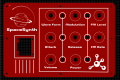
ControlPanel.png

After uploading gerber file to JLCpcb the image shown no OLED cutout:
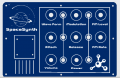
controlPanelNoCutout.png

Is there a reason the image on the JLCpcb website shows no cutout for the OLED?

Sincere thanks,
TonyAm
 

BobTPH

Joined Jun 5, 2013
11,488
They may not support arbitrary shaped cutouts. Did you check with them?

I have written software that produces Gerber files and don’t remember there being a command for arbitrary cutouts. In fact, the drill holes are not in the Gerber files, but in a drill file.

Edited: Just looked it up, they are part of the outline layer. Do your Gerber files contain an outline layer with the cutouts?
 

Thread Starter

TonyAm

Joined Oct 12, 2022
84
Email JLCpcb or chat with them. I have found the engineers to be very helpful. Some time it might take a day but often in hours you will have an answer.
Yes, it turns out that the area shown in the red pcb image will be cut out. I've done this s few times by either using the pink/purple "board outline" and track drawing tool, as well as drawing a solid square/rectangle shape from the pcb tools menu, then right clicking on the shape a selecting "convert into board cutout".

For some reason when uploaded to the jlcpcb website the image there didn't show the cutout area, but they said it will be cut.

Thanks,
TonyAm
 

Thread Starter

TonyAm

Joined Oct 12, 2022
84
They may not support arbitrary shaped cutouts. Did you check with them?

I have written software that produces Gerber files and don’t remember there being a command for arbitrary cutouts. In fact, the drill holes are not in the Gerber files, but in a drill file.

Edited: Just looked it up, they are part of the outline layer. Do your Gerber files contain an outline layer with the cutouts?
Right part of the "BoardOutline". You can draw cutouts either using the BoardOutline layer with the track tool, or by drawing a solid rectangle/square, then right clicking on the shape and selecting "convert to board cutout".
They say it will be cut, even though it's not shown in the gerber file.

Thanks,
TonyAm
 
Top