Do i need PC/MCU/PLC in project

Thread Starter

champ1

Joined Jun 4, 2018
136
You don't need to modify the software running on the printer. Like I mentioned before just write the barcode to a ".txt" file and print the ".txt" file with a ".bat" file or in any other way you want.
batch file is a script file used to automate tasks in Windows.

If I'm not wrong , Printing can also be controlled from within Batch Script via the NET PRINT command
 

Reloadron

Joined Jan 15, 2015
7,891
Printer and scanner have USB port and Computer also have USB port.

Printer come with ready software, when we install that software, Printer will start working manually

My doubt , Do I need to modified ready software or I just need to write a program on computer that will tell the printer to print

printer has its own software running on PC. so I think I don't need extra program
You don't need to modify anything. When a box, package or item comes along on the conveyor you can, for example, scan your bar code. You need to know the box is there. Now you need somewhere to put the data (bar code) you just scanned. I suggested using Excel, Access or any data base software of your choice. Any database is easily printed (hard copy) with the included software or write your own software. You are not going to be printing as you acquisition are you? What exact order do you plan to do things and what exactly, step by step are you looking to do? Your printer software merely supports your printer and brings up a print dialog box.

Are you planning any user interface at all? What would you expect your user interface to do?

Ron
 

Thread Starter

champ1

Joined Jun 4, 2018
136
Print on the product? I have no idea what you mean by that? I assumed the product(s) had printed bar codes on them be it labels or whatever.
Ron
I want to make project for Pharma Company. I want to print the barcode on box and then want to scan that barcode if the barcode is printed correctly then accept and if barcode is not printed correctly or duplicate then reject

Finally count how many product reject and pass
 

Reloadron

Joined Jan 15, 2015
7,891
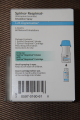
Here is an example of a Pharmaceutical product which has a bar code.
Bar Code Example.png

The labeling on the box is printed before the box is formed into a box. All of the boxes will have the same bar code. The bar codes from box or package to package are all the same and link back to a specific produce. In this example the product is Spiriva Respimat and every box containing that product will have the same bar code, they will all be duplicates. Using the example the bar code is 0597-0160-61 and every box will have the same bar code. The next package or box is not going to be 0597-0160-62 and the next 0597-0160-63, they are all going to be the same. They will all be duplicates for any given product. You can print successive or incremental bar codes but the different codes would be tied to different products.

You can write code to find duplicates but I see no reason to. During any production run the bar codes will all be duplicates for a given product. I provided how to find duplicates earlier in the thread but again, they will all be the same for a given product.

You would, depending on data base, use IF to identify empty cells. Using Excel for example as a data repository you would code If isBlank Then do something but it would be an IF statement in your code. You have yet to share what you plan to do with the data?

Ron
 

Thread Starter

champ1

Joined Jun 4, 2018
136
You have yet to share what you plan to do with the data?
Ron
I want to save the record of barcode online/offline, keep the record of how many good and bad product

I did the little bit research on barcode scanner.

There are the two types of barcode scanner
  • Laser-based barcode scanner
  • Camera based barcode scanner
Which barcode scanner is suitable for my project?

For my more information can you also tell me,
If I buy a barcode scanner, do they provide any software to collect the scan data, is that software customizable
 

Reloadron

Joined Jan 15, 2015
7,891
You likely want a LASER bar code scanner as cameras are used more for QR codes.

All of the PC compatible scanners I have seen include software. The software just provides the needed drivers for the operating system. Most bar code scanners also can scan several types of bar codes and the software allows the scanner setup. I suggest you read:

Types of Barcodes: Choosing the Right Barcode. I mention that earlier, there are several types of bar codes so you want a scanner which will work with what you have and need.

You collect scanned data however you want and you write the software. The included software will setup the PC for the scanner but what you do with the data is up to you. This is why I asked several times what you plan to do with the data? You need to place collected data somewhere of your choosing and write your software to make it happen.

You may also want to note that some barcode scanning software includes a SDK (Software Developers Kit) which contains files like DLL (Dynamic Library Link) for use in your software development.

Ron

 
Last edited:

Thread Starter

champ1

Joined Jun 4, 2018
136
I am working on a project where I have to connect a photoelectric sensor to the computer. Computer should know if there is obiect or not

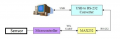
This is my plan to connect a sensor to the computer


upload_2018-11-19_18-4-23.png
Sensor Electrical data
response time / release time < 1 ms
voltage supply range +Vs 12 ... 30 VDC
current consumption max. (no load) 40 mA
current consumption typ. 30 mA
voltage drop Vd < 2 VDC
output function light / dark operate
output circuit PNP
output current < 100 mA
short circuit protection yes
reverse polarity protection yes

I need help to read the datasheet I don't understand what would be output voltage of sensor. If it's more then 5 V then It can be damage microcontroller
 

Attachments

ericgibbs

Joined Jan 29, 2010
21,448
hi,
The datasheet shows an open circuit Collector PNP, which will pull up to Vsupply, it requires an external resistor from the out to 0v.
You could make that resistor a divider ie: 12V in 5v out.
E
 

Attachments

Thread Starter

champ1

Joined Jun 4, 2018
136
hi,
The datasheet shows an open circuit Collector PNP, which will pull up to Vsupply, it requires an external resistor from the out to 0v.
You could make that resistor a divider ie: 12V in 5v out.
E
So I need voltage divider circuit.

I have to write two programs, one for microcontroller so microcontroller will read the status of the sensor and It will send to the serial port of computer and another for computer that will read the serial port of the computer

Anything else I need
 

ericgibbs

Joined Jan 29, 2010
21,448
hi c,
Which type of MCU are you using.?
The type of RS to USB converters I use, expect a TTL level as per the output of a MCU, no MAX232.
E
Ref Edit post #2 image for divider.
 

danadak

Joined Mar 10, 2018
4,057
Just for information, there are micro controllers that would
allow you to take USB directly to PC without having to use
UART and USB to UART dongle. And they have analog,
signal conditioning (DSP), LCD support, logic.....all onchip.

AN57294 - USB 101: An Introduction to Universal Serial Bus 2.0 07/14/2017
AN57473 - USB HID Basics with PSoC® 3 and PSoC 5LP 04/27/2017
AN58726 - USB HID Intermediate with PSoC® 3 and PSoC 5LP 05/04/2017
AN73503 - PSoC® USB HID Bootloader 08/01/2017
AN82072 - PSoC 3 and PSoC 5LP USB General Data Transfer with Standard HID Drivers 05/11/2017

List of resources onchip, attached.


Regards, Dana.
 

Attachments

Last edited:

spinnaker

Joined Oct 29, 2009
7,830
Just for information, there are micro controllers that would
allow you to take USB directly to PC without having to use
UART and USB to UART dongle. And they have analog,
signal conditioning (DSP), LCD support, logic.....all onchip.

AN57294 - USB 101: An Introduction to Universal Serial Bus 2.0 07/14/2017
AN57473 - USB HID Basics with PSoC® 3 and PSoC 5LP 04/27/2017
AN58726 - USB HID Intermediate with PSoC® 3 and PSoC 5LP 05/04/2017
AN73503 - PSoC® USB HID Bootloader 08/01/2017
AN82072 - PSoC 3 and PSoC 5LP USB General Data Transfer with Standard HID Drivers 05/11/2017

List of resources onchip, attached.


Regards, Dana.
You are making this WAY more complicated and confusing then it needs to be. Direct USB is way more complicated that RS232 IMHO. I think the Arduino can do terminal over usb easily but I have never tried it.


TS does not need to connect via USB. Look at the diagram. TS needs to connect via RS232 and that is it. Diagram shows a USB RS232 convertor. Just purchase an Rs232 usb convertor if the pc does not have a serial port.

But I would go one better. I would just use an HC-05 and avoid the convertor and MAX232 all together. A whole lot more simple. The only issue is connecting the PC to the HC-05 via BlueTooth. At least for me it is always a hassle. But once connected, it works great.
 
Last edited:

danadak

Joined Mar 10, 2018
4,057
You are making this WAY more complicated and confusing then it needs to be. Direct USB is way more complicated that RS232 IMHO. I think the Arduino can do terminal over usb easily but I have never tried it.
Actually no, there is several example projects already available. One would
just mod them to get up and running quickly. Of course that would be for a
person knowledgeable on USB, a basic understanding of protocol.

Really depends on the posters level of experience.


Regards, Dana.
 

spinnaker

Joined Oct 29, 2009
7,830
Actually no, there is several example projects already available. One would
just mod them to get up and running quickly. Of course that would be for a
person knowledgeable on USB, a basic understanding of protocol.

Really depends on the posters level of experience.


Regards, Dana.

We are going to have to agree to disagree. I don't see how it gets any easier than an HC-05. You don't even need a micro with a serial peripheral though it makes it a tone easier.
.
 

Reloadron

Joined Jan 15, 2015
7,891
Why do I believe this thread goes back to your questions in this open thread? In post #31 I made a suggestion and gave you a link to try. Since all you need is a few digital I/O ports all you need is a USB to RS232 dongle. That is all you need. The demonstration clearly shows how the serial port RS232 can be used.

All of this would likely go better if you kept everything in a single thread. People would then understand your objective and better help you. You mentioned you wanted to program in C# The small program I linked you to was written in VB 6.0 about 20 years ago. It has worked on every USB to RS232 dongle I have tried it with. Have you run it?

Ron
 
Top