Do i need PC/MCU/PLC in project

shteii01

Joined Feb 19, 2010
4,644
I have connected sensor with microcontroller but never connected sensor with personal computer

consider following module

1. Computer
2. Barcode scanner ( Nuscan 3000 series)
3. photo eye sensor

How to connect sensor with computer ?

barcode scanner has button and we have to press in every scan

how to interface barcode scanner and sensor for automatic scanning ?
Depends on what you bought.

You should have read installation and operation instructions for the scanner before you bought it.

The photo eyes that I am familiar with are connected to PLC, then PLC talks to PC using IP (Industrial Protocol).

I am not controls engineer. You need to research (read) the materials that each piece of equipment has, see what are the connection options (hardware and software). Also keep in mind your goal, 150+ items per minute, you may find a solution, but it might not be fast enough. Finally, you can contact manufacturers/distributors of the equipment you are researching, some of them have personnel to advice/guide/help integrate their systems.
 

Reloadron

Joined Jan 15, 2015
7,891
Most bar code scanners are USB

The photo sensor can be interfaced however you wish to interface it. My suggestion would be a simple data acquisition device all; you are doing is reading a Boolean. The carton is there or it isn't. yes, no a one or zero. It can be as simple as using a RS 232 port or a USB to RS 232 adapter. Data lines aside a RS 232 port has a few DIO (Digital In Out) lines. You really only need a few DIO lines. Most small DAQ devices include a SDK (Software Developers Kit) so you can write software in the language of your choosing.

I have connected sensor with microcontroller but never connected sensor with personal computer
Then use a micro like an Arduino or any micro of your choosing. Just interface the PC with the micro.

You do not need to press a button for each scan, it depends on the scanner you use. This is why it was suggested you look at different scanners and find one which suits your needs. Also scanners with triggers do not always require a manual trigger pull. it can be as simple as a NPN switch externally triggered by the PC.

I asked several times what you plan to do with the scan data? I assume you have some programming skills? I also assume some electronic skills? This is your project.

Ron
 

Thread Starter

champ1

Joined Jun 4, 2018
136
This is my requirement

there are the bunch of cartoon moving one by one on convener belt in factory, There is one industrial printer printing code on cartoon one by one then camera is scanning code if the code is printed that's means cartoon accepted if there is no code or duplicate code printed on cartoon the cartoon will be rejected and send to dustbin
I'm researching a lot for printing and scanning in past few days.

final conclusion I have to write program for PC so that PC will talk with sensor's, barcode scanner and printer.

I asked several times what you plan to do with the scan data?
I want to store data into database

I am planning to use c# .Net programming.

Have you written any code for PC programming to control any hardware device ?
 

Reloadron

Joined Jan 15, 2015
7,891
I want to store data into database

I am planning to use c# .Net programming.

Have you written any code for PC programming to control any hardware device ?
OK, now we are making progress and to answer your last question first I am not a programmer type. Late in my career I did some very light programming for data acquisition applications, similar to what you want to do. Unfortunately back then, at the time, the only language I used was Visual Basic 6.0 long before .NET came along.

I am sure you can do what you want to do using C# in .NET but I am not sure how to go about it. Most everything out there now is new to me, especially the database software. Access and My SQL was as close as I got with dumping data into a database that or just using Microsoft Excel. On the bright side we do have some very good programmer types in these forums. The nice thing about Excel or Access is both software solutions allow you to easily write macros. Sadly I will not be much help with your code.

The example I showed you earlier was just writing to a Excel cell and moving to the next cell using a line of code as a macro in the spreadsheet. I used another line of macro code to identify the duplicate bar code and change the cell background color.

So you can use the database of your choice. Your software will open the database, add to the database, advance to the next line or cell in the database and flag any duplicates or blank cells.

Ron
 

Reloadron

Joined Jan 15, 2015
7,891
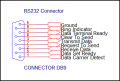
I got to thinking further about this. Something I mentioned earlier came to mind. Several years ago I did a small project using a USB-A to Serial Adapter (DB9). Commonly called a RS232 port or just comm port. I found that in the case of the adapter I used my Logic High was about 5 volts and logic low was about -5 volts. If you look at a RS232 port here is what you get:

RS232.png

The port allows three digital inputs and two digital outputs. I accessed the com port using VB 6.0 but I am sure it can be done in C#. CTS pin 8, DSR pin 6, and DCD pin 1 cal all be used as a digital input and DTR pin 4 and RTS pin 7 can be used as digital outputs. Again, you really do not need much for what you want to do.

Ron
 

Thread Starter

champ1

Joined Jun 4, 2018
136

The port allows three digital inputs and two digital outputs. I accessed the com port using VB 6.0 but I am sure it can be done in C#. CTS pin 8, DSR pin 6, and DCD pin 1 cal all be used as a digital input and DTR pin 4 and RTS pin 7 can be used as digital outputs. Again, you really do not need much for what you want to do.

Ron
I didn't understand what do you mean ? I understand We can send data from mcu to PC or We can receive data from PC to MCU using communication port. I think we cane use usb to rs232 serial converter
 

Thread Starter

champ1

Joined Jun 4, 2018
136
Here's a mad idea that you'd be crazy to put lots of time into. There are various apps available for Android that combine barcode readers with Bluetooth. Get one of these, run it on a cheap smartphone, and send the data to your computer via Bluetooth, and the job's done.

Here's one:
https://play.google.com/store/apps/details?id=com.ramoson

As they say, "Now try to use. Have a good works!"
That's a good idea John P but now I am looking idea for the industrial purpose. I want to make a machine for printing and scanning barcode
 

ArakelTheDragon

Joined Nov 18, 2016
1,366
That's a good idea John P but now I am looking idea for the industrial purpose. I want to make a machine for printing and scanning barcode
It will be better to use a ready printer. The printer needs to communicate with the computer and the computer will be connected to the barcode scanner. From there you just need a simple "C sharp" program to do what you want. You can use".bat" files to start it and run it in different modes.
 

Thread Starter

champ1

Joined Jun 4, 2018
136
It will be better to use a ready printer.
What do you mean by a ready printer?

From there you just need a simple "C sharp" program to do what you want. You can use".bat" files to start it and run it in different modes.
I can write a program for microcontroller but I have never programmed a computer. I know it's a little bit difficult to jump on another language but I have to do it for project requirements.

somehow I have started, I have downloaded visual studio to write "C sharp" program and I'm doing some practice on it.

My doubt is that "one program is already running on the printer then how the computer program will give instruction to a printer ?
 

Reloadron

Joined Jan 15, 2015
7,891
I didn't understand what do you mean ? I understand We can send data from mcu to PC or We can receive data from PC to MCU using communication port. I think we cane use usb to rs232 serial converter
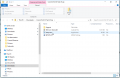
Here is what I was getting at. Any RS232 Serial port has some digital in and digital out available to you. Here is a small program I wrote years ago to demonstrate this. You can download the tiny program from here. Once you download the program it will be in a zip folder so open the zip folder and extract the contents. You will see the following:
Setup.png

Click setup.exe and run through the simple install. The program is very small, about a few MB and will rin on Windows 98 through Windows 10.

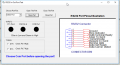
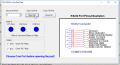
When you run the program it will look like this:
MyComm1.png

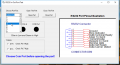
Use your computer Device Manager to see how your Comm Port is setup when using a USB to RS 232 Converter. In my system it is Comm 4 so I choose Com 4 from the drop down menu.
Comm 2.png

Now just click Open Port and the program will display the status of the 3 digital inputs and two digital outputs.
MyComm3.png

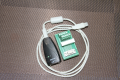
Here are a few images of my USB to RS232 converter:
Adapter 1.png

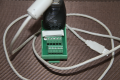
Connected:
Adapter 2.png

The program was originally written in VB 6.0 but you should get the idea as to how the RS232 Serial port can be used as a digital in / out. If you apply a 5 volt signal between port ground and any digital in the shape color will change likewise if you check the digital out check boxes you will measure a changing voltage (logic level) on the Digital Out pins and ground.

You can easily use C+ to communicate with a comm port using a USB adapter.

Ron
 

ArakelTheDragon

Joined Nov 18, 2016
1,366
Since the project requires the use of a computer, my idea is the following:

The barcode scanner is already connected to the computer with a USB
"
".
You can connect your printer with the computer also with USB
"
".
And from there you need to get the information from both and do things with some simple "C shard/C++/C" program. That is the barcode scanner will give you information for the barcode and if its duplicate, etc. The printer will only print. The printer can be connected via a com port, in which case the interface will be RS232.

This approach takes the least money for hardware, but its the most difficult one as it requires programming and intercepting the information from the barcode scanner USB and sending information to the printer.

Otherwise you will need to do this with an MCU. The MCU needs to have a USB connection for the barcode scanner, USB or COM port (RS232) for the printer and USB or COM port (RS232) for the computer. In any case the computer will need to read this information and put it in an excel file or any other file you want to make the report on. To avoid the need of an MCU, you can use the computer directly, but that will require computer programming skills. In both cases the programming can not be avoided.
 
Last edited by a moderator:

ArakelTheDragon

Joined Nov 18, 2016
1,366
I also have an option for you to use a camera for the barcode, instead of a reader. The only option is some app (program) like the android apps which scan the barcode from a picture, to scan it and print it or something. I do not know how to program this on android, the camera will have to be positioned directly over the barcode to avoid the picture including other things.
 

Thread Starter

champ1

Joined Jun 4, 2018
136
Here is what I was getting at. Any RS232 Serial port has some digital in and digital out available to you. Here is a small program I wrote years ago to demonstrate this. You can download the tiny program from here. Once you download the program it will be in a zip folder so open the zip folder and extract the contents. You will see the following:

The program was originally written in VB 6.0 but you should get the idea as to how the RS232 Serial port can be used as a digital in / out. If you apply a 5 volt signal between port ground and any digital in the shape color will change likewise if you check the digital out check boxes you will measure a changing voltage (logic level) on the Digital Out pins and ground.

You can easily use C+ to communicate with a comm port using a USB adapter.

Ron
Thanks, a lot Ron for excellent description
 

Thread Starter

champ1

Joined Jun 4, 2018
136
Since the project requires the use of a computer, my idea is the following:

The barcode scanner is already connected to the computer with a USB

You can connect your printer with the computer also with USB

And from there you need to get the information from both and do things with some simple "C shard/C++/C" program. That is the barcode scanner will give you information for the barcode and if its duplicate, etc. The printer will only print. The printer can be connected via a com port, in which case the interface will be RS232.

This approach takes the least money for hardware, but its the most difficult one as it requires programming and intercepting the information from the barcode scanner USB and sending information to the printer.
To avoid the need of an MCU, you can use the computer directly, but that will require computer programming skills. In both cases the programming can not be avoided.
Most of the persons suggesting computer instead of MCU

you're correct the computer programming is a problem for me but I have time to learn and I have already started to work on it. I just need to take an action step by steps to achieve a big target.

Target 1 : I have to write a computer program that will talk to the printer while printer has its own software program running on it

I'm looking sample code so I can get the idea

Can you help me to get sample code in c sharp programming
 

ArakelTheDragon

Joined Nov 18, 2016
1,366
Most of the persons suggesting computer instead of MCU

you're correct the computer programming is a problem for me but I have time to learn and I have already started to work on it. I just need to take an action step by steps to achieve a big target.

Target 1 : I have to write a computer program that will talk to the printer while printer has its own software program running on it

I'm looking sample code so I can get the idea

Can you help me to get sample code in c sharp programming
I am a hardware developer, I know C programming for microcontrollers, but not for operating systems. If you intend to start learning the OS programming now, prepare to spend at least 2 active years for it. Otherwise the above program might be modified or even used for what you need. But I do not know exactly how it works, so its good for you to check by yourself.
 

Reloadron

Joined Jan 15, 2015
7,891
This article gives a good overview and some code samples which can be used on a Windows form in C#. Take note of the section where the author mentions
"This gives a quick demo of how the pins work. Below is the code":

You create a little windows form, similar to what I linked to in my example but in C#. After you play around with the provided code you can modify things to suit your needs. This should get you started.

Ron
 

Thread Starter

champ1

Joined Jun 4, 2018
136
This article gives a good overview and some code samples which can be used on a Windows form in C#. Take note of the section where the author mentions
"This gives a quick demo of how the pins work. Below is the code":

You create a little windows form, similar to what I linked to in my example but in C#. After you play around with the provided code you can modify things to suit your needs. This should get you started.

Ron
Printer and scanner have USB port and Computer also have USB port.

Printer come with ready software, when we install that software, Printer will start working manually

My doubt , Do I need to modified ready software or I just need to write a program on computer that will tell the printer to print

printer has its own software running on PC. so I think I don't need extra program
 

ArakelTheDragon

Joined Nov 18, 2016
1,366
Printer and scanner have USB port and Computer also have USB port.

Printer come with ready software, when we install that software, Printer will start working manually

My doubt , Do I need to modified ready software or I just need to write a program on computer that will tell the printer to print

printer has its own software running on PC. so I think I don't need extra program
You don't need to modify the software running on the printer. Like I mentioned before just write the barcode to a ".txt" file and print the ".txt" file with a ".bat" file or in any other way you want.
 
Top