Diagnosing a possibly faulty HDMI plug

MisterBill2

Joined Jan 23, 2018
27,631
Once again, the situation is a puzzle. From the initial post: " When we first installed the monitor the HDMI port on our network video recorder (NVR) would no longer accept any signals. " Is that port on the Network Video Recorder an input? or an OUTPUT?? or possibly BOTH???
It is not usual to connect a VIDEO MONITOR INPUT CABLE to an input port of any device, as my experience goes. So we are missing something here.
If that port is bi-directional then it would be quite possible that the HDMI "plug and play" communication changed what it is configured as, and the other device, which may not be "plug and play" equipped, is not able to change it back.

My understanding is that the HDMI interface does include device communication lines.
 

Tonyr1084

Joined Sep 24, 2015
9,744
48V? Can you post a picture of the PS? That doesn't make sense to me either.

The date code on the board: 1730 suggests it was made the 30th week of the year 2017. Likely around July. Would have to count out the weeks on a calendar to decide whether it's June or July.
 

Thread Starter

Tp86

Joined Sep 13, 2023
210
Hi,

A first thought is to use a vga to HDMI converter cable to connect rather than right to the HDMI connector, but this as well as other fixes like this still carry a risk.

That said, if you have a $1000 USD device that is being killed by a $100 device, the best bet is to buy another $100 device from a different manufacturer, even if it costs $200 USD. If the $1000 USD device still breaks, it's bound to be the $1000 device that is just going bad, and if it can not work with the monitor is was designed for, then it's a bad design. In that case, you'd be forced to go with another $1000 device from a different manufacturer.

Could it have something to do with the power connections or static electricity.
If it is plugged in and out a lot it may be static electricity and connections that are not protected well enough.
If the power connections for both devices come from different wall outlets, it could be a galvanic isolation problem, meaning one device gets a slightly different potential on the ground, or one of the grounds in one of the devices is not done right in the design.
To test for the second case, you could plug both devices into the same wall outlet but do not connect the cables. Then, connect an AC voltmeter to the two devices, one probe to one device ground, the other probe to the other device ground, and see if there is a potential difference measured. If you measure more than maybe 5 volts, connect a 10k resistor from one ground to the other and see if the potential goes to zero or much lower. If it does not go much lower there could be that problem.

Problems like this can be difficult to solve but the most certain fix is to buy new devices from a different manufacturer or at least a different model. I know this may sound a bit expensive, but the alternative is to keep blowing devices out.

My gut feeling is that there is a spike that appears on one pin caused by a small design flaw, which could stem from various reasons. A fix for this could be connecting a custom made connector set that has series resistors inside which reduce the current when a spike appears. This also carries quite a bit of risk though because the resistors have to be sized just right, and there are a lot of pins in an HDMI connector.

One almost sure fix comes to mind now though. If they make an HDMI galvanic isolation device you can insert that between the two device HDMI connectors. They make these for RS232, or at least they did at one time, so you can make voltage measurements with a voltmeter that uses a straight RS232 and not worry about blowing up your computer.
This will only work if there is not some innate design flaw with the $1000 device though.
Hi mate. Thanks for you advice on this matter! I agree that its not worth connecting it to the new 1000 dollar NVR again in case the fault is still there. We purchased a new monitor from different manufacturer.
What we believe is the problems with Bill's help was that the NVR may have been trying to use a resolution that may have been unsupported by the monitor. So they screen stayed black. We possibly should have tried to connect a VGA to another monior and see if we could reconfigure the resolution manually for that HDMI port on the NVR. We no longer have that NVR so Im unable to test, unfortunately.
Regarding galvanic isolation for HDMI, I think this would be it http://www.advancedphotonics.co.jp/en/hdmi-isolator.html
They seem pretty difficult to find but ill ask in some of my local stores
I do believe that there is a good possibility the HDMI protocol simply just messed up and the recorder and monitor became set on a resolution that the monitor was unable to display. Possibly a factory reset will have fixed it but Ill never no know we my brother got rid of it a while ago
 

Attachments

Thread Starter

Tp86

Joined Sep 13, 2023
210
Once again, the situation is a puzzle. From the initial post: " When we first installed the monitor the HDMI port on our network video recorder (NVR) would no longer accept any signals. " Is that port on the Network Video Recorder an input? or an OUTPUT?? or possibly BOTH???
It is not usual to connect a VIDEO MONITOR INPUT CABLE to an input port of any device, as my experience goes. So we are missing something here.
If that port is bi-directional then it would be quite possible that the HDMI "plug and play" communication changed what it is configured as, and the other device, which may not be "plug and play" equipped, is not able to change it back.

My understanding is that the HDMI interface does include device communication lines.
Hi mate. I apologize the thread is very confusing now as my brother initially didn't give me all the details. I've asked him many questions about it over the week and gained much more insight. I'm almost certain the hdmi on the recorder was output only!
I do believe there is a good possibility the NVR synced to an incompatible resolution to NVR we had. I unfortunently cannot test it cause we dont have that one anymore so its very hard to diagnose. I do have the original NVR that completely died which is different to the NVR that had an unresponsive port.
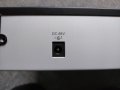
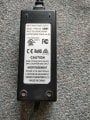
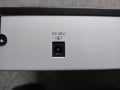
The power supply on it is very unusual in that it uses 48V.

48V? Can you post a picture of the PS? That doesn't make sense to me either.

The date code on the board: 1730 suggests it was made the 30th week of the year 2017. Likely around July. Would have to count out the weeks on a calendar to decide whether it's June or July.
I tested 48V on the power supply when it is plugged into the NVR. I'm not certain if I can rule out a faulty power supply though because I'm not sure if its under load. What I want to buy is a thermal camera device to see if any components are overheating
IMG20231209093910.jpg
IMG20231209112437.jpg
 

MisterBill2

Joined Jan 23, 2018
27,631
Now here is a really radical suggestion: Read the actual manuals for both devices, including the specifications section. If the monitor is "plug and play" it will communicate with the recorder, and possibly change some settings. Then if that setting does not change to the exact setting to record from whatever source is used, nothing will work.
And I am not at all familiar with such a thing, "Network Video Recorder". What source of video is to be recorded??
 

Tonyr1084

Joined Sep 24, 2015
9,744
Well, 48V is uncommon for sure. But you have one right there in the photographs. So - yeah - you have a system that operates on 48V.
 
Top