Designing a PCB

Thread Starter

Ping pong

Joined Feb 13, 2022
91
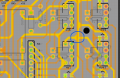
Currently designing a pcb for a small project im working on. from what i have read on the internet, there shouldn't be any 90 degree bends in the traces as that is bad for signals and all. Well I want to join a few traces together and dont have a choice as shown below in the blue circle:
Screenshot 2024-11-23 233115.png
The trace is for ground, doesn't actually carry a signal as such. i have been told to make triangles when joining one trace to another. Is that really necessary or can i just join the traces like i did to the left of the blue circle, 90 degree angles on on either side.
 

nsaspook

Joined Aug 27, 2009
16,321
What's the signal frequency/data rate on those traces using that ground trace? 10 GHz or more?

https://resources.altium.com/p/pcb-routing-angle-myths-45-degree-angle-versus-90-degree-angle
PCB Routing Angle Myths: 45-Degree Angle Vs 90-Degree Angle
Every myth has an origin. In the case of routing with 45° corners, the myth can be traced back to a time when PCB manufacturing wasn’t as advanced as it is today. Back then, right-angle PCB corners or anything with a sharp angle presented a real threat to manufacturability. Sharp corners could cause acid traps, where some of the acids used in etching linger and continue to corrode the copper at sharp corners. Back then, engineers were also concerned that right-angled corners aren’t as sturdy as 45° ones and could be peeled off easily.
Despite the fact that there’s no harm in having right-angle PCB corners in my design, I meticulously ensure that every single corner is 45° before sending my PCB layout for fabrication. This isn’t because I’m an RF designer - I’m not. My obsession with the 45° corner is pretty simple. They look stylish and much nicer, in my opinion, compared to right-angle PCB corners.
 

WBahn

Joined Mar 31, 2012
32,823
The fact that you seem to have a lot of thru-hole components on your board is a pretty good indication that your signal frequencies are such that you don't need to worry about sharp corners causing signal reflections.

If you are fabbing the board yourself, then peeling and acid traps at sharp corners might be a concern and might warrant some effort to minimize them, but no need to get radical about it. If you are having them fabbed, then it is pretty much a non-issue.
 

MisterBill2

Joined Jan 23, 2018
27,508
I do not like sharp corners for much the same reason, and, in addition, they often make the path longer, or get in the way of other routing. Of course, my PCB layout experience started with red and blue tapes and black dots. And sharp turns do seem to be more likely to fail in cheaper boards.
I happen to like curves in lines, which were easy to do with the software I had at the time.
Plated thru vias have been problems on some occasions and so I try to avoid them where it is easy.
 

Thread Starter

Ping pong

Joined Feb 13, 2022
91
What's the signal frequency/data rate on those traces using that ground trace? 10 GHz or more?
Wait, how do you guys determine/calculate that?
The Brains for the PCB is going to be an Arduino Nano. Don't really know about frequency and all.
Before this, I just used a perf board to try out the project and soldered everything up using a few jumper wires. Since that worked fine but looked ugly, I'm designing a PCB to make it a bit cleaner. Guess didn't really research all that well as frequencies on a PCB is new to me...
 

Thread Starter

Ping pong

Joined Feb 13, 2022
91
The fact that you seem to have a lot of thru-hole components on your board is a pretty good indication that your signal frequencies are such that you don't need to worry about sharp corners causing signal reflections.
I just went for through hole components as they are easier to solder lel.
And yes, I do plan on getting the PCB made by a professional manufacturer.
 

nsaspook

Joined Aug 27, 2009
16,321
Wait, how do you guys determine/calculate that?
The Brains for the PCB is going to be an Arduino Nano. Don't really know about frequency and all.
Before this, I just used a perf board to try out the project and soldered everything up using a few jumper wires. Since that worked fine but looked ugly, I'm designing a PCB to make it a bit cleaner. Guess didn't really research all that well as frequencies on a PCB is new to me...
OK, controller I/O clocks. No problem with that on your board with any sort of reasonable (using normal PCB design software) trace connection. Those types of devices usually in the 10's of MHz max for uC type high speed clocks and just about anything else, other than on-board (not on a shield) generated RF signals.

https://store.arduino.cc/products/arduino-nano
Clock Speed 16 MHz
 

MisterBill2

Joined Jan 23, 2018
27,508
Signal frequency and voltage matter much more when they are much higher, but in this case they are not. When you run mains voltages on a PCB it does matter.
 

Thread Starter

Ping pong

Joined Feb 13, 2022
91
Signal frequency and voltage matter much more when they are much higher, but in this case they are not. When you run mains voltages on a PCB it does matter.
Nah. The max voltage this PCB will ever see is like 14v DC. That too is only going to the buck converter which is going to step it down to 5v for the Arduino.
 

Thread Starter

Ping pong

Joined Feb 13, 2022
91
OK, controller I/O clocks. No problem with that on your board with any sort of reasonable (using normal PCB design software) trace connection. Those types of devices usually in the 10's of MHz max for uC type high speed clocks and just about anything else, other than on-board (not on a shield) generated RF signals.

https://store.arduino.cc/products/arduino-nano
Clock Speed 16 MHz
What about ground fill tho? Should I check that or can that mess up the signals by any chance?
 

nsaspook

Joined Aug 27, 2009
16,321
What about ground fill tho? Should I check that or can that mess up the signals by any chance?
If it's used on a PCB for a equipotential low-impedance common/gnd reference tie point for filter/bypass caps, IC vss and wire to board connections that's fine.
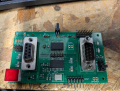
Here (a 4 layer board), ground fill is used to bond the input and output DB9 connectors and circuits to reduce external connector EMI/RFI effects on the board.
1732466657935.png
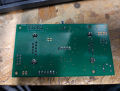
There is a ground plane on the bottom.
1732466757237.png
https://resources.altium.com/p/copper-pour-and-stitching-do-you-need-them-pcb-layout
Copper Pour and Via Stitching: Do You Need Them in a PCB Layout?
 
Top