Dashcam Shutting Down Problem

Tonyr1084

Joined Sep 24, 2015
9,744
Not sure who suggested it but someone recommended connecting a temporary 5 volt DC source where the battery terminals would be soldered to. I think that's a good idea. Only, I noticed in your pictures you show the negative lead with a red arrow pointing to a mounting hole. The B- hole is next to the mounting hole. I've added a red circle and arrow pointing specifically to that negative terminal.
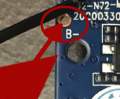
1658421468034.png
 

Thread Starter

torukojinnn

Joined Jul 16, 2022
43
Not sure who suggested it but someone recommended connecting a temporary 5 volt DC source where the battery terminals would be soldered to. I think that's a good idea. Only, I noticed in your pictures you show the negative lead with a red arrow pointing to a mounting hole. The B- hole is next to the mounting hole. I've added a red circle and arrow pointing specifically to that negative terminal.
View attachment 271922
I knew it but thanks a gain for ur attention and help
 

Thread Starter

torukojinnn

Joined Jul 16, 2022
43
Good catch with the battery negative terminal. I missed that.
I knew it but thanks a gain for ur attention and help
Thanks a lot sir, you know what, after checking those supercaps I noticed the price is 25 usd for for a tiny supercap! The dash cam is itself 40 usd ! What da heck! That is the best solution so far! I m gonna let you know the result
 

Thread Starter

torukojinnn

Joined Jul 16, 2022
43
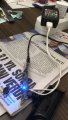
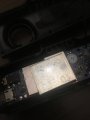
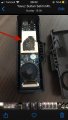
01D7A172-0B09-4FE9-8B05-B8ACFD9170A3.jpegGuys here is test results,
Nothing changed , stil shuts down! At least giving 5v into those battery ports from a phone charger made no change! Still shut down by itself!
See the photos please, for your info, cables were perfectly touching those copper rings inside the battery ports , I checked it with a multimeter and there was 5V , so I failed again , at least I didn t order 5v caps from china in vain!!
so people , any ideas or theories that why that dashcam kept shuttingg down?
Kind Regards
Respect from Turkey
 

Attachments

Thread Starter

torukojinnn

Joined Jul 16, 2022
43
I don't see that having no battery or supercap is the problem.

If the dashcam is powered from the car 12V system while the engine is running then it should not power down.
Have you tried driving the car for more than 5 minutes to see if it still powers down? A stationary dash cam with 12V off should power down eventually.

Have you tried connecting with your smart phone to see if you can access the settings?
Can you post a link to the User Manual?
still nothing in settings?
B32E2EAF-6622-4D45-A1BD-487322D6ADBD.jpeg
 

ThePanMan

Joined Mar 13, 2020
921
Well, I'm glad I was able to offer some guidance; even if it didn't result in the solving of your problem.

I didn't know you had your settings available on your cell phone. Look through that and make sure everything is set correctly. If all else fails do a factory reset.

Bless you and your efforts. I can think of nothing else.

Peace.
 

djsfantasi

Joined Apr 11, 2010
9,237
Not to beat a dead horse, but shutting down is the symptom of your problem… but so far we haven’t found the cause.

I’m stuck on overheating. Is the MCU hot to the touch after a shutdown? Do you have an IR thermometer?

There’s been almost 50 posts, so forgive me if I’m repeating stuff. Is there a voltage regulator on board and is it getting hot? And have you measured the voltage supplied to the MCU?
 

MrChips

Joined Oct 2, 2009
34,823
Like I said in another post, we try to use logic, knowledge, experience, and intuition to figure out a problem.

What do you mean by "shut down"?
Does that mean loss of power?
Does it mean that it stops recording?

To me it sounds like an automatic "sleep mode" when there is no trigger.
 

Thread Starter

torukojinnn

Joined Jul 16, 2022
43
Well, I'm glad I was able to offer some guidance; even if it didn't result in the solving of your problem.

I didn't know you had your settings available on your cell phone. Look through that and make sure everything is set correctly. If all else fails do a factory reset.

Bless you and your efforts. I can think of nothing else.

Peace.
Dude, many thanks for your guidance, I ve already done th factory reset , still nothing ,
 

Thread Starter

torukojinnn

Joined Jul 16, 2022
43
Not to beat a dead horse, but shutting down is the symptom of your problem… but so far we haven’t found the cause.

I’m stuck on overheating. Is the MCU hot to the touch after a shutdown? Do you have an IR thermometer?

There’s been almost 50 posts, so forgive me if I’m repeating stuff. Is there a voltage regulator on board and is it getting hot? And have you measured the voltage supplied to the MCU?
Dude thanks for the help.
Like you said yesterday whilr doing settings in phone app and the cam recording at the same time , I realized it just got overheated and it was 42 degree Celcius, but this shut down thing happens when I opened up the plastic case of dash cam, and the pcb is open.but like you said when my laptop overheats it also shutsdown to protect the processor. You have a point there
and a request from you;
Could you please show me the MCU and voltage regulator on my dash cam pcb, I ve sent manny pictures
Respect
 

Thread Starter

torukojinnn

Joined Jul 16, 2022
43
Not to beat a dead horse, but shutting down is the symptom of your problem… but so far we haven’t found the cause.

I’m stuck on overheating. Is the MCU hot to the touch after a shutdown? Do you have an IR thermometer?

There’s been almost 50 posts, so forgive me if I’m repeating stuff. Is there a voltage regulator on board and is it getting hot? And have you measured the voltage supplied to the MCU?
And great saying :D “not to beat a dead horse”
 

Thread Starter

torukojinnn

Joined Jul 16, 2022
43
Like I said in another post, we try to use logic, knowledge, experience, and intuition to figure out a problem.

What do you mean by "shut down"?
Does that mean loss of power?
Does it mean that it stops recording?

To me it sounds like an automatic "sleep mode" when there is no trigger.
Dude thanks for the help, when I say shut down I mean the camera turns off which means it both stop recording and there is no lights on the camera. When you hit the power button of a device it turns off and turns on : this is what i mean , it turns off like you touch the power button.
Respect
By the way I thought my english is ok as an english teacher from Turkey
there is no sleep mode in settings, i think like @djsfantasi said it might be an overheating issue
3E48DCB0-89B0-41F8-A755-2A07E4F785BC.jpeg
 

ThePanMan

Joined Mar 13, 2020
921
Is there a voltage regulator on board and is it getting hot?
Likely there is no regulator on board. It is driven from a pre-regulated source (5VDC)
I ve already done th factory reset , still nothing
If "nothing" then it isn't in the setup. And since you've used multiple power sources I'd think it isn't a supply issue either. Others are honing in on heat, and you said
I realized it just got overheated and it was 42 degree Celcius
So if it's overheating when it shouldn't be then there's got to be an electronic issue with it. Since you've opened it and messed with stuff, and possibly damaging what may have been a heat sink before, you have literally no hope of getting your money back on this. Fortunately you also said it's not an expensive piece of equipment.
Could you please show me the MCU and voltage regulator on my dash cam pcb
As noted above, there is no regulator on the board. IF there was a battery then there MIGHT be a BMS (Battery Management System), but given the very low cost of this device, I'd say there probably isn't one.

As for pointing out where the MCU is - Hang on. I'll review the pic's and make an edit to this post - or I'll make another post.
 

ThePanMan

Joined Mar 13, 2020
921
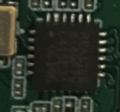
This MIGHT be your MC. It could be something else altogether. Might be the volatile memory mentioned a while back. But without being able to read the numbers on the chip we can't say for sure what it is. Someone else here might know just by looking at it, but in nearly 40 years in the electronics industry I've seen many things that could be an MC.
1658507747540.png1658507776536.png
 

Thread Starter

torukojinnn

Joined Jul 16, 2022
43
Likely there is no regulator on board. It is driven from a pre-regulated source (5VDC)
If "nothing" then it isn't in the setup. And since you've used multiple power sources I'd think it isn't a supply issue either. Others are honing in on heat, and you said

So if it's overheating when it shouldn't be then there's got to be an electronic issue with it. Since you've opened it and messed with stuff, and possibly damaging what may have been a heat sink before, you have literally no hope of getting your money back on this. Fortunately you also said it's not an expensive piece of equipment.
As noted above, there is no regulator on the board. IF there was a battery then there MIGHT be a BMS (Battery Management System), but given the very low cost of this device, I'd say there probably isn't one.

As for pointing out where the MCU is - Hang on. I'll review the pic's and make an edit to this post - or I'll make another post.
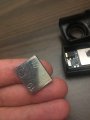
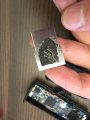
Sir no way i damaged the heat sink , it is just a piece of iron glued on the metal protection above micro chip with a double sided tape. I have it and it is solid but the thing is even before i opened up the camera , with the heat sink properly glued above the micro chip , it kept shutting down .i mean when there was a heat sink before i touch , it shut down itself and this is thw reason why i needed to open up the camera in the first place
Best wishes
3D8BB1EA-A369-4AC5-B97A-BDA9677A3097.jpeg
050AFDB9-3638-49EA-B0AD-BE4EF8CE7B9A.jpeg
 

Thread Starter

torukojinnn

Joined Jul 16, 2022
43
This MIGHT be your MC. It could be something else altogether. Might be the volatile memory mentioned a while back. But without being able to read the numbers on the chip we can't say for sure what it is. Someone else here might know just by looking at it, but in nearly 40 years in the electronics industry I've seen many things that could be an MC.
View attachment 272001View attachment 272002
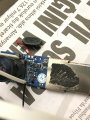
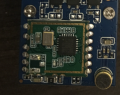
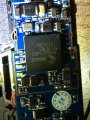
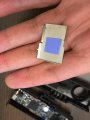
Sir i think i found the micro chip below the metal protection on pcb please check the photos1270F639-EE27-4783-B94A-8E72D0B2C37D.jpeg
 

Attachments

djsfantasi

Joined Apr 11, 2010
9,237
realized it just got overheated and it was 42 degree Celcius, but this shut down thing happens when I opened up the plastic case of the dash ca
I’d say It overheated. Now we have to find out why. Did the shutdowns occur before you opened the plastic case?

You may have inadvertently caused a short. I would very carefully investigate the traces, preferably with magnification. I would start with those closest to where you opened the plastic case. Or a loose piece of metal may have worked its way across two traces.
 

ThePanMan

Joined Mar 13, 2020
921
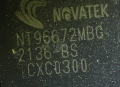
Unsuccessful in finding this part and its data sheet. I suspect that it may have to do with GPS. Given that it's under a shield it seems to be in need of shielding from other sources of interference. A µP (micro-processor) usually doesn't need shielding. I still think the small square chip I showed in post #55 is likely the µP.
1658513935289.png
 
Top