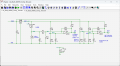
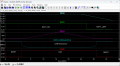
Dark sensor circuit using LM393 question.... unstable OFF/ON... flickering

Thread Starter

johnaustinkaty

Joined Jul 16, 2021
284
hi j,
Have you re-programmed the Reset Pin?
E
Clip:
Reclaiming as I/O: The pin can be repurposed as a standard input/output pin by disabling the RSTDISBL fuse in the configuration bytes.

https://www.google.com/search?client=firefox-b-d&q=tiny85+reset+pin
Hi Eric... I have not done that. I will study the link you sent and repurpose that pin to in/out.
I have to assume that would explain the weird results I'm getting. I'm hoping my circuit is designed correctly.
Thank you !
John
 

Thread Starter

johnaustinkaty

Joined Jul 16, 2021
284
Here is what's happening testing two lights:
Both dark sensors covered with electrical tape:
Light #1
The 3.3k resistor at R11 in one of my lights requires 11.8v to power on, or at least get power to the attiny. Once powered on, I can reduce voltage to 11.1v before it shuts down.
Light #2
The recommended 2.2k resistor at R11 in another light requires 12.9v to power on, or at least get power to the attiny.
Once powered on, I can reduce voltage to 11.2v before it shuts down.

Does this make sense? Or, are the R11 resistors effecting voltage to the attiny?
Or, does this indicate that I definitely need to disable the reset on pin 1?
 

Thread Starter

johnaustinkaty

Joined Jul 16, 2021
284
The testing above is using bench power supply. With tape on dark sensor, when I connect light #1 to a battery at 11.75v, it powers on. LEDs come on. Motion is triggered and LED brightens to a point, then unit suddenly shuts off. Then, when I remove the tape from the dark sensor, the startup blink sequence begins and if I replace the tape, the LEDs never come back on as they should.
 

Thread Starter

johnaustinkaty

Joined Jul 16, 2021
284
I am following these instructions to disable pin 1 as a reset.
1770756893610.png

I burned the bootloader and have scanned the output window for the specific code shown above, but I do not see it. However, I do see these lines related to hfuse:
1770756674425.png

Does the "0xdf" need to be changed to "0x5f"? And, how do I execute it? How do I execute it via terminal?
 

eetech00

Joined Jun 8, 2013
4,709
Here's a revised comparator circuit should you wish to redo the design.
The comparators are operated from the 5V supply. Note the comparator output behavior.
This is a cleaner design than what you have now.

1770759903011.png

1770760006643.png
 

Thread Starter

johnaustinkaty

Joined Jul 16, 2021
284
After a lot of study and many attempts over the last few hours, I am unable to disable the reset pin. It is saying that I don't have access to make the required change, even though I am the admin.
1770760943587.png
 

Thread Starter

johnaustinkaty

Joined Jul 16, 2021
284
Here's a revised comparator circuit should you wish to redo the design.
The comparators are operated from the 5V supply. Note the comparator output behavior.
This is a cleaner design than what you have now.

View attachment 363322

View attachment 363323
I like it. I just wish I had known before I finalized my boards a few weeks ago. Hopefully I can utilize what I have. I'm definitely keeping your schematic for future reference. My dark sensor circuit is working great. I'm not sure about the low batt circuit because I believe I need to disable the reset pin on the attiny85. I've spent all afternoon trying to disable the reset with no success. Thx.
John
 

Thread Starter

johnaustinkaty

Joined Jul 16, 2021
284
I read in an article that it was recommended to add a 10k pull up resistor on pin 1 (along with the internal) to avoid "accidental" triggers/resets.
Thoughts?
 

eetech00

Joined Jun 8, 2013
4,709
I read in an article that it was recommended to add a 10k pull up resistor on pin 1 (along with the internal) to avoid "accidental" triggers/resets.
Thoughts?
There should definitely be a pull up at pin 1 and Pin 2, otherwise the inputs will float (bad thing). I never use internal PU, always external.
 

Thread Starter

johnaustinkaty

Joined Jul 16, 2021
284
There should definitely be a pull up at pin 1 and Pin 2, otherwise the inputs will float (bad thing). I never use internal PU, always external.
Ok... Should I not use the INPUT_PULLUP at all and only use a 10k to 5v at pin 1 & 2?
I still haven't been able to disable the reset pin 1.
 

eetech00

Joined Jun 8, 2013
4,709
Ok... Should I not use the INPUT_PULLUP at all and only use a 10k to 5v at pin 1 & 2?
the pins wouldn't need it if the diode wasn't there, because there is a pullup at the output of the 393 that is connected to each input pin. But since the diode is there, the input pin is floating and needs a pullup. You can use the internal pullup, but I don't recommend it because they are automatically disabled at boot-up. I recommend an external (10k) pullup and disabling the internal pullup.
 

eetech00

Joined Jun 8, 2013
4,709
I still haven't been able to disable the reset pin 1.
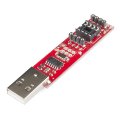
The programmer board uses the reset function for communications during programming.
So if you successfully set the fuse for the pin to "GPIO", the MCU won't be programmable anymore. You'll have to unplug it and plug it into a breadboard, apply power, and test the pin.
If your just using the ADC on pin1, then that is already set (along with reset function) without setting any other fuses.
 
Top