hi john,
I posted that Code for Light/Dark detection for the LDR in post #237.?
E Copy: with the revised Dark/Light ADC Count Limits.
C-like:
/*

  LDR Analog Input

  LDR GL5528 Jan 12 2025 ESP

  Bench testing the LDR >> ADC >> PIR enable limits

*/


int ldrPin = A0; // ADC input

int adcCount = 0;

int adcAvg = 0;

int enbPIR = 0; // PIR detection Enabled when = 1


void setup() {

  Serial.begin(9600); // used for IDE testing

  Serial.println("ADC Counts for LDR Resistance");

}


void loop() {

  // read the ADC count value created from the LDR voltage

  // take the Average of 10 readings, set readings delay to suit project


  for (int i = 0; i <= 9; i++) {

    adcCount = analogRead(ldrPin);

    adcAvg = adcAvg + adcCount;

   Serial.print(adcCount); // test only

  Serial.print("  "); // test only

    delay(200);

  }

  Serial.print("adcAvg= "); // test only

  adcAvg = adcAvg / 10;

  Serial.print(adcAvg); // test only


  // hysteresis

  if ( adcAvg > 700) { // dark

    enbPIR = 1;

    // Serial.print(adcAvg); // test only

  }

  if (adcAvg < 600) { // light

    enbPIR  = 0;

  //   Serial.print(adcAvg); // test only

  }


  adcAvg = 0; // clear AVG Count


  // Select if PIR is enabled or not

  if (enbPIR  == 1) {

    Serial.println(" Dark"); // test only

  } else {

    Serial.println(" Light"); // test only

  }


}
Hi john,
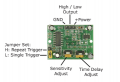
I understand you are using the PIR module HC-SR501 for object movement detection?
Which detection trigger Mode?
What is the ON/HIGH duration time for the PIR output signal, when triggered?
E
Hi john,
I understand you are using the PIR module HC-SR501 for object movement detection?
Which detection trigger Mode?
What is the ON/HIGH duration time for the PIR output signal, when triggered?
E View attachment 362083
Hi Eric,
I didn't realize the code you posted originally was for me to run with... I thought you were still adjusting the code. I have the PIR POT adjusted all the way down, so it should only stay HIGH for approximately 15 seconds+/-.
I studied the code closely and generally understand it. I will incorporate it into my sketch today or tomorrow. Will you be able to review my final sketch to make sure I have it incorporated correctly?
hi john,
This is more code I used for testing with a Nano, bread board, & LED's
You should be able to extract/convert sections of the code to help you build your Sketch
Your flashing LED's and main LED flood lite code goes here. // Required Additional Code Section
E
C-like:
/* Nano
  DRAFT Test Dark/Light Input, Enable PIR, Chech PIR output State
  LDR GL5528 Jan 15 2025ESP
*/
int ldrPin = A0;
int ldrDarkPin = 2;
int pirEnbPin = 3;
int pirTrigPin = 4;
int pirPulse = 5;
int adcCount = 0;

int Dark = 0; // 1 when Dark
int DarkFlag = 0;
int PIRenabled = 0;  // 1 when Dark
int PIRpulse = 0;  // 1 when Dark
int x = 0;
int repeatCnt = 0;

void setup() {
  // declare the ledPin as an OUTPUT:
  pinMode(ldrDarkPin, OUTPUT);
  pinMode(pirEnbPin, OUTPUT);
  pinMode(pirTrigPin, OUTPUT);
  pinMode(pirPulse, INPUT);

  Serial.begin(9600);
  Serial.println("Ready");
}

void loop() {
  // read the value from the ldr:
  adcCount = analogRead(ldrPin);
  Serial.print(adcCount);
  Serial.print(" "); // test only
  if ( adcCount > 700) {
    Dark = 1;
    PIRenabled = 1;
    digitalWrite(pirEnbPin, HIGH); // Set PIR Enabled
    Serial.print("Dark"); // test only
    Serial.println(" "); // test only

    x = digitalRead(pirPulse); // check PIR output state
    repeatCnt = 10;
  }
  if (x == 1) { // if PIR output High then PIR is triggered
    Serial.println( "PIR trig"); // test only

   [B] // Required Additional Code Section[/B]
    // flash indicator LEDs for a set time period then
    // switch ON main flood lite LED for set time period

    while (x == 1 && repeatCnt > 1) {
      x = digitalRead(pirPulse); // check PIR output state, wait until low
      delay(1000); // wait 10 seconds, set to suit project
      repeatCnt=repeatCnt-1;
    }
  }

  if (adcCount < 600) {
    Dark = 0;
    x=0;
    PIRenabled = 0;
    digitalWrite(ldrDarkPin, LOW);
    digitalWrite(pirEnbPin, LOW);
    Serial.println( "Light");
  }

  delay(1000);
}
Serial Port Clip:
16:06:41.998 -> Ready
16:06:41.998 -> 431 Light
16:06:43.001 -> 430 Light
16:06:44.007 -> 431 Light
16:06:45.012 -> 431 Light
16:06:46.015 -> 431 Light
16:06:47.018 -> 430 Light
16:06:48.022 -> 430 Light
16:06:49.024 -> 431 Light
16:06:50.025 -> 430 Light
16:06:51.024 -> 304 Light
16:06:52.029 -> 121 Light
16:06:53.034 -> 9 Light
16:06:54.040 -> 353 Light
16:06:55.012 -> 497 Light
16:06:56.018 -> 569 Light
16:06:57.022 -> 608 642 660 687 702 Dark
16:07:02.053 -> 719 Dark
16:07:03.056 -> 726 Dark
16:07:04.028 -> 726 Dark
16:07:05.037 -> 736 Dark
16:07:06.048 -> 741 Dark
16:07:07.036 -> 741 Dark
16:07:08.064 -> 740 Dark
16:07:09.050 -> 743 Dark
16:07:09.050 -> PIR trig
I see. It repeats 10 times at 1 second ea time.
Also, I didn't notice this originally, so will insert my code here: // Required Additional Code Section
Hi john,
I understand you are using the PIR module HC-SR501 for object movement detection?
Which detection trigger Mode?
What is the ON/HIGH duration time for the PIR output signal, when triggered?
E View attachment 362083
My jumper is set to repeatable "H". Just FYI, time delay is adjusted all the way CCW and the sensitivity is is at mid point. It is sensing ideally up to 20+ feet away.
Eric,
Here is my revised sketch incorporating your ADC coding, for your review and comment. I changed my led blink sequence to a FOR LOOP finally (highlighted)....
The sketch does compile successfully. I will try testing this on a bread board:
Code:
/clock set to "internal 8 MHz" for compiling/uploading to ATTINY


//                       ILLUMINATOR AT 91.7% BRIGHTNESS (NO GAMMA CORRECTION)
// ATMEL ATTINY85

// [B] Eric Gibbs ADC code with John's code inserted : [/B]

int ldrPin = A0;
int ldrDarkPin = 2;
int pirEnbPin = 3;
int pirTrigPin = 4;
int pirPulse = 5;
int adcCount = 0;

int Dark = 0;  // 1 when Dark
int DarkFlag = 0;
int PIRenabled = 0;  // 1 when Dark
int PIRpulse = 0;    // 1 when Dark
int x = 0;
int repeatCnt = 0;

const int ledPin = 0;
const int sensorPin = 2;
const int alertPin = 1;
int delayTime = 30000;

int sensorValue = LOW;
unsigned long lastmotion;

void setup() {
  // declare the ledPin as an OUTPUT:
  pinMode(ldrDarkPin, OUTPUT);
  pinMode(pirEnbPin, OUTPUT);
  pinMode(pirTrigPin, OUTPUT);
  pinMode(pirPulse, INPUT);

  //Serial.begin(9600);
  //Serial.println("Ready");

  pinMode(ledPin, OUTPUT);
  pinMode(sensorPin, INPUT);
  pinMode(alertPin, OUTPUT);


  analogWrite(alertPin, 75);
  digitalWrite(sensorPin, LOW);
  analogWrite(ledPin, 1);
  delay(60000);  //allows PIR to stabilize LOW after power on
}

void loop() {
  // read the value from the ldr:
  adcCount = analogRead(ldrPin);
  //Serial.print(adcCount);
  //Serial.print(" "); // test only
  if (adcCount > 700) {
    Dark = 1;
    PIRenabled = 1;
    digitalWrite(pirEnbPin, HIGH);  // Set PIR Enabled
    //Serial.print("Dark"); // test only
    //Serial.println(" "); // test only

    x = digitalRead(pirPulse);  // check PIR output state
    repeatCnt = 10;
  }
  if (x == 1) {  // if PIR output High then PIR is triggered
                 //Serial.println( "PIR trig"); // test only


    // [B] //John's light function code inserted here: [/B]

    {
      for (int i = 0; i < 5; i++) {
        digitalWrite(alertPin, HIGH);  // turn the LED on
        delay(500);                    // wait for 500 milliseconds (half a second)
        digitalWrite(alertPin, LOW);   // turn the LED off
        delay(500);                    // wait for 500 milliseconds
      }

      analogWrite(alertPin, 75); // red alert leds stay on at reduced brightness

      // fade in from min to max (550 mA for GREEN led and 450 mA for RED led):
      for (int fadeValue = 1; fadeValue <= 234; fadeValue += 1) {
        // sets the value (range from 2 to 234):
        analogWrite(ledPin, fadeValue);
        // wait for 30 milliseconds to see the dimming effect
        delay(386);
      }
      delay(120000);
    }
    lastmotion = millis();

    while (millis() < lastmotion + delayTime) {
      if (digitalRead(sensorPin) == HIGH) {
        lastmotion = millis();
      }
      delay(1000);  //Keep this fix - 1 unit
    }
    // fade out from max to min 40 mA:
    for (int fadeValue = 234; fadeValue >= 1; fadeValue -= 1) {
      // sets the value (range from 0 to 255):
      analogWrite(ledPin, fadeValue);
      // wait for 30 milliseconds to see the dimming effect
      delay(193);
    }


    while (x == 1 && repeatCnt > 1) {
      x = digitalRead(pirPulse);  // check PIR output state, wait until low
      delay(1000);                // wait 10 seconds, set to suit project
      repeatCnt = repeatCnt - 1;
    }
  }

  if (adcCount < 600) {
    Dark = 0;
    x = 0;
    PIRenabled = 0;
    digitalWrite(ldrDarkPin, LOW);
    digitalWrite(pirEnbPin, LOW);
    //Serial.println( "Light");
  }
  delay(1000);
  {
  }
}
When I use my bench power supply to power one of my units, I am reading 600mA +/- max when the 3up LED is at it's brightest (250 PWM). I was using an IRF9Z34N mosfet to allow current to the circuit, which has always worked just fine. It was suggested that I use a 2N7000 instead. However, I see the max drain current is 200mA. Can this be used in my circuit or do I need to stick with the IRF9Z34N that I have been using all along? This mosfet would be utilized on any design that retains the LM393 dark sensing circuit.
I'm using Easyeda. Do you guys trust autoroute? Or, should I just route my traces manually? I understand there will be a bit of clean up with autoroute...
Q1 requires a 4.7K base series resistor.
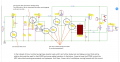
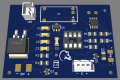
Q2 is shown incorrectly on the schematic and I see a TO263-2 schottky diode on the board. Is that supposed to be Q2?
Q1 requires a 4.7K base series resistor.
Q2 is shown incorrectly on the schematic and I see a TO263-2 schottky diode on the board. Is that supposed to be Q2?
Q2 is not drawn correctly on the schematic.
A resistor is required between pin6 of the ATtiny and the base of Q1.
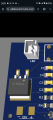
Why on the image of the pcb does it shows a TO263-2 for Q2?
Q2 is not drawn correctly on the schematic. How should it be shown??
A resistor is required between pin6 of the ATtiny and the base of Q1. I understand
Why on the image of the pcb does it shows a TO263-2 for Q2? Because that is an SMD version of the IRF9Z34N mosfet. It will handle the 600 mA current that flows when the high power LED is bright.

 Facebook
 Google
 GitHub
 Linkedin