Converting a traffic light into a timer

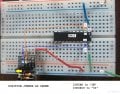
ICLeg2 and ICLeg19 still looks reversed in your photo. Excuse the sloppy editing (I'm not an artist) :) but I believe this is the way your 20M2 should connect to the AXE029.


:) joe
 

Attachments

Thread Starter

Transitory

Joined Jan 2, 2013
64
Looks like it is connected properly. Have you verified +5VDC is going to pin 1 and GND is going to pin 20?

Set your meter to VDC (if there are multiple options, turn it to 20VDC). Place the red probe to pin 1 on the IC and the black probe to pin 20. Do you see 5VDC or -5VDC? If the latter, the power connections from the supply to your breadboard need to be reversed.

Make sure the power supply is plugged in and power is going to your IC before you try to establish a connection with the PC.
It reads 4.95V. Perhaps this is the problem? The PSU not delivering enough power?

I would suggest that you get into the habit of using wire colors consistently whenever possible, especially for power and ground. For example, I try to always use black for ground and red for +V; that way, I can tell at a glance "what's hot and what's not."

And trim those leads on the bottom of the PCB; they are just asking to short something out.

But most of all, congratulations on getting started! :D
Trimmed the leads and adjusted colors! My jumper set doesn't give a ton of leeway though. I understand though, I would color code more if I had the tools.

ICLeg2 and ICLeg19 still looks reversed in your photo. Excuse the sloppy editing (I'm not an artist) :) but I believe this is the way your 20M2 should connect to the AXE029.


:) joe
Thanks for the editing! That's how they are connected. It might not look like that due to the angle of the photo.
 
It reads 4.95V. Perhaps this is the problem? The PSU not delivering enough power?

Source: http://www.picaxe.com/FAQs/PICAXE-Microcontrollers/ "What are the PICAXE electrical characteristics?"

PICAXE M2 and X2 parts will operate with a power supply of 1.8V up to 5V.

So, unless you've damaged the 20M2 and you're using a good, regulated power supply, you're okay. Can you use 3 1.5V batteries instead of the power supply for a quick test?

:) joe
 

Thread Starter

Transitory

Joined Jan 2, 2013
64
Source: http://www.picaxe.com/FAQs/PICAXE-Microcontrollers/ "What are the PICAXE electrical characteristics?"

PICAXE M2 and X2 parts will operate with a power supply of 1.8V up to 5V.

So, unless you've damaged the 20M2 and you're using a good, regulated power supply, you're okay. Can you use 3 1.5V batteries instead of the power supply for a quick test?

:) joe
I don't have a AA battery pack off hand. EDIT: Nevermind. Was able to scrounge one from an old phone. Fresh batteries, no dice :/ So now we keep troubleshooting. Seems like the PSU is doing it's job. Is it the breadboard adapter, the picaxe, or the usb cable? Any suggestions on how to trouble shoot each?
 
Last edited:
Please spare me having to read back through 140-some posts. (grin)

You’re using an AXE027 USB programmer, correct?
(AXE027 installation instructions: http://www.picaxe.com/docs/axe027.pdf)
What operating system?
Is the computers USB port functioning properly? Is it a USB 3 port?
What is the COM PORT the operating system reports the AXE027 is using?
What COM PORT are you selecting in the PICAXE Programming Editor?
Do you have any other PICAXE chips?

In an earlier post you mentioned the 20M2 was "warm." With nothing connected (except the programming connections) I find that troubling.

Let me know!

:) joe
 
Last edited:
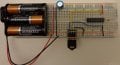
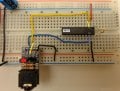
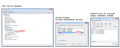
I slapped together a setup similar to yours and it works! (grin) {I rarely use batteries as I have a bench power supply. Batteries = 4.93V}

I included the Windows 7 Device Manager screen. It shows COM10, yours may show a different COM PORT number. As long as the OPTIONS screen in the PICAXE Programming Editor shows the same COM PORT, you’re okay.

On the far right is the Function Key F8 Serial Terminal screen showing the “Hello…” text. All new PICAXE’s show that text straight from the factory.

:) joe
 

Attachments

elec_mech

Joined Nov 12, 2008
1,500
I agree with Joe's concern over a warm uC. The connections look correct, the power is good, and it sounds like the PC is trying to connect. As Joe mentioned, are you sure the correct USB port is selected on the PC?

Assuming yes, do you have another PICAXE handy? That seems like the most likely culprit.
 

Thread Starter

Transitory

Joined Jan 2, 2013
64
All my connections on the PC end look just like Joe's. The PICAXE does get warm, but only when the +5V is connected. I don't have another, but I suppose I could order another if the consensus is that I somehow toasted the first one! :eek:
 
All my connections on the PC end look just like Joe's. The PICAXE does get warm, but only when the +5V is connected. I don't have another, but I suppose I could order another if the consensus is that I somehow toasted the first one! :eek:

There are a number of ways to toast integrated circuits such as microcontrollers. Power connected backwards, static zap (ESD), tying outputs directly to positive or directly to negative, excessive power supply voltage, excessive current draw though outputs (including shorted outputs,) positive connected but ground (0V or common) not connected, poorly regulated power supply, oscillation (no bypass capacitor) and the list goes on and on. If you’re working at the kitchen table with carpet or a rug underfoot, I’d go with ESD as the first killer cause.

The PICAXE does get warm, but only when the +5V is connected.
“only when the +5V is connected” Do you mean when the power supply is connected, the batteries are connected, both? I can’t help but smile if you’re saying the PICAXE only gets warm when power is connected.

Many vendors (including PHAnderson http://www.phanderson.com/picaxe ) grant a discount when purchasing multiple chips. As inexpensive as they are, never hurts to have a couple of extras lying around. Mark ones you’ve used with a white or silver marker, saves troubleshooting in the future. PHAnderson also sells an “assortment” of PICAXE chips (three PICAXE-08M2, two PICAXE-18M2, two PICAXE-20M2 for $22.95.) I’m not affiliated with PHAnderson but I am a customer, plus I truly appreciate the contributions of Dr. Anderson to the microcontroller world. Dr. Anderson passed away recently, his son is doing a great job keeping the business going.


:) joe
 

Thread Starter

Transitory

Joined Jan 2, 2013
64
There are a number of ways to toast integrated circuits such as microcontrollers. Power connected backwards, static zap (ESD), tying outputs directly to positive or directly to negative, excessive power supply voltage, excessive current draw though outputs (including shorted outputs,) positive connected but ground (0V or common) not connected, poorly regulated power supply, oscillation (no bypass capacitor) and the list goes on and on. If you’re working at the kitchen table with carpet or a rug underfoot, I’d go with ESD as the first killer cause.


“only when the +5V is connected” Do you mean when the power supply is connected, the batteries are connected, both? I can’t help but smile if you’re saying the PICAXE only gets warm when power is connected.

Many vendors (including PHAnderson http://www.phanderson.com/picaxe ) grant a discount when purchasing multiple chips. As inexpensive as they are, never hurts to have a couple of extras lying around. Mark ones you’ve used with a white or silver marker, saves troubleshooting in the future. PHAnderson also sells an “assortment” of PICAXE chips (three PICAXE-08M2, two PICAXE-18M2, two PICAXE-20M2 for $22.95.) I’m not affiliated with PHAnderson but I am a customer, plus I truly appreciate the contributions of Dr. Anderson to the microcontroller world. Dr. Anderson passed away recently, his son is doing a great job keeping the business going.


:) joe
Yes, the PICAXE gets warm just when power is connected. This probably makes sense...
 
Yes, the PICAXE gets warm just when power is connected. This probably makes sense...

Okay. I thought maybe you redefined the laws of physics at your house. (grin)

If the PICAXE warms whether connected to batteries or the 5V supply, it's time to give it to the recycler folks and purchase a new one. Any suspicions why, maybe connected it backwards once? I'd like to know.

The 08M2 is less money than the 20M2. When you order replacement 20M2’s, you might want to purchase (a couple of) 08M2’s to test the download circuit – cheaper for risk of frying, plus they are handy to have around.

:) joe
 

Thread Starter

Transitory

Joined Jan 2, 2013
64
Okay. I thought maybe you redefined the laws of physics at your house. (grin)

If the PICAXE warms whether connected to batteries or the 5V supply, it's time to give it to the recycler folks and purchase a new one. Any suspicions why, maybe connected it backwards once? I'd like to know.

The 08M2 is less money than the 20M2. When you order replacement 20M2’s, you might want to purchase (a couple of) 08M2’s to test the download circuit – cheaper for risk of frying, plus they are handy to have around.

:) joe
Not sure. I know for sure I did connect it backwards once. The first time I thought I had the +/- mixed up on the barrel connector so I switched it around. Turns out I was right the first time. :rolleyes: Whoops! Now I know better and have a multimeter to check everything. New PICAXE on the way.

Interestingly enough, I think the first time it did get hot (connected properly), so maybe it was DOA and then I just nailed the coffin in with reversing +/-.
 
Has a decision been finalized regarding the traffic light lamps and drivers? 12V/120V LED's? 120V incandescent? RV 12V lights?

Has the code been posted in a .bas or .txt format? I saw the .PDF. I think I'll build a breadboard of the entire project too, just something to do. :)

Thank you!

:) joe
 

Thread Starter

Transitory

Joined Jan 2, 2013
64
Has a decision been finalized regarding the traffic light lamps and drivers? 12V/120V LED's? 120V incandescent? RV 12V lights?

Has the code been posted in a .bas or .txt format? I saw the .PDF. I think I'll build a breadboard of the entire project too, just something to do. :)

Thank you!

:) joe
Show off! You'll probably finish it before I get my new chip!

We did some research on going to RV 12V lights, but nothing for sure. I wanted to get the prototype built first and do a little code modification before scaling up.
 

Thread Starter

Transitory

Joined Jan 2, 2013
64
Success! The new chip arrived and worked perfectly! I have successfully downloaded the program, now slowly constructing the bigger circuit on a much bigger breadboard.
 

Thread Starter

Transitory

Joined Jan 2, 2013
64
So, I started constructing the rest of the circuit on the big breadboard. First of all, so many wires! It's a maze of colors, but it's been a fun process. I've been trying to double check everything as I go along.

Unfortunately, I did hit some snags that are going to hold up completion.

(1) I forgot to order the blue LED so can't do that yet.

(2) Bigger snag: the buttons you suggested I get as a replacement for the originals that were backordered to not fit into the breadboard. I imagine this could be worked around with some jumpers and soldering, but that seems unnecessarily laborious. Can you point to some buttons on Digikey (since that's where the blue LED has to come from) that would fit the bill? (or maybe none will fit into the breadboard and I just have to get along soldering?)

(3) I never ordered a buzzer! Not essential, but still something I overlooked. What are the requirements for it? (i.e. is there a special type which will work with the picaxe, any from digikey?)


I also have some questions:

(1) On the DS1307 pins 1 and 2 are connected by a component labeled X1. Is that internal, a jumper cable, nothing?

(2) There are two places in the circuit where it appears that ground is directly linked to +5V via the 0.1uF Ceramic Capacitor, 50VDC. This occurs off of pin 4 on the Ds1307 and off of pin 4/9 on the MAX7721. Is this right? Should the capacitor be between the +5V and GND connection? After the previous debacle toasting the PICAXE I want to be sure.


Sorry for all the questions! I, as always, appreciate your guys' guidance in this process. It's great to get it going.
 
Top