Controlling pc fans with 2 psu

Thread Starter

ulterior_motive

Joined Sep 30, 2017
6
I searched through 200 thread topics but can't find the one I'm looking for, mind you I probably typed the wrong items in the search.

I have 12 x 140mm PC fans that I need triggered by two seperate accessories.

First entity---------------
I have one psu and I will be connecting it to this item:
http://www.ebay.ca/itm/401190616827
Which will be controlling 12 fans.

Second entity--------------
I have a humidity controller which will trigger the on/off state of this following unit which I've purchased.
http://www.ebay.ca/itm/151476448835

What I'm hoping to do is have the fans connected to both entities.
With the first entity, I'm hoping the the timer will trigger the fans on about 10 times a day keeping the air inside constantly rotating, and what I'm also hoping is that when the humidifier turns on I can also trigger those fans to turn on as well.

I'm guessing I would need a relay of sorts but I don't know what to look for.

I hope this wasn't confusing.
 

GopherT

Joined Nov 23, 2012
8,009
I searched through 200 thread topics but can't find the one I'm looking for, mind you I probably typed the wrong items in the search.

I have 12 x 140mm PC fans that I need triggered by two seperate accessories.

First entity---------------
I have one psu and I will be connecting it to this item:
http://www.ebay.ca/itm/401190616827
Which will be controlling 12 fans.

Second entity--------------
I have a humidity controller which will trigger the on/off state of this following unit which I've purchased.
http://www.ebay.ca/itm/151476448835

What I'm hoping to do is have the fans connected to both entities.
With the first entity, I'm hoping the the timer will trigger the fans on about 10 times a day keeping the air inside constantly rotating, and what I'm also hoping is that when the humidifier turns on I can also trigger those fans to turn on as well.

I'm guessing I would need a relay of sorts but I don't know what to look for.

I hope this wasn't confusing.
Which humidity controller do you have and how do you plan to connect that to the atomizer? Once we have that, I can show you how to tap into your atomizer circuit to get your fans to turn on.

Also, which 12v power supply are you using for the fans?
 

Thread Starter

ulterior_motive

Joined Sep 30, 2017
6
Which humidity controller do you have and how do you plan to connect that to the atomizer? Once we have that, I can show you how to tap into your atomizer circuit to get your fans to turn on.

Also, which 12v power supply are you using for the fans?
That was super quick, wasn't expecting that,
So
The fan psu I was going to use the following:
Corsair cx600 (atx psu) > 12 v spliced into a pc fan speed controller > all fans connected to that

The humidification controller:
willhi 8040 (which I already own) (110v in, once the probe feels humidity is set either too low it triggers the 110v out which the atomizer will be connected to, the atomizer has a 110v ac to a 24v DC psu)
 

Dodgydave

Joined Jun 22, 2012
11,395
Your humility sensor (willhi 8040)has a set of Voltage free contacts, so you can use this to feed the mains to both psus, 24v and 12v, then both items will work.

OR you can feed the mains to the 24V psu and use a 24V relay to feed the 12V to the fan.
.
 

Thread Starter

ulterior_motive

Joined Sep 30, 2017
6
Ok, I should add, the Willhi humidity sensor is 110v I didn't get the 12v version, wasn't available at the time.

Also, I don't think I'm conveying my problem that well.
Explaining something seems so simple but so flipping hard.

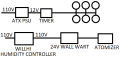
This is what it looks like now...


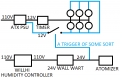
This is what im trying to achieve, im guessing to be the easiest way...


Does this make sense?
If it does, what part do i need? is a relay even what i'm looking for?
 

Attachments

Thread Starter

ulterior_motive

Joined Sep 30, 2017
6
Your humility sensor (willhi 8040)has a set of Voltage free contacts, so you can use this to feed the mains to both psus, 24v and 12v, then both items will work.

OR you can feed the mains to the 24V psu and use a 24V relay to feed the 12V to the fan.
.
the second thing you mentioned, the 24v relay to trigger the 12v fans is what my research these last few days is leading me towards.
is there one that you can recommend? I honestly don't know what to look for.
 

GopherT

Joined Nov 23, 2012
8,009
the second thing you mentioned, the 24v relay to trigger the 12v fans is what my research these last few days is leading me towards.
is there one that you can recommend? I honestly don't know what to look for.
Is your ATX power supply set up as a Lab power supply or do you have a plain ATX power supply?

Is the 20-pin (24-pin) connector still on the ATX supply?
 

GopherT

Joined Nov 23, 2012
8,009
I've got it set up as a lab PSU

So, I assume you know that disconnecting the green wire from ground turns off the ATX power supply (and now you do)

So, instead of trying to switch a high current DC load with all of those fans, let’s just switch that green wire.

You may already have a toggle switch connecting that green wire to ground.

All you have to do is...
Get one 12v Wall wart. And one 5v Wall wart (old cell phone charger) and one cheap relay ( 5v coil voltage)

1) Connect your fans directly to your 12V power supply.


Now, you are going to put two switches in parallel across that cut green wire.

One of the two “switches” will be the switch terminals on your timer.

the other switch will be a tiny, cheap relay you will buy (5v coil voltage).

Now, on your humidity controller, instead of connecting that to one 24v Wall wart, connect it to one of thos crappy extension cords with the three outlets on it. That way you can plug your 24v wall wort AND a 5V Wall wart. Connect the 5 v Wall wart to your new relay.

PS, you must power your timer with 12v from a power supply that always has power. That is why you need the 12v wallwort.
 

Thread Starter

ulterior_motive

Joined Sep 30, 2017
6
So, I assume you know that disconnecting the green wir..............

I thinks that's going to work for me, i never really thought to do it that way.
Going to give this a go next weekend when i have the weekend off.
Thank you for your ongoing help Senior Gopher.

Correction. Would have NEVER thought of doing it that way.
 

GopherT

Joined Nov 23, 2012
8,009
I thinks that's going to work for me, i never really thought to do it that way.
Going to give this a go next weekend when i have the weekend off.
Thank you for your ongoing help Senior Gopher.

Correction. Would have NEVER thought of doing it that way.
You should check if your 12V timer might work on a 5V supply. The ATX +5VSB (purple wire)might be enough to keep the clock on. That 5V will be constant (regardless whether the green wire is connected to ground). That will prevent the need for an additional 12v Wallwort.
 
Top