Facebook
 Google
 GitHub
 Linkedin

I am using LM016L LCD and 16f722A MCU in proteus. I am running a simple program to send a 'single' character to LCD. Program runs fine and the cursor is shown on the LCD but the proteus doesn't show the character. The following error shows that the controller of LCD was busy when the character was transferred but I have already built a function to see whether the LCD is busy or not before the transmission of character.
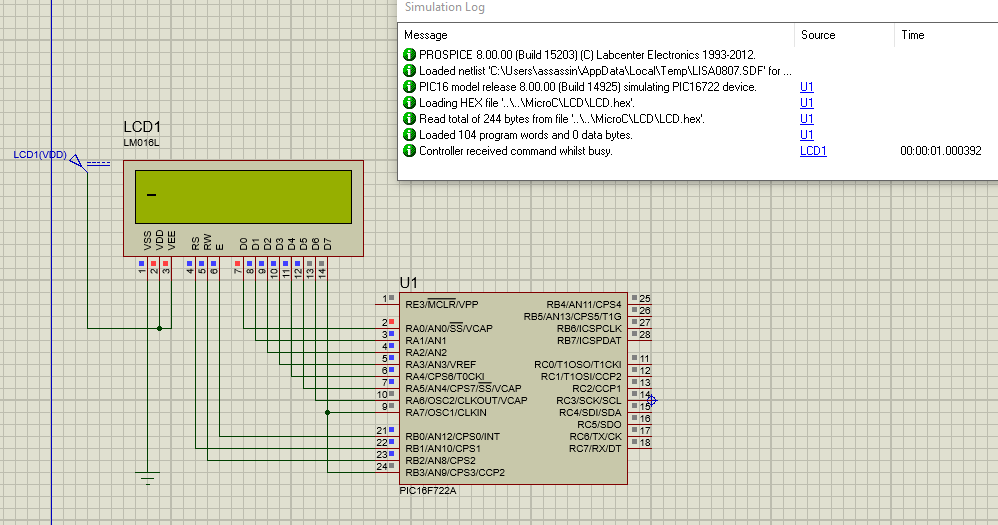
Here is the program
Any help would be appreciated.
Here is the program
Code:
#include <stdio.h>
#include <stdbool.h>

#define LCD_DATA PORTA
#define LCD_CTRL PORTB

sbit LCD_EN at PORTB.B0;        // LCD Latch pin (Enable) | High to Low signal for lactching
sbit LCD_RS at PORTB.B1;       // Command/Data select PIN | Command(RS=0) | DATA(RS=1)
sbit LCD_RW at PORTB.B2;       // READ/WRTIE pin | Read (1) | Write (0)
sbit LCD_BUSY_FLAG at PORTB.B3;  // Check LCD Busy Status bit

#define LCD_DATA_DIRECTION TRISA
sbit LCD_EN_Direction at TRISB0_bit;
sbit LCD_RS_Direction at TRISB1_bit;
sbit LCD_RW_Direction at TRISB2_bit;
sbit LCD_BUSY_FLAG_Direction at TRISB3_bit;

// =========================    LCD FUNCTIONS =========================

//           LCD busy function

void lcd_ready(){
             LCD_RS=0; // Command register
             LCD_RW=1; // Read from LCD
             Delay_us(1);LCD_EN=1;Delay_us(1);LCD_EN=0; // LATCH signal
             while(LCD_BUSY_FLAG); // wait until busy flag is low
}


//          LCD_POWER(ON/OFF) | ON=1
void LCD_POWER(bool flag){

                if(flag){
                        Delay_ms(250); // Power up delay
                        lcd_ready(); // Is LCD BUSY ? wait here
                        LCD_RS=0;      // Select Command Register
                        LCD_RW=0;      // Write operation
                        LCD_DATA=0x38; // LCD 2 Lines, 5x7 characters
                        Delay_us(1);LCD_EN=1;Delay_us(1);LCD_EN=0; // High-to-Low signal for LATCH
                        lcd_ready(); // Is LCD BUSY ? wait here
                        LCD_DATA=0x0E; // LCD ON, CURSOR ON
                        Delay_us(1);LCD_EN=1;Delay_us(1);LCD_EN=0; // LATCH
                        lcd_ready(); // Is LCD BUSY ? wait here
                        LCD_DATA=0x01;        // Cursor to the HOME position
                        Delay_us(1);LCD_EN=1;Delay_us(1);LCD_EN=0; // LATCH
                        }
                    else{
                        lcd_ready(); // Is LCD BUSY ? wait here
                        LCD_RS=0;      // Select Command Register
                        LCD_RW=0;      // Write operation
                        LCD_DATA=0x10; // Cursor and Display off
                        Delay_us(1);LCD_EN=1;Delay_us(1);LCD_EN=0; // Latch
                        }
}

void main() {

             // char DATA[]={'H','I',' ','L','C','D'};
            //  =========================    Set Ports Directions =========================
            LCD_DATA_DIRECTION=0;
            LCD_EN_Direction=0;
            LCD_RW_Direction=0;
            LCD_RS_Direction=0;
            LCD_BUSY_FLAG_Direction=1;

            // Power ON LCD
            LCD_POWER(1);
            lcd_ready(); // Is LCD BUSY ? wait here
            LCD_RS=1; // Data register
            LCD_RW=0; // write to LCD
            LCD_DATA='A';
            Delay_us(1);LCD_EN=1;Delay_us(1);LCD_EN=0; // LATCH