Comparator with hysteresis

Thread Starter

Ian0

Joined Aug 7, 2020
13,132
hi @Ian0,
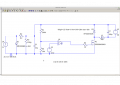
This is another Solar Cell option.
E
View attachment 255193
Comparing this one and the previous one with a solar-panel datasheet, the IV curve of the PREVIOUS model is the closer (the one that @Papabravo ridiculed). The real graph seems to be somewhere between the two. The spread of open circuit voltage with changes in light (represented by the current source) is the interesting parameter. The real panel has a slightly larger spread than the first model, but nowhere near as much as this one.
 

Thread Starter

Ian0

Joined Aug 7, 2020
13,132
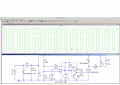
This is my simplest version of the solar panel. I just kept trying different diodes until I got one that was a good match for the VI curve in the datasheet.
Solar4.png
But it still won't converge.
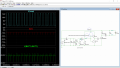
If I go back to the much more complex LM393 circuit, then it works fine.
Solar3.pngBut what I was trying to achieve was to set the hysteresis in mV, not with a feedback resistor, because that is a close match to how the LPC802 does it.
 

Papabravo

Joined Feb 24, 2006
22,083
Comparing this one and the previous one with a solar-panel datasheet, the IV curve of the PREVIOUS model is the closer (the one that @Papabravo ridiculed). The real graph seems to be somewhere between the two. The spread of open circuit voltage with changes in light (represented by the current source) is the interesting parameter. The real panel has a slightly larger spread than the first model, but nowhere near as much as this one.
I don't quite understand how trying to help you find a solution to a simulator problem amounts to ridicule. It's just a simulation after all. It's not personal. There are many mysteries about what is under the hood in a complex piece of software and not all of them will have an obvious explanation or a solution. I'm sure the answer is out there, but I'm not motivated to continue the search for it.
 

Thread Starter

Ian0

Joined Aug 7, 2020
13,132
Try giving V2 a finite series resistance and ticking 'Skip initial operating point solution'. Works for me.
Thanks. When I first came across SPICE (as a student at Marconi in 1985) the engineers used to curse it for "not converging". When I decided that my lockdown project would be to increase by understanding of it, I was amazed that it hadn't learned how to converge over the last 35 years. Back then, the graph was a huge affair printed with asterisks on acres of line-printer paper. Now it has fancy graphics that can be instantly zoomed and rescaled, but it still gets stuck "converging".
Yes. Skipping the initial operating point thing makes it work, but am I missing anything important?
 

eetech00

Joined Jun 8, 2013
4,705
But it still won't converge.
But what I was trying to achieve was to set the hysteresis in mV, not with a feedback resistor, because that is a close match to how the LPC802 does it.
I didn't check the circuit much but the following changes allowed switching to occur:

1. Set initial condition for L1
2. The A device output is not open collector, so don't need PU.
3. Add A device params similar to LM393 and included output limiter resistor of 1K
4. Don't use "Skip initial operating point solution"
I circled the changes.
See below.

1639598994430.png
 

Alec_t

Joined Sep 17, 2013
15,119
Skipping the initial operating point thing makes it work, but am I missing anything important?
I know nothing of the inner workings of Spice. I get the impression (probably totally wrong) that the LT version of Spice is somewhat proprietary and optimised for simulations of switch-mode regulators. Perhaps the initial operating point thing helps for those (or other) sims in some way, but can't get started if zero or infinite values are present.
I've found skipping that step often gets a stuck (or glacially slow) sim going, without any apparent adverse effect on the sim.
As eetech says, setting an initial condition (usually for a reactive component) is another thing to try.
 

Thread Starter

Ian0

Joined Aug 7, 2020
13,132
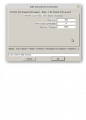
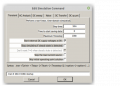
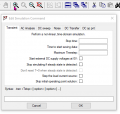
I've just discovered lots of extra items on the "Edit simulation command" box.
Normally it looks like this:
simulation0.png
And I've just discovered that if I click in the grey area below "maximum timestep" there are lots of other options I didn't know existed:
simulation1.png
I can get it to work using "start external DC supply voltages at 0V" and I don't need to use "skip initial operating point solution"
 

hrs

Joined Jun 13, 2014
532
I've just discovered lots of extra items on the "Edit simulation command" box.
Normally it looks like this:
View attachment 255337
And I've just discovered that if I click in the grey area below "maximum timestep" there are lots of other options I didn't know existed:
View attachment 255338
I can get it to work using "start external DC supply voltages at 0V" and I don't need to use "skip initial operating point solution"
Do you run LTSpice in Wine by any chance? Then this is a known bug. You may also not always see column headers when selecting e.g. a specific diode or transistor. Resizing the window will make the 'hidden' elements reappear.
 

Thread Starter

Ian0

Joined Aug 7, 2020
13,132
Do you run LTSpice in Wine by any chance? Then this is a known bug. You may also not always see column headers when selecting e.g. a specific diode or transistor. Resizing the window will make the 'hidden' elements reappear.
Indeed I do!
And all this time I’ve been unaware of how to find those options.
 
Top