Choosing an IoT platform

nsaspook

Joined Aug 27, 2009
16,328
Seems like it's the -4 option that gets MQTT. I'm glad you spotted that as I was just going to order one.
The Waveshare one has a separate manual for setting up the MQTT.
I did a quick read of the Waveshare MQTT link from my post above. Looks good but as usual the devil is in the details. I might get one just to play around with.
Cheers.
 

nsaspook

Joined Aug 27, 2009
16,328
Decided to have the MQTT client directly on controller board so I can use a regular UART to Ethernet module like this that I designed into a previous board: https://www.waveshare.com/uart-to-eth.htm
Config the module for a TCP client pointing to the broker address and port.
1699298150477.png

Copy over to the PIC32 source directory the Linux version of client software and convert the BSD socket and pthread routines to something usable on the bare-metal controller software. The pthread routines were converted to run in the main task loop and the network socket file pointer code (send/recv and support routines) was converted to single point serial TX/RX I/O with a dummy handle.
Secion of the main program look the handles MQTT
C:
        if (TimerDone(TMR_REPLY)) {
            StartTimer(TMR_REPLY, host_xmit_wait);
#ifdef HOST_MQTT
            mqtt_work(); // process tx/rx mqtt messages
#endif
        }


        if (TimerDone(TMR_HOST)) {
#ifndef HOST_MQTT        
            StartTimer(TMR_HOST, host_canfd_update);
#else
            StartTimer(TMR_HOST, host_mqtt_update);
#endif
            if (rec_message) {
                rec_message = false;
                if (CAN1_InterruptGet(1, CANFD_FIFO_INTERRUPT_TFNRFNIF_MASK)) {
                    send_wait = true;
                    send_from_host(HOST_MAGIC_ID); // Master broadcast ID
                    while (send_wait) {
                    };
                }
            }
            eaDogM_WriteStringAtPos(6, 0, cmd_buffer);
            eaDogM_WriteStringAtPos(7, 0, response_buffer);
#ifndef HOST_MQTT
            snprintf(buffer, max_buf, "Tx CAN-FD %8X   %6i", messageID, tx_num);
            eaDogM_WriteStringAtPos(11, 0, buffer);
#else
            snprintf(buffer, max_buf, " Tx MQTT %8X   %6i ", messageID, tx_num++);
            eaDogM_WriteStringAtPos(11, 0, buffer);
#endif
            OledUpdate();
#ifdef HOST_MQTT
            mqtt_check(buffer); // send test mqtt message
#endif
        }
Fake socket routines for ttl serial
C:
void UART1DmaWrite(const char *, uint32_t);

ssize_t mqtt_pal_sendall(mqtt_pal_socket_handle fd, const void* buf, size_t len, int flags)
{
    enum MQTTErrors error = 0;
    size_t sent = 0;
    while (sent < len) {
        UART1DmaWrite((const char *) buf, len);
        ssize_t rv = len;
        //        ssize_t rv = send(fd, (const char*) buf + sent, len - sent, flags);
        if (rv < 0) {
            if (errno == EAGAIN) {
                /* should call send later again */
                break;
            }
            error = MQTT_ERROR_SOCKET_ERROR;
            break;
        }
        if (rv == 0) {
            /* is this possible? maybe OS bug. */
            error = MQTT_ERROR_SOCKET_ERROR;
            break;
        }
        sent += (size_t) rv;
    }
    if (sent == 0) {
        return error;
    }
    return(ssize_t) sent;
}

int32_t linux_getc_mqtt(uint8_t *);

int32_t linux_getc_mqtt(uint8_t *a_data)
{
    if (UART1_ReceiverIsReady()) {
        UART1_Read(a_data, 1);
        return 1;
    } else {
        return -1;
    }
}

ssize_t mqtt_pal_recvall(mqtt_pal_socket_handle fd, void* buf, size_t bufsz, int flags)
{
    const void *const start = buf;
    enum MQTTErrors error = 0;
    ssize_t rv;
    do {
        LED_RED_Off();
        //rv = recv(fd, buf, bufsz, flags);

        rv = linux_getc_mqtt(buf);
        if (rv == 0) {
            /*
             * recv returns 0 when the socket is (half) closed by the peer.
             *
             * Raise an error to trigger a reconnect.
             */
            error = MQTT_ERROR_SOCKET_ERROR;
            break;
        }
        if (rv < 0) {
            errno = EWOULDBLOCK;
            if (errno == EAGAIN || errno == EWOULDBLOCK) {
                /* should call recv later again */
                break;
            }
            /* an error occurred that wasn't "nothing to read". */
            error = MQTT_ERROR_SOCKET_ERROR;
            break;
        }
        buf = (char*) buf + rv;
        bufsz -= (unsigned long) rv;
    } while (bufsz > 0);
    if (buf == start) {
        return error;
    }
    LED_RED_On();
    return(char*) buf - (const char*) start;
}
1699299075580.png
MQTT send/receive byte counts on the Waveshare module web page
1699299253732.png
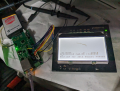
My controller boards GLCD display for MQTT packets.
1699299467544.png
Subscriber payloads on a remote computer from the broker server.

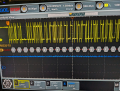
Scope on the TTL serial pins from the controller to the Ethernet module.
http://www.steves-internet-guide.com/mqtt-protocol-messages-overview/
1699300101133.png
CONNECT request
1699300175234.png
CONNACT
1699300250723.png
Publish request
1699300334503.png
PUBACK
 

Thread Starter

Ian0

Joined Aug 7, 2020
13,132
You answered the question before I asked it: “As MQTT is just a TCP message can I just use an ordinary UART to TCP/UDP device?”. So obviously I can. That would be handy as they are more common and could be put to other uses, especially the ones with more than one socket. When I’ve got the hang of it, I’d like to have a go with a W5500, but first things first. More reading to do, but plenty of duller tasks at the moment that are more pressing.

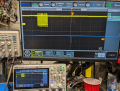
PS. What’s that fancy piece of equipment that is displaying the hex next to the waveform? Scope or logic analyser?
 

nsaspook

Joined Aug 27, 2009
16,328
You answered the question before I asked it: “As MQTT is just a TCP message can I just use an ordinary UART to TCP/UDP device?”. So obviously I can. That would be handy as they are more common and could be put to other uses, especially the ones with more than one socket. When I’ve got the hang of it, I’d like to have a go with a W5500, but first things first. More reading to do, but plenty of duller tasks at the moment that are more pressing.

PS. What’s that fancy piece of equipment that is displaying the hex next to the waveform? Scope or logic analyser?
1699382155665.png
Scope.

The 1st software trick to using the TTL serial port Ethernet on bare-metal hardware is to dummy up the TCP socket send/receive routines and setups in the networking part of the MQTT software that assumes a normal TCP stack socket creating a connection. It's all just a pipe of digital data at the ends, so once you have that code happy, it will send and receive data.
C:
/*
* init the socket connection to the broker server and start client daemon
*/
int mqtt_socket(void)
{

    addr = ADDR_MQTT; // cloud testing server, set in Ethernet module
    port = "1883"; // MQTT port, set in Ethernet module
    topic = DATA_MQTT_SOLAR;

    /* open the non-blocking TCP socket (connecting to the broker) */
    sockfd = open_nb_socket_mqtt(addr, port); // returns a dummy socket handle

    if (sockfd == -1) {
        return sockfd;
    }

    /* setup a client */
    mqtt_init(&client, sockfd, sendbuf, sizeof(sendbuf), recvbuf, sizeof(recvbuf), publish_callback);
    /* Create an anonymous session */
    client_id = NULL;
    /* Ensure we have a clean session */
    connect_flags = MQTT_CONNECT_CLEAN_SESSION;
    /* Send connection request to the broker. */
    mqtt_connect(&client, client_id, NULL, NULL, 0, NULL, NULL, connect_flags, 400);

    /* check that we don't have any errors */
    if (client.error != MQTT_OK) {
        return client.error;
    }
    return 0;
}

/*
    A template for opening a non-blocking POSIX socket.
 */
int open_nb_socket_mqtt(const char* addr, const char* port);

/*
 * dummy socket interface for TTL to Ethernet module
 */
int open_nb_socket_mqtt(const char* addr, const char* port)
{
    static int sockfd = 0;

    sockfd++;
    /* return the new socket fd */
    return sockfd;
}
The 2nd trick is to fix (use a simple state machine) any possible pthread or multi-tasking issues with MUTEX or thread creation with main program flow timers to create 'fake' multitasking for the TCP background process that expects to run the I/O pipe.. I've also ported the cJSON code to the controller so IoT compatible data is being generated.
1699382983049.png

The cJSON source code uses dynamic allocation so a heap is needed for that but it's possible just to munge the JSON output with snprintf into a buffer if you don't need to also parse JSON data.
 
Last edited:

Ya’akov

Joined Jan 27, 2019
10,238
MQTT is good stuff. Simple, and very widely supported. It is also very low overhead and supports devices with unreliable connections which is extremely handy. I like using it.
 

nsaspook

Joined Aug 27, 2009
16,328
MQTT is good stuff. Simple, and very widely supported. It is also very low overhead and supports devices with unreliable connections which is extremely handy. I like using it.
It like it too but integrating the source code to a couple of devices has shown me a few things.
It's useful when you have lots of cycles to waste compared to binary protocols if you use encoding like json/xml for interop, things don't need to be very fast and there is existing networking communications structure to ride it's coat-tails.
 
Last edited:

Thread Starter

Ian0

Joined Aug 7, 2020
13,132
Thanks for all the useful input. I am currently tasked with something far duller. I'll be back to this in due course.
 

Ya’akov

Joined Jan 27, 2019
10,238
Since it was designed for distributed sensor networks, including those which may be operating on battery and/or solar power, the robustness lies in the ability to get a message of a reasonable size from or to a node that is mostly expecting an asynchronous interaction.

It’s not particularly good for C&C of nodes that need to respond quickly to commands for actuation and the like. And it’s not very good for large payloads. But within its limitations—and there are a lot of things that fall into that category—it‘s pretty nice. If you know you have a solid network, you can push it a bit and depend on it to command actuators, but I wouldn’t do health and safety with it!

I haven’t tried to combine it with LoRa yet, but that seems really interesting.
 

Thread Starter

Ian0

Joined Aug 7, 2020
13,132
MQTT is good stuff. Simple, and very widely supported. It is also very low overhead and supports devices with unreliable connections which is extremely handy. I like using it.
I was looking through various providers' websites, all of whom told me how simple it was, and some provided embedded C libraries, so simple that it only took 10,000 lines of code.
 

nsaspook

Joined Aug 27, 2009
16,328
Since it was designed for distributed sensor networks, including those which may be operating on battery and/or solar power, the robustness lies in the ability to get a message of a reasonable size from or to a node that is mostly expecting an asynchronous interaction.

It’s not particularly good for C&C of nodes that need to respond quickly to commands for actuation and the like. And it’s not very good for large payloads. But within its limitations—and there are a lot of things that fall into that category—it‘s pretty nice. If you know you have a solid network, you can push it a bit and depend on it to command actuators, but I wouldn’t do health and safety with it!

I haven’t tried to combine it with LoRa yet, but that seems really interesting.
My local testing has been pretty slack. 100ms updates for a few million transfers to test the client and server/broker software. The load on my local server (using the mosquitto suite) is minimal for a few subs.
https://mosquitto.org/
1699992795962.png
 

Ya’akov

Joined Jan 27, 2019
10,238
I was looking through various providers' websites, all of whom told me how simple it was, and some provided embedded C libraries, so simple that it only took 10,000 lines of code.
It can be implemented much more compactly than that, and it also depends on whether you need encryption and security which will add to the bulk of the code considerably. But F/OSS MQTT clients for small MCUs are readily available.
 

nsaspook

Joined Aug 27, 2009
16,328
I was looking through various providers' websites, all of whom told me how simple it was, and some provided embedded C libraries, so simple that it only took 10,000 lines of code.
I used MQTT-C as my source baseline: 2000 lines of code but only a few of those lines need changes for most 32-bit controllers platforms with a TCP stack, more changes if you only have is a bi-directional serial line. I don't even try on a 8-bit controller.
https://github.com/LiamBindle/MQTT-C
 

Thread Starter

Ian0

Joined Aug 7, 2020
13,132
It can be implemented much more compactly than that, and it also depends on whether you need encryption and security which will add to the bulk of the code considerably. But F/OSS MQTT clients for small MCUs are readily available.
Even so, it is still more complex than I expected. I was thinking I could get UART to Ethernet (TCP) interface and send a few bytes of data to it.
Because a DIN-rail module works better for how we like to build things, I'll most likely be using a MQTT-enabled module, and my aspirations to understand it in depth and put it all on my own pcb using a W5500 will disappear by the wayside. Meanwhile I have to deal with a CHP system that is not working properly and the world will end if Mrs. Atkinson doesn't get a hot shower. If only we had installed remote monitoring.. . .
 

liaifat85

Joined Sep 12, 2023
200
I’m currently investigating IoT platforms for remotely logging data.
Having looked at the various websites, they all seem very much like an attempt to keep out the hoi polloi. There is much talk about getting a system up and running in 5 minutes, but 5 hours later and I am still struggling through the acronyms: OTA updates? But I don’t even have an operational transconductance amplifier in circuit.
Surely sending data to the server must be trivial: serial-to-Ethernet module sending internet command followed by some form of ID, followed by variable name, and finally the new data value, so why does it seem to require the downloading of megabytes of ”libraries”?
I would have thought that these firms would need to appeal to the hardware designer and embedded programmer, rather that just the computer cognoscenti, because those are the engineers that actually have real-world-connected hardware that needs monitoring.
Does anyone know of any engineer-friendly IoT providers?
Have you considered Thingspeak?
 

nsaspook

Joined Aug 27, 2009
16,328
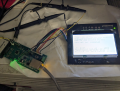
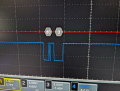
Did a bit of code optimization on the IMU sensor PIC32MK client MQTT implementation to see how fast I could push it without threads and just using a main loop timed state machine. I can get about 20 updates (read IMU, processes IMU data, send to broker, receive ack from broker) per second per client on the server. The Linux subscriber clients can easily handle the load but the phone IoT clients lockup (unable to connect) at that data rate.

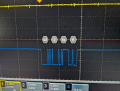
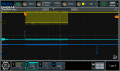
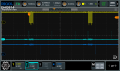
Yellow: MQTT data to host on the serial line. Green: DEBUG TP3 pulses for the functions to check for messages and to send a message. Blue: Response from the broker ACK for the MQTT message.
C:
            imu0.op.imu_getdata(&imu0); // read data from the chip
            imu0.update = false;
            getAllData(&h_accel, &imu0); // convert data from the chip
#ifdef SHOW_VG
            q0 = h_accel.x;
            q1 = h_accel.y;
            q2 = h_accel.z;
            q3 = h_accel.x;
            vector_graph();
#endif

            benergy = benergy + 1.0f;
            json = cJSON_CreateObject();
            cJSON_AddStringToObject(json, "name", "MQTT sensor board");
            cJSON_AddNumberToObject(json, "sequence", benergy);
            cJSON_AddNumberToObject(json, "X", q0);
            cJSON_AddNumberToObject(json, "Y", q1);
            cJSON_AddNumberToObject(json, "Z", q2 * -1.0f); // flip Z
            cJSON_AddStringToObject(json, "system", "PIC32MK");
            // convert the cJSON object to a JSON string
            json_str = cJSON_Print(json);

            TP3_Set();
            mqtt_check((uint8_t *) json_str); // prepare MQTT message from the string
            TP3_Clear();
            TP3_Set(); // thicker line to ID this pulse from the other pulse
            TP3_Clear();

            cJSON_free(json_str); // free internal data structure memory
            cJSON_Delete(json);
            TP3_Set();
            mqtt_work(); // process tx/rx mqtt messages
            TP3_Clear();
            StartTimer(TMR_REPLY, HOST_MQTT_JOB_WAIT);
1700084513759.png
1700083309431.png
1700083455624.png
 
Last edited:

nsaspook

Joined Aug 27, 2009
16,328
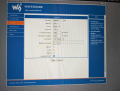
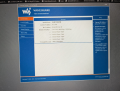
Received my MQTT device. The first step is to log into the damn thing over the network.

Factory rest to get the default static IP address 192.168.1.254 (it is NOT 192.168.1.200) . That's IP is on another network from the house. :(
Setup a compatible address on one of the server Ethernet ports as a gateway and then add network route to that.
Plug a cable from that computer Ethernet port to a switch with POE ports for power, another cable from the switch POE port to the Waveshare unit.

1700448323723.png
1700448396991.png
Finally in.

STEP #1 Start the device configuration for DHCP to get a normal address and other things.
 
Top