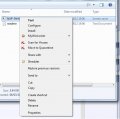
I've tried to download some footprints for Eagle from Farnell, however when I open the file, my computer says it is a screensaver file, whereas it is supposed to be a script - .scr.
If you're using Windows 7, right-click on it, choose "Open With" and then choose either Eagle or "Choose default program" if you just want to be able to double-click them and have them always open in Eagle.
There's another way to associate a program with a file.
In Windows Explorer, right click on the file, click "Properties". On the "General" tab, there's a line saying "Opens with:...." and a button. Click the "Change" button.
Now, in the resulting dialog box, navigate to Eagle, one way or another. First, click the little arrow at the end of the "Other Programs" line and see if Eagle is there - since it didn't show up for you in "Open with", it might not be here either.
If not, click the "browse" button and navigate to Eagle's EXE file under "Program Files" or "Program Files (x86)" structure.
Once you've selected a program, it becomes the default program opened when you double-click on a file.
Oh, btw, if you don't want to associate a file with a program, it's perfectly OK to just open Eagle first, then File -> Open, navigate to your file location and click into it there.
I made the assumption you wanted to always open Eagle when clicking on SCR files but that isn't necessary by any means.

 Facebook
 Google
 GitHub
 Linkedin