
 Facebook
 Google
 GitHub
 Linkedin
Hello,
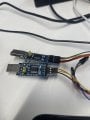
I have two USB Type A to UARR FT232 hardware which I connect on the same pc so that i can transfer data from one software to another using the COM ports generated by this. I tried communicating with hterm, and they work perfectly even on different baudrates. But then when I tried to do this with two labview based softwares and it is not working. The baudrates for the softwares are all set correctly, but it is not working. I used to use these softwares with virtual com ports. And it was working. But the problem is my company changed my laptop to a newer version with new admin rules. So for the virtual com port to work, i need to make such changes in my old laptop, but it is not allowed in my old laptop because of admin rules. So i had to buy this hardware for doing this. The hardware is working fine, as i said it worked with hterm and those software also work fine with virtual comports. But the hardware is not working with these two softwares. And I dont know how to debugg this issue. Can you give me ideas on what I can do to solve this issue. Thank you.
I have two USB Type A to UARR FT232 hardware which I connect on the same pc so that i can transfer data from one software to another using the COM ports generated by this. I tried communicating with hterm, and they work perfectly even on different baudrates. But then when I tried to do this with two labview based softwares and it is not working. The baudrates for the softwares are all set correctly, but it is not working. I used to use these softwares with virtual com ports. And it was working. But the problem is my company changed my laptop to a newer version with new admin rules. So for the virtual com port to work, i need to make such changes in my old laptop, but it is not allowed in my old laptop because of admin rules. So i had to buy this hardware for doing this. The hardware is working fine, as i said it worked with hterm and those software also work fine with virtual comports. But the hardware is not working with these two softwares. And I dont know how to debugg this issue. Can you give me ideas on what I can do to solve this issue. Thank you.
Attachments
-
 49.1 KB Views: 6






