Blink camera power dilema, going crazy here.

Thread Starter

ulms

Joined Mar 19, 2024
179
Hello

I have 2 blink doorbell cameras, one at the front door and one at the back door, they are readily available on Amazon, each camera runs on 2 AA batteries. After spending a small nations GNP on lithium batteries I decided I would run them off of a 3 volt power supply.
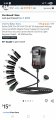
Screenshot_20251207_154043_Chrome.jpg


I have solid copper bell wire coming from the power supply. The cameras are wired in parallel and there is 3.2 v at each but I can only operated one camera at a time. The power supply is rated at 3a at three volts. How many amps do you think they need?
 
Last edited:
sghioto

Joined Dec 31, 2017
8,633
Not
How many amps do you think they need?
I have one of those power supplies and it will not maintain an output of 3 volts at 3 amps.
No load measures 3.2volts and 3 volts at a 300ma load (10ohm resistor).
Will need individual power supplies if using that model.
 
Last edited:

MisterBill2

Joined Jan 23, 2018
27,164
What is not clear is what voltage do you measure when both cameras are connected. Are you measuring 3.2 volts NO LOAD??? Next question: Are you operating with both cameras connected but only one ON???

It is totally unclear, both the condition when one works at a time, and when two do not work at the same time.
OR, do you mean that yoou can not get video from two of them at the same time??? Please give us ALL of the actual details, because I am not able to see into other peoples minds.
If they connect using bluetooth, then NO!!, you can not use both at the same time. I went down that road with wireless video projectors. ONLY ONE wireless connection at a time.
 

Thread Starter

ulms

Joined Mar 19, 2024
179
What is not clear is what voltage do you measure when both cameras are connected. Are you measuring 3.2 volts NO LOAD??? Next question: Are you operating with both cameras connected but only one ON???

It is totally unclear, both the condition when one works at a time, and when two do not work at the same time.
OR, do you mean that yoou can not get video from two of them at the same time??? Please give us ALL of the actual details, because I am not able to see into other peoples minds.
If they connect using bluetooth, then NO!!, you can not use both at the same time. I went down that road with wireless video projectors. ONLY ONE wireless connection at a time.
At the power supply terminals in the basement I read 3.34v. Both cams are on. The front door cam has 3.10 v and the back door cam has 3.34 v. I cannot live view nor will they record when both are in the circuit. They will both live view for the first 30 secs in the circuit then stop.

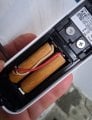
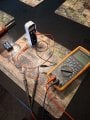
I took a camera out of the circuit, hooked it back up to the batteries and it works fine. It's very responsive. The batteries have 3.17 volts. MB2 I put my DVM in series while powering from the batteries to the camera to meas the current used ... The amp reading flickers all over the place and the camera will not work at all with the meter in the circuit. If I take the amp meter out of the circuit the camera runs fine on the batteries (see picture below)

20251208_135752.jpg
 

boostbuck

Joined Oct 5, 2017
1,032
What is the gauge of the bell wire? Some can be pretty thin and I have found that cameras can have high transient current requirements so it sounds like maybe insufficient copper in the wires.

Alternatively a large capacitor (2000uf or more) across the supply at the camera might be enough to meet transient demand.
 

Thread Starter

ulms

Joined Mar 19, 2024
179
What is the gauge of the bell wire? Some can be pretty thin and I have found that cameras can have high transient current requirements so it sounds like maybe insufficient copper in the wires.

Alternatively a large capacitor (2000uf or more) across the supply at the camera might be enough to meet transient demand.
The wire is 20 gage (.0315 " dia). I have a 2200 uf cap. Install it pos to pos?
 

Thread Starter

ulms

Joined Mar 19, 2024
179
The problem is the supply.
Can you measure the voltage when both cameras are on simultaneously?
At the power supply terminals in the basement I read 3.34v. Both cams are on. The front door cam has 3.10 v and the back door cam has 3.34 v.

I am looking into other supply options.
 

MisterBill2

Joined Jan 23, 2018
27,164
Hereis another possible reason for the problem, which would be the actual doorbell solenoid coil being in series with the front button connection. Of course, THAT IS how doorbells were supposed to be connected for the past several decades. The other possible problem that I see is that low voltage.Normal doorbell systems are powered by AC, anywhere from six volts to 12 volts, with 8 volts being common in my area. .
Did your residence previously have a functional doorbell?? Is there an actual transformer that was powering the doorbell??
What does the installation guide say about powering the "BLINK" device??
If you are powering it from the two terminals on the back you really need more than three volts, because the interface between an external AC power input and the DC powered electronics has a bit of voltage drop. So a very reasonable step would be to change the setting on that plug-in power pack up to 4.5 volts and see what that does for you. You can verify for your self that the terminals on the back do not connect to the internal battery terminals.
 

Thread Starter

ulms

Joined Mar 19, 2024
179
I meant when both cameras were live viewing simultaneously.
When both cameras are wired to the power supply above I cannot live view. I get a problem encountered message. One camera alone (remove second cam) in the system will work although live view takes 10 seconds to view where it only takes 2 seconds with 2 aa batts.
 

Thread Starter

ulms

Joined Mar 19, 2024
179
Hereis another possible reason for the problem, which would be the actual doorbell solenoid coil being in series with the front button connection. Of course, THAT IS how doorbells were supposed to be connected for the past several decades. The other possible problem that I see is that low voltage.Normal doorbell systems are powered by AC, anywhere from six volts to 12 volts, with 8 volts being common in my area. .
Did your residence previously have a functional doorbell?? Is there an actual transformer that was powering the doorbell??
What does the installation guide say about powering the "BLINK" device??
If you are powering it from the two terminals on the back you really need more than three volts, because the interface between an external AC power input and the DC powered electronics has a bit of voltage drop. So a very reasonable step would be to change the setting on that plug-in power pack up to 4.5 volts and see what that does for you. You can verify for your self that the terminals on the back do not connect to the internal battery terminals.
Hello MB2, I am only using the existing run wires from the original doorbell system.The 12 V AC Transformers are disconnected. The blink camera ad was slightly ambiguous and somewhat deceitful when they said it could be hardwired ... hardwired to them was nothing more than a push button on the camera to operate your old chime.
 

MisterBill2

Joined Jan 23, 2018
27,164
When both cameras are wired to the power supply above I cannot live view. I get a problem encountered message. One camera alone (remove second cam) in the system will work although live view takes 10 seconds to view where it only takes 2 seconds with 2 aa batts.
OF COURSE NOT !!! That is the way digital video links work!! One signal at a time. Several years back I was asked to solve a problem in a church where they wanted to send the same signal to two video projectors with one wireless link. It seems that the consumer grade wireless links are Point to point only, and never "point to POINTS" . To see both at once you will need two different receivers.

It might possibly be that somebody who visits this site has a solution, but my guess is that it is neither simple nor cheap. My fix with tyhe two video projectors was a cable to the close one and wireless to the far one. That worked very well.
 

MisterBill2

Joined Jan 23, 2018
27,164
The specifications for these devices says they use wifi to connect, so should have thought that multiple connections would be catered for.
What is bothering me now is that I didn't think about that right away. I should have remembered that video project! It was only ten years ago!!
 

Jon Chandler

Joined Jun 12, 2008
1,560
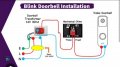
The photo shows the normal connections, which include a mechanical doorbell. When the button is pressed, the power connections are shorted together. If you've done away with the old-school doorbell, that means a dead short across the power supply.

Screenshot_20251208_184041_Edge.jpg

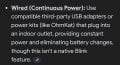
The Blink documentation states that the batteries are always required and are the primary source of power. They also state that wired with an existing doorbell as shown above that the required primary lithium cell batteries receive a small trickle charge when wired as above, which i believe IS NOT recommended by the battery manufacturers.

The instructions also say the doorbell may be powered by a USB adapter. I don't know if this is a standard feature – I don't recall seeing a USB connector on our Blink doorbell.

Screenshot_20251208_184249_Edge.jpg
 

Thread Starter

ulms

Joined Mar 19, 2024
179
The photo shows the normal connections, which include a mechanical doorbell. When the button is pressed, the power connections are shorted together. If you've done away with the old-school doorbell, that means a dead short across the power supply.

View attachment 360247

The Blink documentation states that the batteries are always required and are the primary source of power. They also state that wired with an existing doorbell as shown above that the required primary lithium cell batteries receive a small trickle charge when wired as above, which i believe IS NOT recommended by the battery manufacturers.

The instructions also say the doorbell may be powered by a USB adapter. I don't know if this is a standard feature – I don't recall seeing a USB connector on our Blink doorbell.

View attachment 360248
20251202_151502.jpg

The white wire is gnd, the red is plus 3 vdc. They come from the 3 vdc powersupply shown at top of thread. Those two srews are the pb contacts for a doorbell if you want to use them
 
Top