Blender 3D

Thread Starter

biferi

Joined Apr 14, 2017
518
I was going to Buy this Book for the Blender 3D Program.


I wanted to Buy a 3D Printer some Day.

I was going to Buy this Book for the Blender 3D Program.

I think this may just be for Animation though?
https://www.amazon.com/gp/product/1801077215/ref=ox_sc_act_image_2?smid=ATVPDKIKX0DER&psc=1

Would this Book be what I need?
https://www.amazon.com/gp/product/1119616964/ref=ox_sc_act_image_3?smid=ATVPDKIKX0DER&psc=1
 

MisterBill2

Joined Jan 23, 2018
27,311
Certainly 3D printers are able to do a lot of things that were far more difficult to make by any other means. And certainly they allow a whole lot of people to produce a vast array of things that could not even be imagined to be produced by any other means. But the machines that print steel or even aluminum are still far too expensive for individuals to even dream about.
But eventually a lot more will be possible and so it could be very handy for a person starting a career in a technical field to have an understanding and a familiarity with the design for 3D production process. So studying books is a good way to learn at one's own pace.
 

Ya’akov

Joined Jan 27, 2019
10,226
Blender is a great program, and there are a lot of free reosurces online to learn, but, If you are looking to make models for 3D printing Blender won‘t top the list.

You need a 3D CAD program. It will produce 3D models—but that’s where the similarity to Blender ends. Take a look at FreeCAD. It’s a free, open source, full featured parametric CAD program. On the other hand it is arcane and will take a lot to learn.

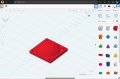
As an alternative you could use TinkerCAD, a more limited but functional cloud-based option that runs in your browser provided by AutoCAD. You’ll have to sign up for an account but there‘s no payment required. It will get you started but eventually you will run into limitations that will probably force you to do something else.

IMG_3225.jpeg
TinkerCAD, a good start but probably not a forever solution.
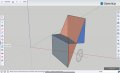
There’s also SketchUP Free from Trimble a browser-based option like TinkerCAD but more sophisticated. The free tier is limited but functional. You have to create an account but there is no payment information required—you can just start using it.

IMG_3227.jpeg
SketchUP Free, not bad but with limits if you don’t pay.​

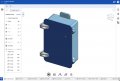
or you could try the free tier (hobbyist/maker) level of OnShape, which is much more capable. It is alos cloud-based but does have a native app, I believe it also runs in the brower. OnShape is extremely full-featured. One of the limitations of the free account is that you can’t make anything private. It is a very expensive subscription if you want to get rid of the limits but many people use it to great effect.

IMG_3226.jpeg
OnShape, really good but limited in the free version and very expensive otherwise.
There are others out there as well, if you look around. I use Shapr3D a non-free program that fits my needs very well. They offer a trial version but no free tier. It runs on MacOS, iOS and iPadOS which is perfect for me, and of course it also runs on Windows.

It’s possible that someone (@joeyd999?) will have suggestions for native Linux optons. I’m pretty sure FreeCAD will run, and you can always use emulation—but maybe there’s a better option. Whatever you choose, if you are trying to learn Blender for 3D Printing—stop—learn CAD.
 

Ya’akov

Joined Jan 27, 2019
10,226
Certainly 3D printers are able to do a lot of things that were far more difficult to make by any other means. And certainly they allow a whole lot of people to produce a vast array of things that could not even be imagined to be produced by any other means. But the machines that print steel or even aluminum are still far too expensive for individuals to even dream about.
But eventually a lot more will be possible and so it could be very handy for a person starting a career in a technical field to have an understanding and a familiarity with the design for 3D production process. So studying books is a good way to learn at one's own pace.
The so-called engineering polymers (e.g.: carbon fiber filled high temperature nylon, glass filled ABS, TPU, among many others) offer a great deal of functionality when printing parts for use and are easily in the reach of hobbyists. These materials can print very strong and/or tough parts to surprising levels of precision. There’s not really any reason to concern oneself with metal printing when considering hobbyist additive manufacturing.

You also might not be aware of the many companies that will print or cut materials based on a model file. This includes a full range of metals and bulk plastics. And companies like JLCPCB have added affordable CNC on various materials, and 3DP in a variety of very sophisticated technologies in addition to their PCB services. It’s pretty amazing.
 

Ya’akov

Joined Jan 27, 2019
10,226
Does anybody know if the 3D Printers that use these Filaments are Toxic?

They can be, when they are heated during the printing process some produce VOCs that can be a problem. In partiular, ABS can produce formaldehyde if it is overheated. Ventilation is important.

PLA, the most common polymer used, presents very little risk—but ventilation is still important.
 

Thread Starter

biferi

Joined Apr 14, 2017
518
I am Legally Blind and I became a Computer Graphic Artist in 2000.

I can make 3D Objects but they are in CorelDraw so they are still 2D they are just look 3D.

I watched some videos on YouTube about Blender 3D Print and because the Program is very Dark I loved it.

The Program 123D Print is a White and hard for me to see.

I like Blender because you can use it Offline it is not a Cloud Program.

If I did use Blender 3D Print with a 3D Printer can I not make a Nut and Bolt or a Big Coffee Mug?

I will not be using it for a Company.
 

ZCochran98

Joined Jul 24, 2018
351
I am Legally Blind and I became a Computer Graphic Artist in 2000.

I can make 3D Objects but they are in CorelDraw so they are still 2D they are just look 3D.

I watched some videos on YouTube about Blender 3D Print and because the Program is very Dark I loved it.

The Program 123D Print is a White and hard for me to see.

I like Blender because you can use it Offline it is not a Cloud Program.

If I did use Blender 3D Print with a 3D Printer can I not make a Nut and Bolt or a Big Coffee Mug?

I will not be using it for a Company.
You can use Blender to model things, but its primary purpose is modeling for animations and similar (so it's more challenging to do more "rigorous" modeling) - it's meant for "artistic" purposes. For "proper" modeling, like what you'd expect from CAD-level software or other engineering software tools, while also remaining cloud-free, like previous users said I also would recommend FreeCAD, though its initial learning curve is a bit steep (it's free, at least, and offline, and is additionally a parametric modeling tool, so everything is modeled based on dimensions, constraints, variables, and equations, depending on how in-depth you go with it), and has online tutorials aplenty (PDF format, webpages, YouTube, etc - not sure if there are any books). There used to be other free modeling softwares, but they seem to have gone the way of the cloud. In any case, you can export files from FreeCAD as a .stp file (I think) and import them (I think) into Blender, which has plugins for 3D printing. FreeCAD I think also has plugins for 3D printing.

In short, yes, you can use Blender to make a nut and bolt or big coffee mug, and there are plugins for some special types of geometries beyond the primitives, but it is really not meant for modeling things like that except from an artistic point of view (though the coffee mug would probably be easy to model in Blender). For things that are to be 3D printed and used as parts, FreeCAD would be your better choice, in my opinion.
 

Ya’akov

Joined Jan 27, 2019
10,226
I am Legally Blind and I became a Computer Graphic Artist in 2000.

I can make 3D Objects but they are in CorelDraw so they are still 2D they are just look 3D.

I watched some videos on YouTube about Blender 3D Print and because the Program is very Dark I loved it.

The Program 123D Print is a White and hard for me to see.

I like Blender because you can use it Offline it is not a Cloud Program.

If I did use Blender 3D Print with a 3D Printer can I not make a Nut and Bolt or a Big Coffee Mug?

I will not be using it for a Company.
Blender is a program for making 3D models intended for graphics. Because of this dimensioning is not as well supported as it is in CAD, and I don’t think it offers parametric functionality. In any case, do whatever makes you happy.

Good luck.
 

Ya’akov

Joined Jan 27, 2019
10,226
You can use Blender to model things, but its primary purpose is modeling for animations and similar (so it's more challenging to do more "rigorous" modeling) - it's meant for "artistic" purposes. For "proper" modeling, like what you'd expect from CAD-level software or other engineering software tools, while also remaining cloud-free, like previous users said I also would recommend FreeCAD, though its initial learning curve is a bit steep (it's free, at least, and offline, and is additionally a parametric modeling tool, so everything is modeled based on dimensions, constraints, variables, and equations, depending on how in-depth you go with it), and has online tutorials aplenty (PDF format, webpages, YouTube, etc - not sure if there are any books). There used to be other free modeling softwares, but they seem to have gone the way of the cloud. In any case, you can export files from FreeCAD as a .stp file (I think) and import them (I think) into Blender, which has plugins for 3D printing. FreeCAD I think also has plugins for 3D printing.

In short, yes, you can use Blender to make a nut and bolt or big coffee mug, and there are plugins for some special types of geometries beyond the primitives, but it is really not meant for modeling things like that except from an artistic point of view (though the coffee mug would probably be easy to model in Blender). For things that are to be 3D printed and used as parts, FreeCAD would be your better choice, in my opinion.
I should add that a 3D printed coffee mug—at least one from an FDM printer for sure—is not something you would want to drink from.
 

Thread Starter

biferi

Joined Apr 14, 2017
518
If I get FreeCAD can I change the color them to Dark this I why I like Blender 3D Print?

In the videos for Blender 3D Print it looks very easy for my Eyes.
 

Thread Starter

biferi

Joined Apr 14, 2017
518
I want to Buy the Anycubic Vyper 3D Printer.

All the videos I watch so far are very good.

I was going to look on Amazon for it.

I wanted to know should I not Buy the Newest Model should I look for say last years to save money?

I will not be doing 3D Printing for a company and I know some times the newest one of anything you are just paying for Bells and Whistles that you do not need.

So can anybody help?
 

Thread Starter

biferi

Joined Apr 14, 2017
518
I just e mailed Anycubic Vyper 3D from an e mail I got off google.

It can back to me and did not work.

If I go to the WebSite they have a form but you need an account to e mail them.

I just want to ask some things.

Does anybody know of any 3D Printers that have Phone Support?
 
Top