Arduino and machine comminication

Thread Starter

talhams

Joined May 29, 2024
10
Hi, a friend of mine wants to develop a small device. There is a nitrogen tank, this tank gives temperature and level data to the computer via cable. We want the data to be received by Arduino, saved to sd card and transferred to the computer via wifi when needed.

My question is I don't know what the output on the control panel of the tank is or what protocol is used. I have never done a project like this before. What should I use or how can I find out?
 

DickCappels

Joined Aug 21, 2008
10,661
It might help if you supply details of the part of the nitrogen tank that sends the data.

I would search the internet Arduino applications (or “sketches”) that use WIFI and ones that use an SD card.
 

Thread Starter

talhams

Joined May 29, 2024
10
It might help if you supply details of the part of the nitrogen tank that sends the data.

I would search the internet Arduino applications (or “sketches”) that use WIFI and ones that use an SD card.
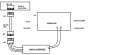
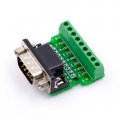
I found it, machine uses rs485 comminication protocol via rj45 port. So i may use rs485 to ttl am i right on below image? Thanks for your reply.Ardcomm.png
 

Reloadron

Joined Jan 15, 2015
7,889
RJ45 is a connector and that's all it is, an eight pin connector. RS485 is a communications interface. Do you know what protocol is actually used? You can buy a RS232/RS485 Shield for Arduino but you still need to know how to communicate with the machines control panel. Would this be gaseous nitrogen or liquid nitrogen? I am assuming liquid as you mention level in the tank. Ultrasonic sensors are popular for measuring LN levels in a tank or another method is measuring tank weight. You need to know exactly how the data is transferred and what the data actually is? This may help and as to wireless I would be looking at an ESP8266 or similar. That or Arduino Uno REV 4.


Ron
 
Last edited:

Thread Starter

talhams

Joined May 29, 2024
10
Hi Ron, thanks for detailed reply. Yes it is a liquid nitrogen tank.I've found control panels datasheet.

I didnt find the protocol on datasheet.
Also can i use Max485? Because it is way more cheaper and easy to find in Istanbul.
At page 42
7.1.8. Communication / Networking Capabilities
The TEC 3000 RS-485 Serial interface offers several advanced communication capabilities. The TEC 3000 is equipped with two, independent RJ-45 serial ports. These ports are intended for connection to another MVE controller, PC, serial printer, or other RS-485 device.
At page 94 below of connections
At page 102
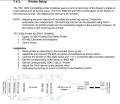
7.4.3. Printer Setup (More detailed here and above, I guess my application is printer setup?)
" The TEC 3000 is equipped with two independent RJ-45 serial ports. These ports are intended for connection to another MVE controller, PC, serial printer, or other RS-485 device. "
Datasheet Link
 

MrChips

Joined Oct 2, 2009
34,810
Thanks for posting the MVE TEC 3000 Techincal Manual. That is all we need.

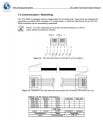
MVE TEC3000 page 92.jpg
This is a 4-wire plus GND RS-485 connection. What you need is an RJ-45 plug and cable.
Next, you need two MAX485 ICs to convert RS-485 to TTL.
Then I would suggest that you get a CP2102 USB-to-TTL bridge. With this setup you will be able to connect to the USB port of a PC and test the communication using a terminal program such as PuTTY,
 

Thread Starter

talhams

Joined May 29, 2024
10
Thanks for posting the MVE TEC 3000 Techincal Manual. That is all we need.

This is a 4-wire plus GND RS-485 connection. What you need is an RJ-45 plug and cable.
Next, you need two MAX485 ICs to convert RS-485 to TTL.
Then I would suggest that you get a CP2102 USB-to-TTL bridge. With this setup you will be able to connect to the USB port of a PC and test the communication using a terminal program such as PuTTY,
Thanks for nice reply. I want to take the data to Arduino, save it to the SD card and transfer it to the computer via wifi. Could you please explain the process of importing the data to Arduino in detail?
 

MrChips

Joined Oct 2, 2009
34,810
Thanks for nice reply. I want to take the data to Arduino, save it to the SD card and transfer it to the computer via wifi. Could you please explain the process of importing the data to Arduino in detail?
I understand that but leave that for a later step. You are diving into unknown territory. The first thing you want to test is the communication with the TEC3000. The implementation with the Arduino and SD Card will come later.
 

Reloadron

Joined Jan 15, 2015
7,889
OK now in your link ,7.4. Communication / Networking gets interesting. I see MrChips is already on that. They give you commands. I would just start simple as suggested. Connect to a PC and try the commands they give you. I agree that the Arduino (or similar) come later. You can use any serial monitor like the old Hyper Terminal by Microsoft or Tera Term to communicate using the commands in the manual. Once that all works then we can worry about u8sing an Arduino or similar to collect data. That manual is what was needed. They provide all the settings like baud rate, bits and everything you need.

Ron
 

Reloadron

Joined Jan 15, 2015
7,889
OK, We want to be able to read and write to and from the serial port we are using. There are a dozen software apps to do this and I would try Tera Term which you can download here. What this does is allow you to send and receive data through a serial port on your PC. This is where you can send the commands you see in the manual.

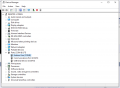
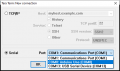
Using your PC open the Device Manager and see which port is being used after you connect. This will tell you the serial port the PC has assigned. Here is an example:
Device Manager.png

Using the device manager I see an Arduino on COM8 so just as an example I would put COM8 in my Tera Term application.

Using Tera Term you will see this:
Tera Term.png

Choose Serial as seen above. Now you can send and receive data over the selected serial port. Your device should show in your device manager.

When you send a command you should get a reply.

Ron
 

Thread Starter

talhams

Joined May 29, 2024
10
Thanks Dear Ron. Then how can i proceed to arduino. I'm asking because we have limited time with tank. So i want to take a shot with arduino too when i try with PC. And i know that i will have successful comminication with PC. I want the Arduino system to be ready to try it. What should the Arduino circuit diagram be like for comminication with TEC3000?You can ignore SD cart and wifi.
 

Ya’akov

Joined Jan 27, 2019
10,235
Thanks Dear Ron. Then how can i proceed to arduino. I'm asking because we have limited time with tank. So i want to take a shot with arduino too when i try with PC. And i know that i will have successful comminication with PC. I want the Arduino system to be ready to try it. What should the Arduino circuit diagram be like for comminication with TEC3000?You can ignore SD cart and wifi.
Welcome to AAC.

You are asking about how to do something that is a relatively complicated development project. You want to create a store-and-forward datalogger that speaks a proprietary protocol on one side, using wired serial communications; and interfaces with a PC on the other using WiFi using a not-yet-explained method to transfer the data. That is a lot of moving parts, particularly for someone who doesn’t even know where to start.

The “Arduino circuit” is a minor problem, but it is also completely useless without the much more complicated and critical code that will make the MCU do what you need. This is not a project that you, as a complete neophyte, can do in a hurry. If you have limited time you will either need to get someone else to do it or buy something off the shelf that can do it.

There is no “quick” solution here, you have to first research and characterize the parts of the problem, then built subsystems/write code to create a system. I am not trying to be discouraging, I am sure that given sufficient resources you could do this very successfully—but time is one of those you will need, and if you are trying to skip steps because you don’t have time, then you don’t have time to do this.
 

Thread Starter

talhams

Joined May 29, 2024
10
Thanks Ya'akov.
I'm not newbie to develop small devices and a couple of machines that run by Arduino. I just haven't communicated Arduino with another device except arduino before. I've used I2C and other communication methods, but I didn't use this one. I thought this would be easy, maybe that was my mistake.
I thought it would be easy because of the printer setup below. In the first stage, I only receive data, I do not send commands to Tec3000. According to the information below, I thought that I could read data from the serial port by connecting my device instead of a printer without changing the default settings of Tec3000. Do you think this is wrong?
By the way I am not offended, you can talk as you wish, I am aware that you want to help and appreciated for that.

resim_2024-05-31_145650645.png
 

John P

Joined Oct 14, 2008
2,061
I'm not seeing any wire carrying power to the tank, and if you just call it a "nitrogen tank" then it sounds as if it wouldn't have its own battery. Is there actually something which will power the sensor? An RS-485 link wouldn't necessarily provide this.
 

Reloadron

Joined Jan 15, 2015
7,889
Sorry I am behind today, just a busy day. I don't see using the parallel printer port as viable. Yes, my take is you will be sending commands requesting data based on the manual. If I recall correctly the manual listed the commands you will need. I suggested using a program like Tera Term only because I figured it would be nice to make sure you could communicate with the system. Now if you want to forgo that due to time restraints then you can try just starting with an Arduino or uC of your choice.
I'm not seeing any wire carrying power to the tank, and if you just call it a "nitrogen tank" then it sounds as if it wouldn't have its own battery. Is there actually something which will power the sensor? An RS-485 link wouldn't necessarily provide this.
Back in post #5 there is a link to the system the thread starter wishes to communicate with. The manual also list the commands.

Most of this is pretty much old school but the old school stuff works. A Google of "Send and receive data serial port Arduino" should get you some hits and code samples you can work from. The closest I come is I wrote a few routines for reading from HP and Agilent bench meters and I did that in I think VB6 to run on a PC.

Ron
 

MrChips

Joined Oct 2, 2009
34,810
The diagram shown with four adapters was meant to plug into a printer with RS-232 serial interface. It's a bit like a Rube Goldberg contraption. All you need is a scrap RJ-45 cable. Cut off one connector and simply connect to TX- and GND for serial output. Connect this to an oscilloscope and you can tell if it is working.
 
Top