Any other decent alternative to LT Spice

crutschow

Joined Mar 14, 2008
38,567
So you are saying that every circuit you've tried gives you a syntax error?
If so it sounds like something if wrong with your LTspice implementation.
Are you on a PC?
You might try uninstalling and then reinstalling it.
 

Thread Starter

MaxHeadRoom

Joined Jul 18, 2013
30,699
No, the one example is one I thought I would run to see the result, the very first on the list.
It doesn't even load without the error message.
I have spent the best part of the day using one book which I believe is a publication By LT Spice. It is totally useless as a walk through approach.
I watched a couple of Utube video's and copied the commands verbatim but did not get the results the video showed, Just a simple R/C time constant example!.:rolleyes:
Max.
 

Alec_t

Joined Sep 17, 2013
15,126
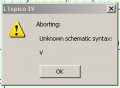
It doesn't load due to 'Unknown Schematic Syntax'.
It loads and runs without error on my setup (Win10, LTspice XVII). Must be something to do with your setup. Don't think LTS can be blamed.
Have you tried any of the examples in the ..... LTspice/examples/educational folder? Just double-click the file name and it should open LTS ready to run.
 
Last edited:

bertus

Joined Apr 5, 2008
22,949
Hello,

I just tried the LT3468 example on my linux box using WINE and LTSpice 4.23k and it worked fine.

Bertus
 

Thread Starter

MaxHeadRoom

Joined Jul 18, 2013
30,699
I am using the latest on WIN 10 now, and the previous file loads OK now.
But I am not getting the Utube tutorial video results however.
Is there a really Decent tutorial for LT out there?
I went back to basics but I do not get the ramp up trace in spite of following the video on either PC.
Max.
 

crutschow

Joined Mar 14, 2008
38,567
Here's the result of my simulation with a DC input and the initial conditions with a 5ms simulation time.
I labeled the input and output nodes (F4) to make them easier to identify.

What did your results look like?

upload_2017-4-23_12-29-7.png
 

Thread Starter

MaxHeadRoom

Joined Jul 18, 2013
30,699
Have you tried the LTS Help (which you can summon using the F1 key) ? The sections on Modes of operation, Schematic capture and Waveform viewer are quite informative.
As for tutorials, check out http://www.simonbramble.co.uk
That is all well and good using existing jigs and examples but it does not exactly explain the journey!
I would like something that walks one through the reasoning and explanation of each step.
The LT book I have is supposed to be an introduction, but most examples assume you know how they are derived with minimum of instruction.

Here's the result of my simulation with a DC input and the initial conditions with a 5ms simulation time.
I labeled the input and output nodes (F4) to make them easier to identify.
What did your results look like?
I just had the flat-line at 10v.
I couldn't achieve the result in the vid.
I need a LT Spice book for Dummies!
Max.
 

crutschow

Joined Mar 14, 2008
38,567
I just had the flat-line at 10v.
Sounds like you didn't have the right node for the initial conditions.
(The node numbers change depending upon the order you generated the schematic. They also may change when you make any change to the schematic. That's why I add the node labels).

Can you post a screen dump of your simulation and post your .asc file?

I attached my file.
See if that works for you.
 

Attachments

Thread Starter

MaxHeadRoom

Joined Jul 18, 2013
30,699
Sounds like you didn't have the right node for the initial conditions.
The node numbers change depending upon the order you generated the schematic. They also may change when you make any change to the schematic.

.
That's something that is not in the book!
I will run it and see.
Max.
 

Thread Starter

MaxHeadRoom

Joined Jul 18, 2013
30,699
The instructions I have you just move the probe to the node/point you wish to measure and click on it??
I ran your file and it works for me, I will play with the file I have and see if I can replicate it.
Thanks.
max.
 

crutschow

Joined Mar 14, 2008
38,567
The instructions I have you just move the probe to the node/point you wish to measure and click on it??
That is correct, (after you run the simulation).
You can also plot the voltage between two nodes by click- hold on the first node, move to the second node, and release the hold.

Other tips:

You can plot current through a device by clicking on the device (or clicking on the node connections at the active device models). (The cursor will change to a meter symbol with the arrow direction showing the assumed positive current direction. If the current is actually in the opposite direction, then the displayed value will be negative).

You can plot instantaneous device power by holding down the ALT button and clicking on the component (the cursor will change to a thermometer).

In the plot you can display the average and RMS values of the waveform by CTRL-click of the plot signal label at the top of the graph.
That allows you to calculate the average and RMS values of any current, voltage, or power waveform, no mater what its shape.
(But note that you must display whole cycles of the waveform to get the correct steady-state value).

Many of these are displays/calculations that are very difficult (or even impossible) to do on the actual circuit.

Right clicking on a component allows you to edit its characteristics.

P.S. Did you determine what the syntax error display was from?
 
Last edited:

Bordodynov

Joined May 20, 2015
3,428
I have just about given up on LT Spice, of all the examples and Utube videos tried nothing is working.
Tried the very first example posted by @bertus here https://forum.allaboutcircuits.com/threads/lt-spice-demo-circuits.95945/
It doesn't load due to 'Unknown Schematic Syntax'.
Anyone found a decent alternative to LT?
Max.
I have my own opinion, why problems arise with modeling. Many users, including myself, made a large extension of the libraries of elements (putting their system folders). When they place their examples, they make it the simplest way, i.e. Place their examples without thinking that not everyone has the necessary library components (symbols and spice-models). There is an alternative approach in the Yahoo group. In this case, the new project is placed in a separate folder. At the same time, the schema and necessary non-standard symbols and models are placed in this folder. By the way. There is a broken version of LTspiceXVII for Win XP on the Russian site. My collection of models (November 2013) is on the site LTwiki.org. Now my collection is about twice as large.
 
Top