Another Guitar Amp Need Help w Fix

JoeJester

Joined Apr 26, 2005
4,390
Robert,

I found a multimeter that can be both ranged or set to auto range. I would always set it to the range I want. It has a range setting of 400 mV with a minimum reading of 0.1 mV. It can also measure frequency. Attached is a link to the meter and the manual for that meter. This way you can get a jump on reading the manual and asking questions.

https://www.amazon.com/Mastech-MS82...=1497059027&ref_=sr_1_12&s=industrial&sr=1-12
 

Attachments

JoeJester

Joined Apr 26, 2005
4,390
On you latest function generator, you will be using silence ... to test for any noise that could be present. You'll also use 1 kHz (1000 Hz). Read the notes posted on page one of the schematics. In fact, you can develop your test plan. Of course you can test all the DC voltages referenced to common (ground).

Remember when you asked if there is a plan that people follow ... yes, there is.

Referencing that six step trouble shooting process I posted on page one, Let's see where you are right now.

Step 1 - Symptom Recognization

Your built in test equipment and knowledge recognized the problem pretty quickly. Although, I don't know if you did it BEFORE or AFTER you renewed all the capacitors.

FYI: There are two tests for capacitors, Value and ESR. ESR meters can be built or you can purchase one. A capacitor with a high ESR needs to be replaced just like one with an out of tolerance value.

You were successful before, by mass replacing of the electroyltic, so you did that approach again. If your going to do this for compensation, the client may not want you to take that approach. You can recommend and they concur or they can direct. Otherwise, it would be a wise investment in an ESR meter for in-circuit testing of capacitors ESR.

Step 2 - Symptom Elaboration

Here you manipulate controls to see what makes the condition change. You don't have a functional picture (yet), but you can certainly draw one from the front panel picture and the rear panel picture. I'm currently working on a block diagram as well as all the other circuits. I had completed the power supply block ... which ended up having a number of sub-circuits, from input condition to the two +/- supplies and the fan control.

One can only gain knowledge by reading and doing. You would more than likely be using "associative learning" (applying current knowledge to new problems).

Step 3 - Listing of probably faulty functions

From the front panel, you see the input (plus room balance, Bass, and Treble adjustments) followed by the three equalizers (with it's switch (EQ on/off) and it's amplifier (gain)) then the Master Volume (also mute). On the back, you have line out (with gain adjust and (pre or post) equalization. Also there is effects send and effects return as well as the speaker connections.

This is where drawing a block diagram comes in handy. Plus, with associative learning, most amplifiers you work on will have basically the same blocks and accessories. Armed with the knowledge of the front and read panel controls, their jacks, and the user guide, you can understand the function of each of the controls and jacks. From here we look at the diagram to see where each jack is within the circuitry as we develop the block diagram.

I'm sure your keeping copious notes while your troubleshooting.

Step 4 - Localizing the problem:

Here we break out some testing devices. I know, one doesn't normally think of a dummy quarter inch jack as a piece of test equipment, but it is.

So far, with the limited testing devices at our disposal, we did make some progress.

In one test I had you inject a signal into the effects return jack. Breaking out the schematic, page three, you see the effects return jack, J202,. It looks like a normal jack, but it functions as a switch. You see where TP26 is listed.Inserting a jack into that the TIP breaks the connection that comes from R204 and sent the injected signal to P100-6. The sleeve of that jack broke the signal from R203 and the return signal from whatever you used to inject the signal was connected to P100-5. We have to go to page on, right side, and locate the P-100 connection. P100-6 goes to U10B, negative input, and P100-5 goes to U10B, positive input. The output of U10B goes to the Master Volume Control which works it's way to U12B and out to the power amplifier via P101-5, to one side of the differential amplifer Q1. The other side of differential amplifier gets it signal from U16B via P101-6.

You have reported that you did NOT hear any abnormality with the signal in the Effects Return Jack. Normally the signal at the effects return jack is closer to 1 volt, not the 50 mV or so from your pickup. So, if you wanted to retest something, stick a dummy jack into the effects return and crank that baby up (when the wife isn't home). If you downloaded a spectrum analyzer app, place your phone near the speaker and capture the screen shot if there is any noise. If it's nice and clean, capture the screen shot for your records. That one test eliminated a lot of potential problems.

The next test you did was putting a set of headphones in the XLR jack called Line Out, or the Tune jack. Let's see what the Tune jack checked ....

You can keep the master volume set to zero, so only you get the pleasure or displeasure of the sounds. Once done, we don't need to mess with it again until we think the problem is solved.

Tune out is just a monitor point. The expected signal, based on the input specified on page one, is 99 mV, so the headphones won't be too loud. Back to page 1, P101-7 is (ground) and P101-8 is output of U1A, the first amplifier in the set. The only controls you can manipulate is Active or Passive. If the undesired signal is there .... we will be lucky, as there is ONLY one circuit to fix. If not ... there's s stretch of circuits between those two points. However, there are two more jacks we can use to narrow it down.

Effects Send. This jack's level would be about a volt with the specified input signal level. This signal backwards path takes us through P100-8 (audio) and P100-7 (ground). Back to page 1. Test Point 13 is P100-8. This Jack is AFTER the equalizers You can manipulate the equalizer on/off switch to see if there is any change. Also, you and increase the input gain to as high as you had it when you were plugged into the tune jack.

Lastly, the XLR line out jack. It's input is after the pre-post switch. P101-6 is the Post position and that signal originates as the output of U16B P101-8 is the Pre position and it is the same as tune out.

So, the test results always brackets the amplifier to a smaller group of circuits. All of this would have been easier if it were in a block diagram form .... but, that will come later.

So, my advice to you is, while your waiting for your test equipment to arrive, is to read the user guides and juxtapose your reading with the schematic. We haven't even looked at any of the indicator circuits ... yet.

As far as an ESR tester, this one looks pretty good. I have one from about 20 years ago, an seven segment display model. This one is less expensive then mine, but like I said, you can build one yourself if your up to it. https://www.amazon.com/MK-328-TR-LC...qid=1497065599&sr=8-1&keywords=lcr+esr+tester

The ESR meter allows you to test capacitance as well.

I take it you don't have a 4 ohm 400 W resister hanging around to substitute for the main speakers.
 
Last edited:

JoeJester

Joined Apr 26, 2005
4,390
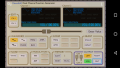
Here is the function generator I have on my tablet. I did a test using my grandaughter's headset.

Screenshot_20170609-231003.png

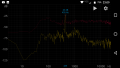
and here is the spectrum analysis of a 440 hz signal using spectrum analyzer app on my phone. The yellow trace is when I stopped the recording and the red trace is the max hold of the signals. The TV was playing in the background so it captured those signals as well.

Screenshot_20170609-230913.png

They hold promise for a quick check. My hearing is so bad ... I must rely on visuals.

And since I can't hear what you hear ... this could greatly assist. When you were strumming, any particular chord you used?

Function Generator and Spectroid were the names of those two apps at the android app store.
 
Last edited:

Thread Starter

ColoradoRobert

Joined Jan 22, 2016
155
On the Spectroid and Function Generator you said you used her headset? How exactly should I do the test using these and why can't both run at the same time on the phone?
 

JoeJester

Joined Apr 26, 2005
4,390
On the Spectroid and Function Generator you said you used her headset? How exactly should I do the test using these and why can't both run at the same time on the phone?
You can't. That's why I asked if you had a tablet as well. If you have a computer you can use ... that will work as well, only I'd send you a -10 dB 1 kHz tone. You will have to make up the connectors to get the signal to the amplifier. I haven't found any inexpensive audio sine wave generators yet, although building one isn't out the question.

However, you can do the silence test .... dummy plug into the effects return and turn up the amp ... measuring any thing the amp puts out. I have some files on some guitar string sounds .... individual notes. That could give a reference.

All those readings on the schematic were taken under specified conditions as listed on the schematics. I know I wouldn't want to buy a 350w+ 4 ohm load.

Just to let you know, I'm showing you the procedure you can use in the future.

Can you post a good picture of the underside of the boards where you replaced capacitors? I can see if there are any suspicious areas.
 

Thread Starter

ColoradoRobert

Joined Jan 22, 2016
155
Returned the Klein meter and I guess I'll buy the one you found. But to bad I can't get something at the Depot.... since when I look at it on Amazon, it says delivery between June 30th and July 24th!!! Geez. I've not placed the order yet. BTW, do you know of a signal generator that I could download for my Vista Windows PC? Then I will have these 2 things ready to go at least. I will work on the pictures of the boards next when I have the time.
 

JoeJester

Joined Apr 26, 2005
4,390
Well....you can use your media player. There are two tones, mp3s and a silence mp3 at http://www.tech-service.net/joe/aac.html

Now all you would have to do I'd build an divider or hook up a potentiometer to adjust the signal to the desired level at the jack.

Get a 3.5 mm plug and a quarter inch plug, and a length of cable to reach from your computer audio out to the amplifier.

If you want I'll look for another meter source. I know mouser sells them, not that model, and they would have the other parts you might need.
 

Thread Starter

ColoradoRobert

Joined Jan 22, 2016
155
This meter looks even better in regards to the lower DC mv (60mv versus 400mv - Thank you for finding it), but one thing I did not like
about auto-ranging is that they pick up static in the air so the reading on the screen never stops fluctuating.
I returned the one I had bought because of it.

To me, it is annoying and I don't see how that would not chew up the battery (all the fluctuating).

Has this been your experience Joe with auto-ranging or do they have a meter that holds at zero and then automatically
adjusts the scale when you read something? If they don't make one they should. I thought mine was broken until I
called the Company and they told me this is why it fluctuated (= static).
 
Last edited:

JoeJester

Joined Apr 26, 2005
4,390
I started with analog meters, and had used so auto ranging is a pain in the butt to me. I'm of the school of knowing what to expect and if unknown, start high and work low.

Analog is good for peaking adjustments ... Referencing other types of equipments, although an oscilloscope is my preferred choice for viewing signals.

You can search for a Windows based signal generator. Some amateur radio sites would be a good source.

Hopefully we can get back to work soon. I still have more work to do with respect to your project. I am currently putting together each circuit on the simulator and labeling the blocks of circuits for ease of troubleshooting. I hope to send you off on your journey with some good baseline info and good procedures.

The last time I did something like this was designing a course lesson by lesson, the night before each lesson.
 

Thread Starter

ColoradoRobert

Joined Jan 22, 2016
155
While I didn't like the auto-ranging, I think that one looks the best for reading the low ACmv the other Mastech did not go that low. Some one said there is a model that let's you do both but I don't think this one does. Still I will probably order it unless somebody comes up with one that is better in the next few days.

To complicate your efforts Joe (and I do appreciate them), I have to tell you that I have been enlisted/drafted into a project at home and at our daughters house. Since we live in a small condo, this is going to require that I put everything away (for now and who knows for how long), related to tools, guitars and amplifiers; out of the front room and store them in the back clothes closet. I will be sneaking back of course at every chance I get, but this is going to be a long very inconsistent exchange from now on. Sorry up front.
 

JoeJester

Joined Apr 26, 2005
4,390
Not a problem Robert, That will give me time to catch up on things and we can pick this up at a later time. If speed was of the essence, the internet wouldn't be the first venue of choice.

Do what you need to do. You can spend some of your familiarizing your self with by reading the user manual and correlating it with the schematic ... and pay attention to the notes on the schematic. The back and forth can be questions you have about what your reading and any difficulties you have with the schematic. You will still have productive time, just not actively with your hands in the equipment.

While all of that time is specifically geared towards the Fender 400, the skills will be applicable to host of other equipment. Every step of the six step troubleshooting procedure will be covered and I'll printout chapter on that procedure and post it for you.
 

Thread Starter

ColoradoRobert

Joined Jan 22, 2016
155
So I did read the article and a question does arise, are TP's indicators of the circuit divisions or are they just random and jump around for other reasons. Again it would be nice if TP's bracketed the circuit (1-6 is the master, 7-12 is the gain, etc.). Not sure I understand how to identify each circuit to be able to place a bracket. BTW, when I did the test where I plugged my guitar into the back of the amp (in the return I think), and the sound came out normal through the speakers did that test prove that the power amp side was good and so we should concentrate on the pre-amp board side?
 
Last edited:

JoeJester

Joined Apr 26, 2005
4,390
They are circuit divisions typically. It's usually the output and or some special scenarios.

The block diagram for this amplifier is typically linear, with some control blocks and naturally, a power supply block.

The whole amp is a unit. We agree on that.
When we described some basic tests, I broke that out based on functions

Power Amp is a functional unit
Equalizers and associated amplifier is a functional unit
The first circuit was considered a functional unit because we had access to it's output via the tune jack
The line out is another group of circuits that is a functional unit.

Some functions share some amplifiers.

When we get back to this, I would like for you to use your spectrum analyzer and take some screenshots.

Screenshot one would be where you plan to place the phone when you test the main speaker's out. The amplifier is off, so all we will see is the room noise at that position.

Screenshot two would be under the following conditions:
Dummy plug into Effects return.
Main Volume at 25 percent

If you have found a signal generator for your vista machine, we can further tests, mostly repeating some of the ones we did.

These first two will tell us what is present without any audio and we can possibly completely eliminate the power amplifier from consideration.

Once you have a signal generator, send me the link. I will get one as well. You will need a 3.5 mm to quarter inch adapter or just make the cable yourself.

Since we will be dealing with mostly line level signals, we can construct a cable into a test probe that we can use your headphones or a cheap set of earbuds. We can't get to the individual circuits unless you can either hear or see the signal.

Are there hamcoms or hamfests in the denver area? You might be able to pickup a cheap scope or you could visit ebay. I did see a 100 dollar scope that was bluetooth and usb ....I'm going to wait a bit, None of them talk or display their software well.
 
Last edited:

Thread Starter

ColoradoRobert

Joined Jan 22, 2016
155
Hey Joe, On your $100 scope comment I need to add some information. First, I have only bought a few amps over years of time that were broken. The reason people were selling was because the amp was not worth fixing at a normal repair shop. So basically I bought them for what the cabinet and speaker would be worth on the wholesale market. I really don't have much interest in owning a scope because we do not have room for it and I am not going into electronics full time, it was just a passing hobby; to try an save amps that were not going to be repaired but cannibalized.

In fact, if I don't shorten my time with this amp, I could find myself in a constant battle with my wife over using the dining room table as a workshop. The amp right now is in storage because she wants me doing other things and I kind of agree with her. I would like to have the test knowledge though, to narrow down the 100's of components on a circuit board. But I have to tell you once I get this amp fixed; I don't see myself buying anything else, anytime soon. The dmm on the other hand will come in handy for other things. I did buy that from Amazon.
 

JoeJester

Joined Apr 26, 2005
4,390
Yes the meter will come in handy. I guess you can cobble together a probe to use with a pair of headphones for this low level stuff and use the spectrum analysis app to do what we need to do.

The troubleshooting process we are going through will serve you well when you look at other things that need repairing.
 
Top