All of my Functions Plot fine Except for my Last One

Thread Starter

WARDEVIL_UFO

Joined Nov 16, 2010
47
close all;
clear all;
clc;
t = 0:0.000001:0.01; % 0ms < t < 10ms in 1uS increments


% 1. 10V Amplitude 1000 Hz Sine Save
A1 = 10; %10V Amplictude
f1 = 1000; %frequency in Hz
%t1 = 0:0.000001:0.001;
S1 = A1*sin(2*pi*f1*t); %sine wave
plot(t,S1);
xlabel('Time (ms)');
ylabel('Amplitude (V)');
title('10V Amplitude 1000 Hz Sine Wave');
grid on;


% 2. 15V Amplitude 1200 Hz Cosine Save
A2 = 15; %15V Amplictude
f2 = 1200; %frequency in Hz
S2 = A2*sin(2*pi*f2*t); %Cosine wave
plot(t,S2);
xlabel('Time (ms)');
ylabel('Amplitude (V)');
title('15V Amplitude 1200 Hz Sine Wave');
grid on;


% 3a. Add S1 and S2
S3 = S1+S2;
plot(t,S3);
xlabel('Time (ms)');
ylabel('Amplitude (V)');
title('S1 + S2 Plot');
grid on;


% 3b. Subtract S1 from S2
S4 = S2-S1;
plot(t,S3);
xlabel('Time (ms)');
ylabel('Amplitude (V)');
title('S2 - S1 Plot');
grid on;


% 3c. Multiply S1 by S2
S5 = S1*S2;
plot(t,S5);
xlabel('Time (ms)');
ylabel('Amplitude (V)');
title('S1 X S2 Plot');
grid on;


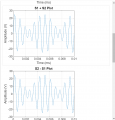
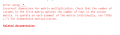
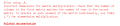
Here Are my results for each waveform:
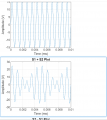
1716553927679.png
1716553998891.png

1716554028336.png
Could someone explain why this one doesn't work?
 

ZCochran98

Joined Jul 24, 2018
351
You have a typo in the statement S5 = S1*S2. It should read as S5 = S1.*S2;

In MATLAB, in order to do element-wise multiplication (or any other binary operation that may have multiple meanings, such as *, ^, or /) you need a . before it in order to specify element-wise multiplication, not matrix multiplication. For instance, if we have
a = [1 2; 3 4];
b = [1 0; 0 1];

The value of a*b will NOT be the same as a.*b. The first will be matrix multiplication, while the second will be element-by-element multiplication.
 

WBahn

Joined Mar 31, 2012
32,702
Could someone explain why this one doesn't work?
It's telling you exactly what the problem is and even suggesting exactly what you need to do to fix it.

1716580338124.png

You need to start reading the error messages the software gives you and making an effort to understand them. If you don't know what matrix multiplication is, do a bit of digging to learn about it and then ask yourself if that's what you are trying to do. If not, then look in the documentation (they even give you a link to related documentation) to find out what this "operate on each element of the matrix individually" might be talking about.

Also, in general, don't assume that the strangers on an electronics forum are going to automatically know what programming language you are using. If you are using Matlab, tell us that. Don't make us guess. It's also helpful to spend a few minutes reducing your code to the smallest piece that exhibits the problem. Often, in doing so, you are actually able to figure out the problem yourself.
 

Thread Starter

WARDEVIL_UFO

Joined Nov 16, 2010
47
It's telling you exactly what the problem is and even suggesting exactly what you need to do to fix it.

View attachment 323094

You need to start reading the error messages the software gives you and making an effort to understand them. If you don't know what matrix multiplication is, do a bit of digging to learn about it and then ask yourself if that's what you are trying to do. If not, then look in the documentation (they even give you a link to related documentation) to find out what this "operate on each element of the matrix individually" might be talking about.
I'll avoid letting this one hurt my ego; you're clearly trying to help. I know what Matrix Multiplication is. I have completed not one, but TWO Linear Algebra Courses (on from Baylor in 2005 and one from Arizona State University in 2019, and earned respectable grades in both courses. I have an enormous appreciation of Invertible Matrix Theorem as well as the applications of eigenvalues (related to the roots of the characteristic polynomial) to linear differential equations and Singular Value Decomposition for non-square systems. It was really cool because by default, Eigenvalues only have meaning for square matrices. My most favorite application of matrices of all is solving linear circuits with both DC systems and systems with Phasors using the RREF functionality of my TI-Nspire.

The difficulty here is that sinusoids are not matrices. They are continuous functions. I don't see what matrix multiplication has to do with multiplying two continuous functions together.

Also, in general, don't assume that the strangers on an electronics forum are going to automatically know what programming language you are using. If you are using Matlab, tell us that. Don't make us guess. It's also helpful to spend a few minutes reducing your code to the smallest piece that exhibits the problem. Often, in doing so, you are actually able to figure out the problem yourself.
That's a fair point, noted. I did try to emphasize the relevant portion with the bold case. I suppose that wasn't effective then? I almost actually included exclusively the bolded portion, but there were previous lines of code that this section depended on so I opted to include it just in case.
 
Last edited:

Thread Starter

WARDEVIL_UFO

Joined Nov 16, 2010
47
You have a typo in the statement S5 = S1*S2. It should read as S5 = S1.*S2;

In MATLAB, in order to do element-wise multiplication (or any other binary operation that may have multiple meanings, such as *, ^, or /) you need a . before it in order to specify element-wise multiplication, not matrix multiplication. For instance, if we have
a = [1 2; 3 4];
b = [1 0; 0 1];

The value of a*b will NOT be the same as a.*b. The first will be matrix multiplication, while the second will be element-by-element multiplication.
I will try this "*." technique. It seems vaguely familiar as a workaround that I had to use in the past many years ago the last time I used MATLAB. But I was skeptical if it was appropriate in this case.

I'll repeat what I said to WBahn in a much longer post that the conceptual difficulty I have here is that sinusoids are not matrices. They are continuous functions. I don't see what matrix multiplication has to do with multiplying two continuous functions together. I sense that we are somehow probably converting a continuous function into a matrix with discrete number of finite elements for processing by MATLAB. But, how exactly this is done is somewhat of a mystery to me. I did seethe message about the ".*" but wasn't sure about it because I wasn't sure if it was appropriate for continuous functions.
 
Last edited:

WBahn

Joined Mar 31, 2012
32,702
Matlab is short for Matrix Laboratory, so it is a software package that is primarily aimed at performing matrix manipulations. Thus, if you multiply A by B, it is not too surprising that if A and B can both be interpreted as any kind of matrix (which includes one dimensional arrays, a.k.a., vectors), Matlab will assume that you want to perform matrix multiplication, If you want to NOT perform matrix multiplication, then you have to override that basic behavior by using the '.*' operator instead. With that in mind, go back and read the error message it gave you and you should see that this is exactly what it is telling you.

It's important to understand this, because if you have two square arrays that you want to multiply element by element and you just put A*B, Matlab will perform matrix multiplication on them and not say a word about not doing what you wanted it to do since it was able to perform the operation you actually told it to do.
 
Top